EasyManua.ls Logo

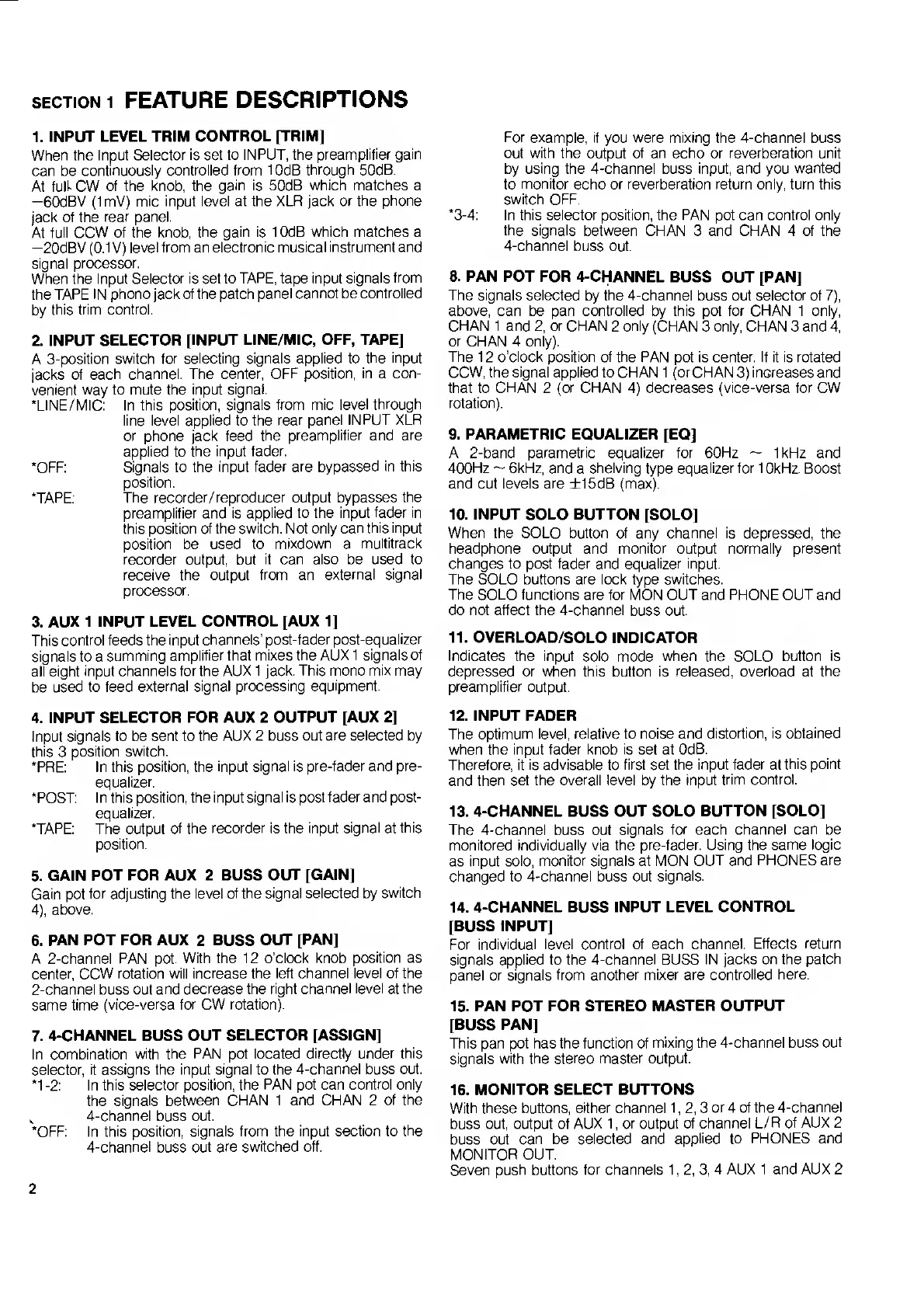
Fostex 450 - Section 1 Feature Descriptions; Input Level Controls (Trim, Fader); Input Signal Selection & Routing; Equalizer and Solo Functions

Fostex 450
18 pages
Print Icon
To Next Page IconTo Next Page
To Previous Page IconTo Previous Page
Loading...
SECTION
1
FEATURE
DESCRIPTIONS
1.
INPUT
LEVEL
TRIM
CONTROL
[TRIM]
When
the
Input
Selector
is
set
to
INPUT,
the
preamplifier
gain
can
be
continuously
controlled
from
10dB
through
50dB.
At
full-
CW
of
the
knob,
the
gain
is
50dB
which
matches
a
—60dBV
(ImV)
mic
input
level
at
the
XLR
jack
or
the
phone
jack
of
the
rear
panel.
At
full
CCW
of
the
knob,
the
gain
is
10dB
which
matches
a
—20dBV
(0.1
V)
level
from
an
electronic
musical
instrument
and
signal
processor.
When
the
Input
Selector
is
set
to
TAPE,
tape
input
signals
from
the
TAPE
IN
phono
jack
of
the
patch
panel
cannot
be
controlled
by
this
trim
control.
2.
INPUT
SELECTOR
[INPUT
LINE/MIC,
OFF,
TAPE]
A
3-position
switch
for
selecting
signals
applied
to
the
input
jacks
of
each
channel.
The
center,
OFF
position,
in
a
con¬
venient
way
to
mute
the
input
signal.
‘LINE/MIC:
In
this
position,
signals
from
mic
level
through
line
level
applied
to
the
rear
panel
INPUT
XLR
or
phone
jack
feed
the
preamplifier
and
are
applied
to
the
input
fader.
‘OFF:
Signals
to
the
input
fader
are
bypassed
in
this
position.
‘TAPE:
The
recorder/reproducer
output
bypasses
the
preamplifier
and
is
applied
to
the
input
fader
in
this
position
of
the
switch.
Not
only
can
this
input
position
be
used
to
mixdown
a
multitrack
recorder
output,
but
it
can
also
be
used
to
receive
the
output
from
an
external
signal
processor.
3.
AUX
1
INPUT
LEVEL
CONTROL
[AUX
1]
This
control
feeds
the
input
channels’
post-fader
post-equalizer
signals
to
a
summing
amplifier
that
mixes
the
AUX
1
signals
of
all
eight
input
channels
for
the
AUX
1
jack.
This
mono
mix
may
be
used
to
feed
external
signal
processing
equipment.
4.
INPUT
SELECTOR
FOR
AUX
2
OUTPUT
[AUX
2]
Input
signals
to
be
sent
to
the
AUX
2
buss
out
are
selected
by
this
3
position
switch.
*PRE:
In
this
position,
the
input
signal
is
pre-fader
and
pre¬
equalizer.
‘POST:
In
this
position,
the
input
signal
is
post
fader
and
post-
equalizer.
‘TAPE:
The
output
of
the
recorder
is
the
input
signal
at
this
position.
5.
GAIN
POT
FOR
AUX
2
BUSS
OUT
[GAIN]
Gain
pot
for
adjusting
the
level
of
the
signal
selected
by
switch
4),
above.
6.
PAN
POT
FOR
AUX
2
BUSS
OUT
[PAN]
A
2-channel
PAN
pot.
With
the
12
o’clock
knob
position
as
center,
CCW
rotation
will
increase
the
left
channel
level
of
the
2-channel
buss
out
and
decrease
the
right
channel
level
at
the
same
time
(vice-versa
for
CW
rotation).
7.
4-CHANNEL
BUSS
OUT
SELECTOR
[ASSIGN]
In
combination
with
the
PAN
pot
located
directly
under
this
selector,
it
assigns
the
input
signal
to
the
4-channel
buss
out.
‘1
-2:
In
this
selector
position,
the
PAN
pot
can
control
only
the
signals
between
CHAN
1
and
CHAN
2
of
the
,
4-channel
buss
out.
‘OFF:
In
this
position,
signals
from
the
input
section
to
the
4-channel
buss
out
are
switched
off.
For
example,
if
you
were
mixing
the
4-channel
buss
out
with
the
output
of
an
echo
or
reverberation
unit
by
using
the
4-channel
buss
input,
and
you
wanted
to
monitor
echo
or
reverberation
return
only,
turn
this
switch
OFF.
‘3-4:
In
this
selector
position,
the
PAN
pot
can
control
only
the
signals
between
CHAN
3
and
CHAN
4
of
the
4-channel
buss
out.
8.
PAN
POT
FOR
4-CHANNEL
BUSS
OUT
[PAN]
The
signals
selected
by
the
4-channel
buss
out
selector
of
7),
above,
can
be
pan
controlled
by
this
pot
for
CHAN
1
only,
CHAN
1
and
2,
or
CHAN
2
only
(CHAN
3
only,
CHAN
3
and
4,
or
CHAN
4
only).
The
12
o'clock
position
of
the
PAN
pot
is
center.
If
it
is
rotated
CCW,
the
signal
applied
to
CHAN
1
(or
CHAN
3)
increases
and
that
to
CHAN
2
(or
CHAN
4)
decreases
(vice-versa
for
CW
rotation).
9.
PARAMETRIC
EQUALIZER
[EQ]
A
2-band
parametric
equalizer
for
60Hz
~
1kHz
and
400Hz
~
6kHz,
and
a
shelving
type
equalizer
for
10kHz.
Boost
and
cut
levels
are
±15dB
(max).
10.
INPUT
SOLO
BUTTON
[SOLO]
When
the
SOLO
button
of
any
channel
is
depressed,
the
headphone
output
and
monitor
output
normally
present
changes
to
post
fader
and
equalizer
input.
The
SOLO
buttons
are
lock
type
switches.
The
SOLO
functions
are
for
MON
OUT
and
PHONE
OUT
and
do
not
affect
the
4-channel
buss
out.
11.
OVERLOAD/SOLO
INDICATOR
Indicates
the
input
solo
mode
when
the
SOLO
button
is
depressed
or
when
this
button
is
released,
overload
at
the
preamplifier
output.
12.
INPUT
FADER
The
optimum
level,
relative
to
noise
and
distortion,
is
obtained
when
the
input
fader
knob
is
set
at
OdB.
Therefore,
it
is
advisable
to
first
set
the
input
fader
at
this
point
and
then
set
the
overall
level
by
the
input
trim
control.
13.
4-CHANNEL
BUSS
OUT
SOLO
BUTTON
[SOLO]
The
4-channel
buss
out
signals
for
each
channel
can
be
monitored
individually
via
the
pre-fader.
Using
the
same
logic
as
input
solo,
monitor
signals
at
MON
OUT
and
PHONES
are
changed
to
4-channel
buss
out
signals.
14.
4-CHANNEL
BUSS
INPUT
LEVEL
CONTROL
[BUSS
INPUT]
For
individual
level
control
of
each
channel.
Effects
return
signals
applied
to
the
4-channel
BUSS
IN
jacks
on
the
patch
panel
or
signals
from
another
mixer
are
controlled
here.
15.
PAN
POT
FOR
STEREO
MASTER
OUTPUT
[BUSS
PAN]
This
pan
pot
has
the
function
of
mixing
the
4-channel
buss
out
signals
with
the
stereo
master
output.
16.
MONITOR
SELECT
BUTTONS
With
these
buttons,
either
channel
1,2,3
or
4
of
the
4-channel
buss
out,
output
of
AUX
1,
or
output
of
channel
L/R
of
AUX
2
buss
out
can
be
selected
and
applied
to
PHONES
and
MONITOR
OUT.
Seven
push
buttons
for
channels
1,2,3,4
AUX
1
and
AUX
2
2

Related product manuals