118
2. Press the [SETUP] key to enter the setup mode.
The display shows the screen for selecting the setup
menu.
The following description is assumed that you have a CD-RW/CD-R disc which contains saved data.
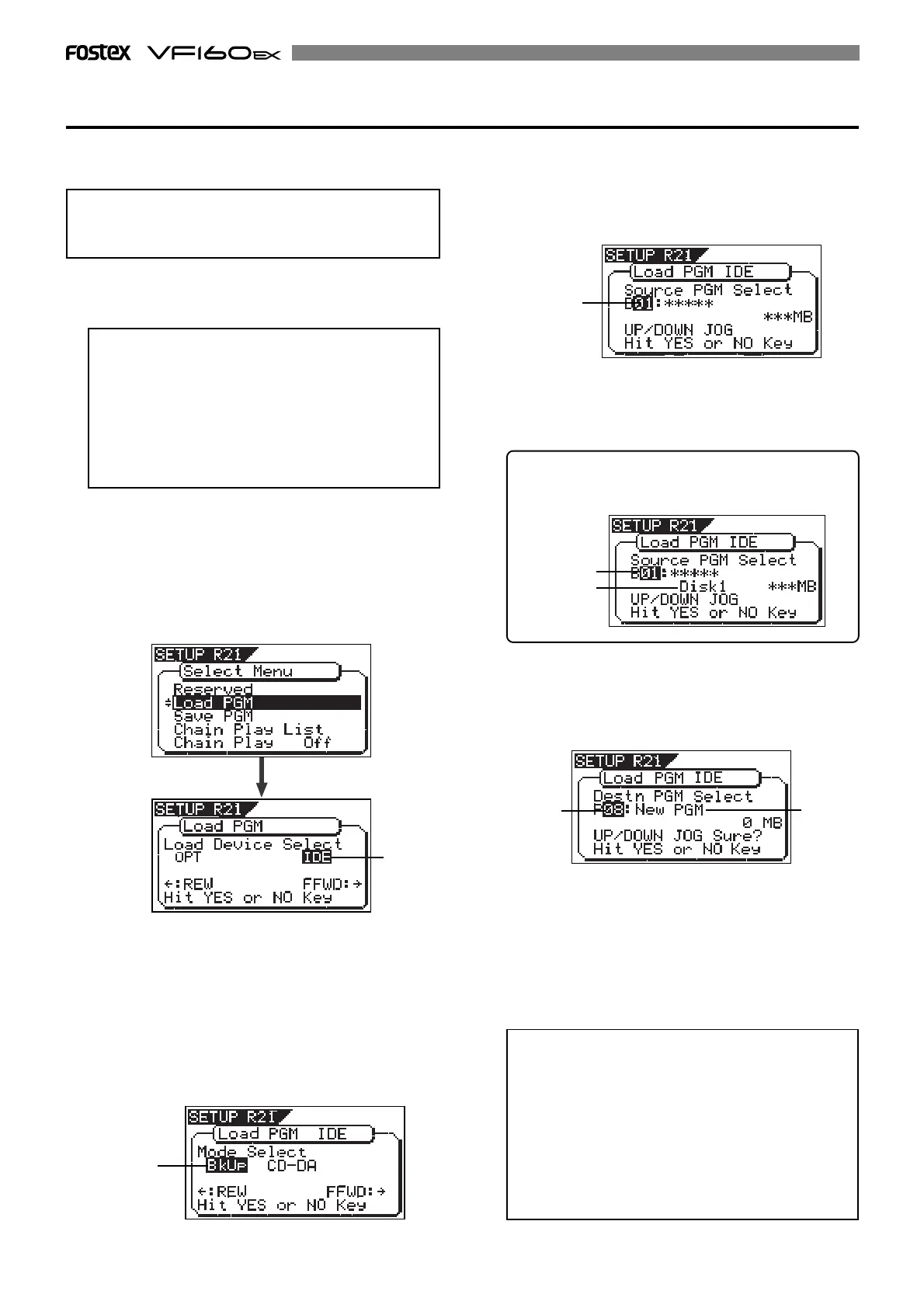
3. Use the [JOG] dial to select (highlight) “Load PGM” and
press the [ENTER/YES] key.
The display shows the screen for selecting a load device,
where “IDE” is flashing.
Loading backup data from a CD-R/RW drive
<Note>
Do not carry out any VF160EX key operation until the
access process to the CD-RW/CD-R disc is completed.
<Note>
If you load song data which is saved to more than one
disc, set
DISC-1
first.
If you set the other disc and go on the following pro-
cedure, the VF160EX automatically recognized that
the disc order is not correct and the display shows
“Wrong Disk”
, followed by
“Illegal No!”
momentarily,
and the disc is automatically ejected.
1. After turning on the VF160EX, insert the disc to the
CD-R/RW drive.
5. While “BkUp” is flashing, press the [ENTER/YES] key.
The display shows the backup number and title, as well
as recorded space.
flashing
4. While “IDE” is flashing, press the [ENTER/YES] key.
Press the [ENTER/YES] key to display the CD-R/RW drive
name, and then changes to the load mode select screen
where "Bkup" (Backup) flashes.
To load saved data, select "BkUp". To load data from an
audio CD, select "CD-DA".
Let's select "Bkup" here and go on to the following
procedure.
See "loading from an audio CD" described later for details
about how to use audio CD (CD-DA) discs.
By rotating the [JOG] dial, you can select a desired pro-
gram number/title from among available programs in
the VF160EX current drive. You can also select “Eject”.
If you select “Eject” and press the [ENTER/YES] key, the
disc is ejected
6. While the desired backup number/title is shown on the
display, press the [ENTER/YES] key.
The display shows the screen for creating a new
program on the current drive, to which data will be
loaded (“New PGM” lights).
As described earlier, when loading data from a CD-RW
drive, the VF160EX creates a new program on the cur-
rent drive, which is the load destination. Therefore, “New
PGM” is shown on the right of the flashing program num-
ber. The program number for the newly created desti-
nation program is the next number to the highest exist-
ing program number. For example, if there are 8 exist-
ing programs (“P01” through “P08”) on the current drive,
the newly created program is numbered “P09”.
<Note>
If you rotate the
[JOG]
dial while the above screen
(“
Destn PGM Select
”) is shown, you can select an exist-
ing program on the current drive as the destination.
However, as mentioned earlier, when loading data
using CD-RW you cannot actually load data to the ex-
isting program by overwriting the program data.
If you press the
[ENTER/YES]
key (see the next step)
while selecting an existing program as the destina-
tion, the display shows “
Void!
” and the VF160EX ig-
nores the operation.
When you load song data which is saved to more than
one disc, the display also shows the disc number cur-
rently set. The example below shows DISC-1 is set.
flashing
flashing
lighting
flashing
lighting
flashing



 To Next Page