39
Up to now, we changed the input channel according to the track to record. However, there is also a way to record
all tracks with one input jack. You can do this by exchanging a recorded track that was recorded normally with an
unrecorded track. This procedure is called “Track Exchange”.
This feature is convenient to use when recording with all G and H [INPUT] jacks that can be connected with a condenser
mic or balanced output, for example. Note that the VF160EX comes with 16 tracks, plus 8 additional tracks.
The Track Exchange feature makes it possible to exchange these tracks with any unneeded tracks 1-16.
Instructions
For this procedure, you need a recorded track and a
blank track.
1. Repeatedly press the [EDIT] key while the recorder is in
the STOP state to find and display the “Track Exchange”
mode.
The mode can also be selected by pressing the [EDIT] key
then turning the [JOG] dial.
2. Press the [ENTER/YES] key.
The track selection menu of the Track Exchange mode
appears.
3. Turn the [JOG] dial to select the track to exchange from.
By rotating the [JOG] dial, you can select the track unit
among 1, 2 and 8.
Depending on the selected unit, the track indication on the
right changes (see the figure below).
Tips:
“Select Err!” appears on the LCD and the exchange
process is invalidated if the same track is selected for the
track to exchange from and track to exchange and
[ENTER/YES] key is pressed. (Ex: 03<=>03 and so on)
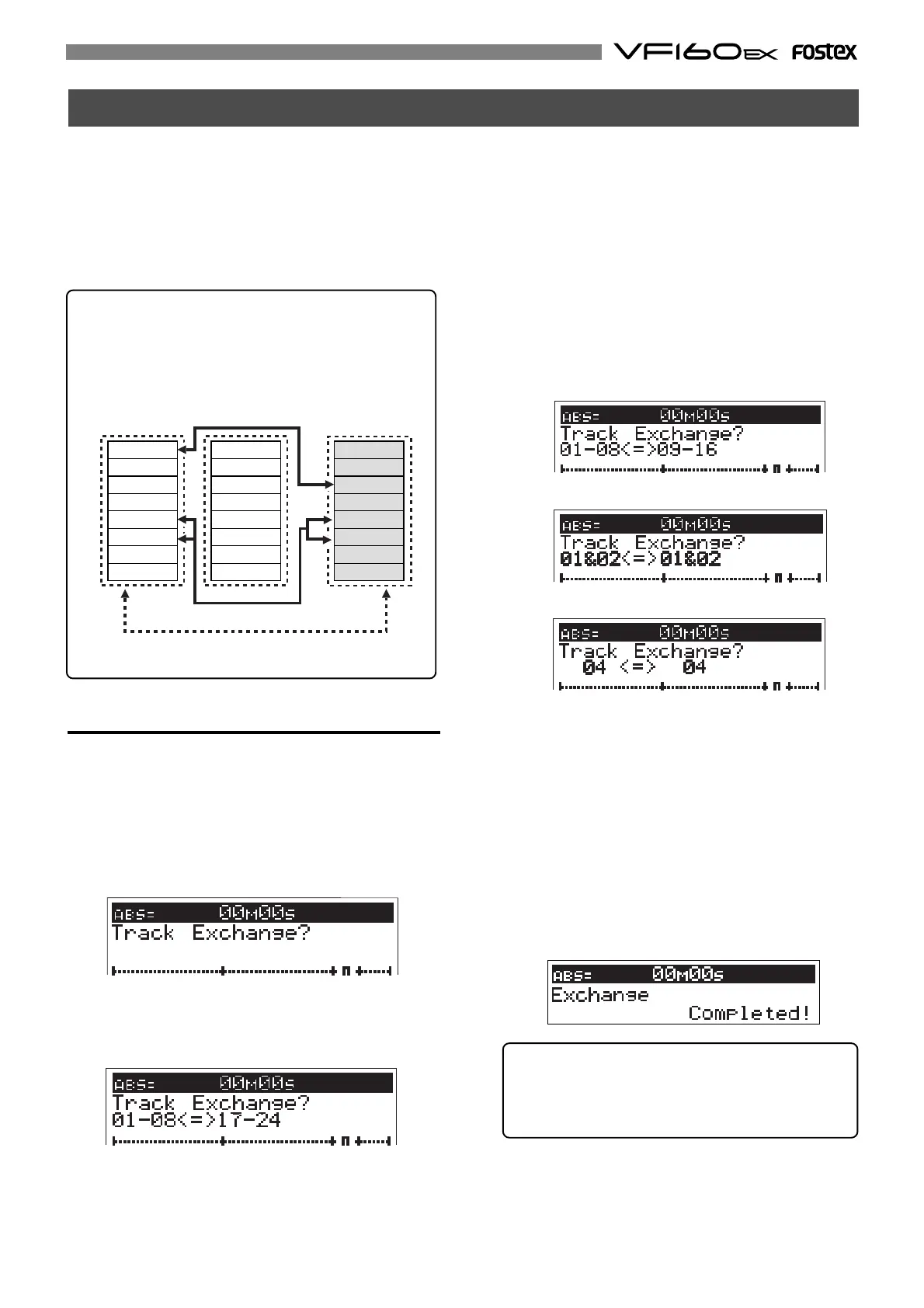
Track Exchange
Tips:
The Track Exchange can be done among all 24 real
and additional tracks, as shown in the figure be-
low.
You can exchange track(s) in single, stereo, or 8-
track units.
One track exchange
8 track block exchange
2 track block exchange
Track 17
Track 18
Track 19
Track 20
Track 21
Track 22
Track 23
Track 24
Track 9
Track 10
Track 11
Track 12
Track 13
Track 14
Track 15
Track 16
Track 1
Track 2
Track 3
Track 4
Track 5
Track 6
Track 7
Track 8
4. Press the [HOLD/>] key, then move the cursor to the track
to exchange to.
The cursor moves every time the [HOLD/>] key is pressed.
The cursor can also be moved using the [REWIND] key or
[F FWD] key.
5. Turn the [JOG] dial to select the track to exchange to.
6. Press the [ENTER/YES] key.
“Exchange” appears on the LCD and the exchange process
takes place instantaneously.
“Completed!” appears on the LCD when the exchange
process is completed.
Then the system returns to the Normal Display.
• Selection in 8-track unit
• Selection in 2-track (stereo pair) unit
• Selection in single (mono) -track unit



 To Next Page