35
Saving on the Memory key and Mark key
1. Ensure the system is in the PLAY or STOP status. Press
the [HOLD/>] key at the time to save.
The time is held on the LCD at the point the [HOLD/>] key
is pressed.
2. Press the [STORE] key (RED: Light ON).
3-1. Press a voluntary Memory key.
The time held is saved as a point of the Memory Key, and
then the system returns to the Normal Display.
3-2. Press the [MARK 1-7] key while the [SHIFT] key is
depressed.
The time held is saved as a Mark Memory of MARK 1-7, and
the system returns to the Normal Display.
Direct Location of Memory key or Mark key
1-1. Press a voluntary Memory key.
The name of the key pressed and the point saved appears
on the LCD.
1-2. Press the [MARK 1-7] key while the [SHIFT] key is
depressed.
The name of the Mark Memory and the time saved appears
on the LCD.
2. Press the [LOCATE] key.
This allows Direct Location to the time shown.
Tips: PREROLL
By setting “PREROLL” in the SETUP mode, it is possible to
locate the time (0-10 seconds) several seconds before the
time set to locate.
Changing the Time Saved in the Memory key
and Mark key
1-1. Press a voluntary Memory key.
The name of the key pressed and the point saved appears
on the LCD.
1-2. Press the [MARK 1-7] key while the [SHIFT] key is
depressed.
The name of the Mark Memory and the time saved appears
on the LCD.
2. Change the parameter of the flashing column (cursor)
(H/M/S/F/SF or BAR/BEAT/CLK) using the [JOG] dial.
Move the flashing column (cursor) by pressing the
[HOLD/>] key.
3. Press the [STORE] key (RED: Light ON).
3-1. Press a voluntary Memory key.
The time modified is saved as the time point of the Memory
Key, and the system returns to the Normal Display.
3-2. Press the [MARK 1-7] key while the [SHIFT] key is
depressed.
The time modified is saved as a Mark Memory of MARK
1-7, and the system returns to the Normal Display.
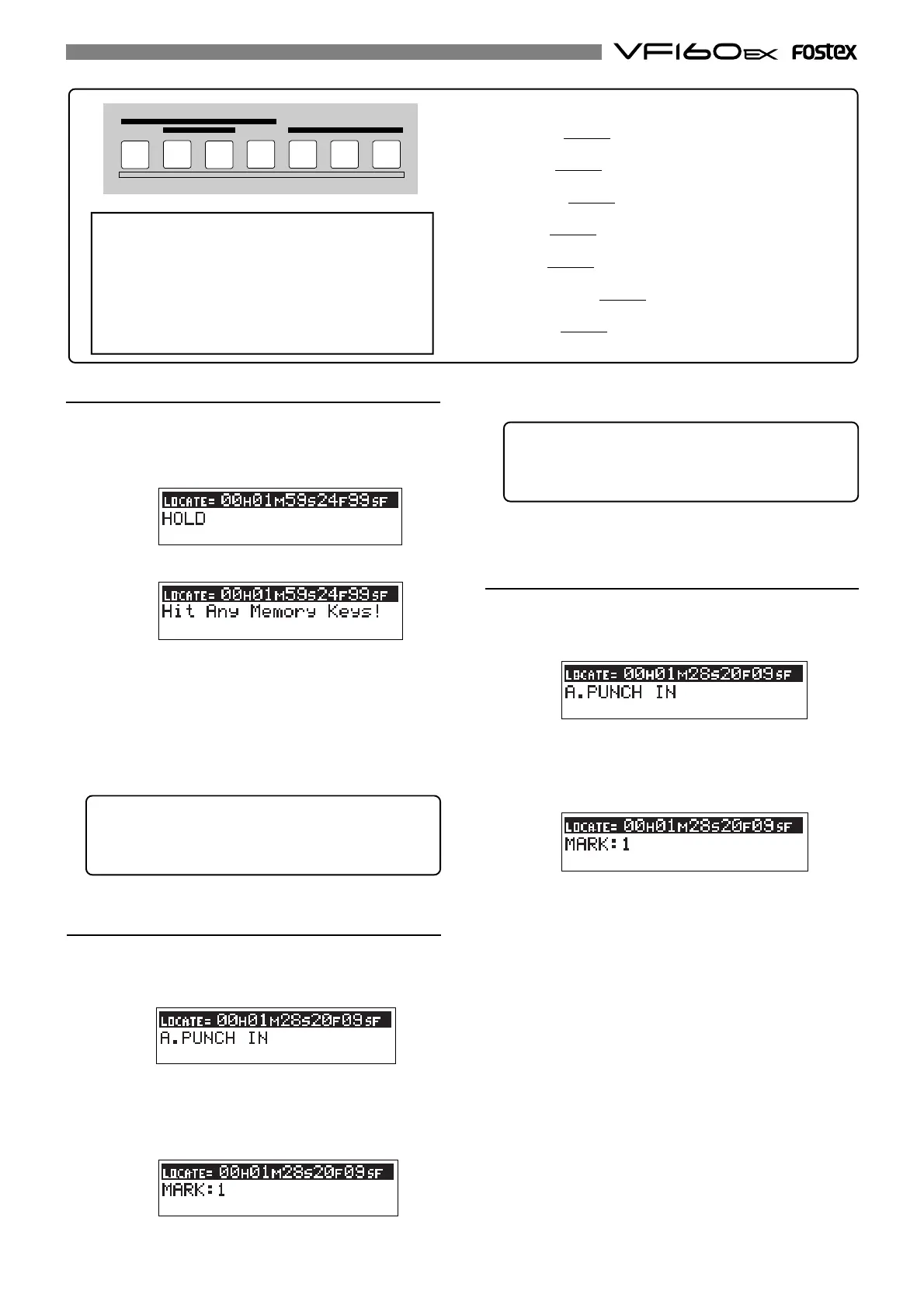
The following details are saved in each Memory Key.
[AUTO RTN-START/MARK 1] Key:
-> START point and MARK 1 memory.
[AUTO PUNCH-IN/MARK 2] Key:
-> PUNCH IN point and MARK 2 memory.
[AUTO PUNCH-OUT/MARK 3] Key:
-> PUNCH OUT point and MARK 3 memory.
[AUTO RTN-END/MARK 4] Key:
-> END point and MARK 4 memory.
[CLIPBOARD-IN/MARK 5] Key:
-> CLIP IN point and MARK 5 memory.
[CLIPBOARD-ALIGN SEL/MARK 6] Key:
-> ALIGN SEL point and MARK 6 memory.
[CLIPBOARD-OUT/MARK 7] Key:
-> CLIP OUT point and MARK 7 memory.
AUTO RTN
AUTO PUNCH
START IN
OUT
END
IN ALIGN SEL OUT
CLIPBOARD
MARK
1
2
3
4
5
6
7
<Note>
Normally, the
[CLIPBOARD-ALIGN SEL/MARK6]
key can
store the MARK6 memory. When doing a copy/paste
(or move/paste) function, the time data stored in the
[CLIPBOARD IN]
key is automatically copied and stored
in this key, allowing you to use it as the ALIGN SEL
point. See “Copy/paste and Move/paste” on page 73
for details.
Tips: How to check stored time data
To check the memory points, press the desired memory
key. To check the mark memory, press the desired
memory key while depressing the [SHIFT] key.



 To Next Page