2
14
2-4 Install other Internal Connectors
Power Connectors
This motherboard uses an ATX power supply. In order not to damage any device, make sure all
the devices have been installed properly before applying the power supply.
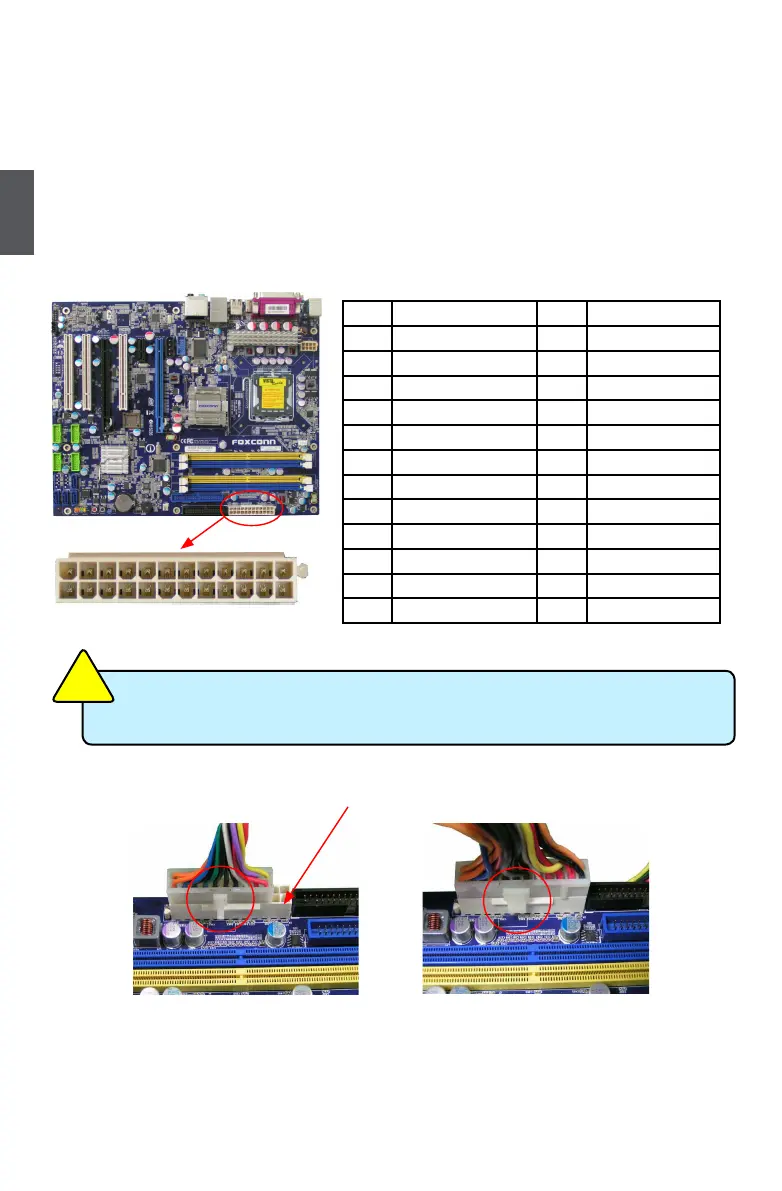
24-pin ATX power connector : PWR1
PWR1 is the ATX power supply connector. Make sure that the power supply cable and pins are
properly aligned with the connector on the motherboard. Firmly plug the power supply cable into
the connector and make sure it is secure.
20-Pin Power 24-Pin Power
Pin No. 24
Pin # Denition Pin # Denition
1 3.3V 13 3.3V
2 3.3V 14 -12V
3 GND 15 GND
4 +5V 16 PS_ON(Soft On/Off)
5 GND 17 GND
6 +5V 18 GND
7 GND 19 GND
8 Power Good 20 -5V
9 +5V SB(Stand by +5V) 21 +5V
10 +12V 22 +5V
11 +12V 23 +5V
12 3.3V 24 GND
PWR1
24
13
12
1
We recommend you use 24-pin power supply. If you want to use 20-pin power supply,
you need to align the ATX power connector according to the following picture.
C
A
U
T
I
O
N
!


 To Next Page
 Loading...