16
refer to the WiFi product manual for more details).
4. Set-up the site account on the Fox ESS monitoring platform (please refer to the monitoring user
manual for more details).
• CT (optional)
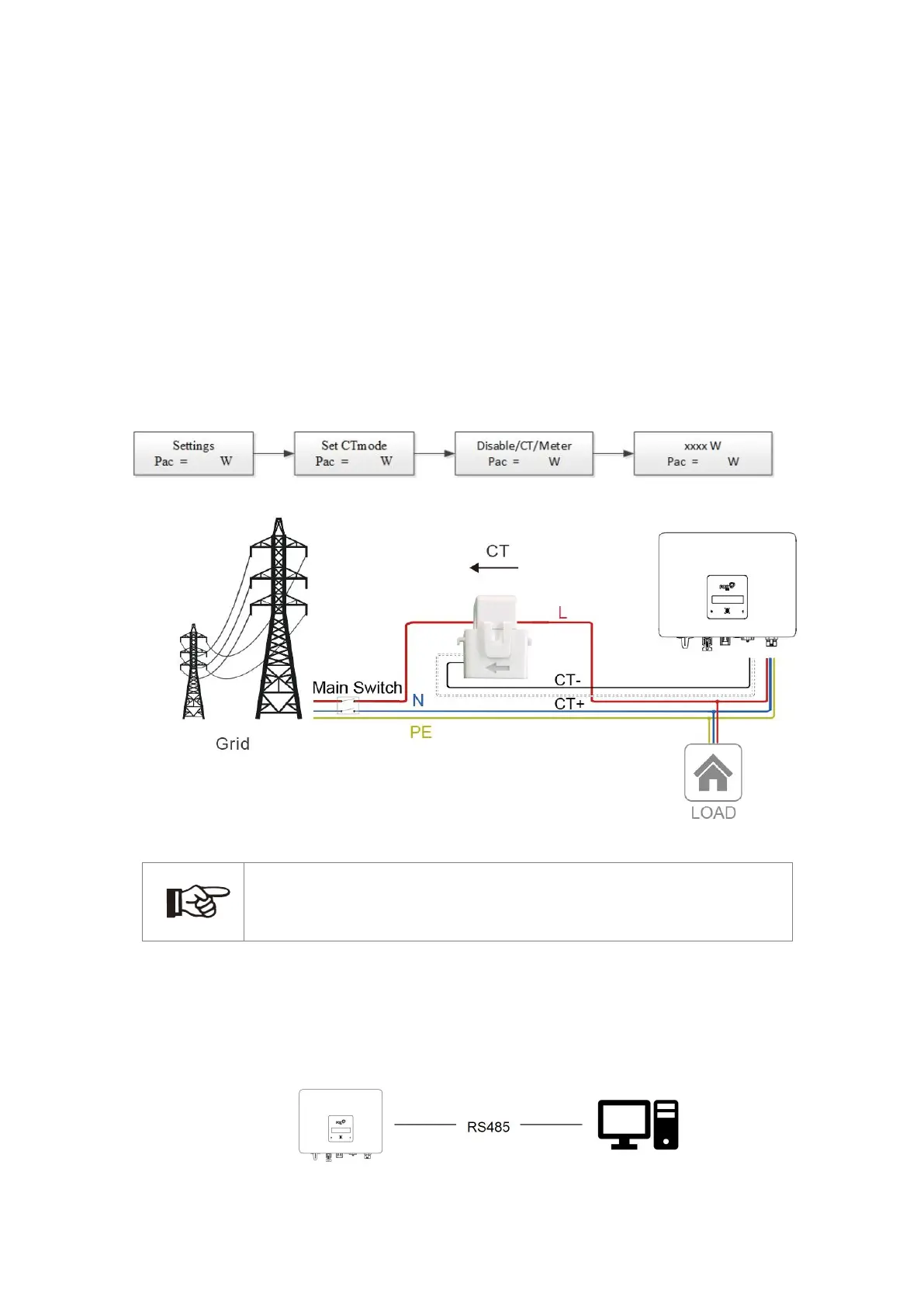
This inverter has an integrated export management function. To enable this function, a power meter or
CT must be installed. The CT should be clamped on the main live line of the grid side. The arrow on the
CT should be pointing towards the grid. The white cable connects to CT+, and the black cable connects
to CT-.
Export limitation setting:
Short press the touch key to switch display or make the number+1. Long press the touch key to confirm
your setting.
Note!
For a precise reading and control of power, a meter can be used instead of a CT. If the
CT is fitted in the wrong orientation, anti-backflow function will fail.
• RS485/Meter
-
RS485
RS485 is a standard communication interface which can transmit the real time data from inverter
to PC or other monitoring devices.



 To Next Page