XI.Battery
Battery Maintenance
The battery’s life and performance may be affected by temperature, condition of the battery, and
the weight of the user. It is recommended that you charge the battery, when the lowest level of the
LED light on the control panel flashes. Not charging it at that point may damage the battery and
reduce it's service life.
When charging a new battery for the first time, it must be fully charged(when charger's charging
light turns "green") in order to fully activate the battery.
Always check if the battery is fully charged before use. The regular charging time is about 5 hours.
But if the power is fully run out it may take 10-12 hours to charge fully until the red LED on the
charger turns green. Thus the recommended charging time for the battery is 8-12 hrs.
When not using the chair for a long duration, charge the battery fully every month. If the battery is
left uncharged for a long period of time, it will damage the battery permanently.
Mounting/Removing Battery
Ensure the chair is powered off before mounting or removing the battery.
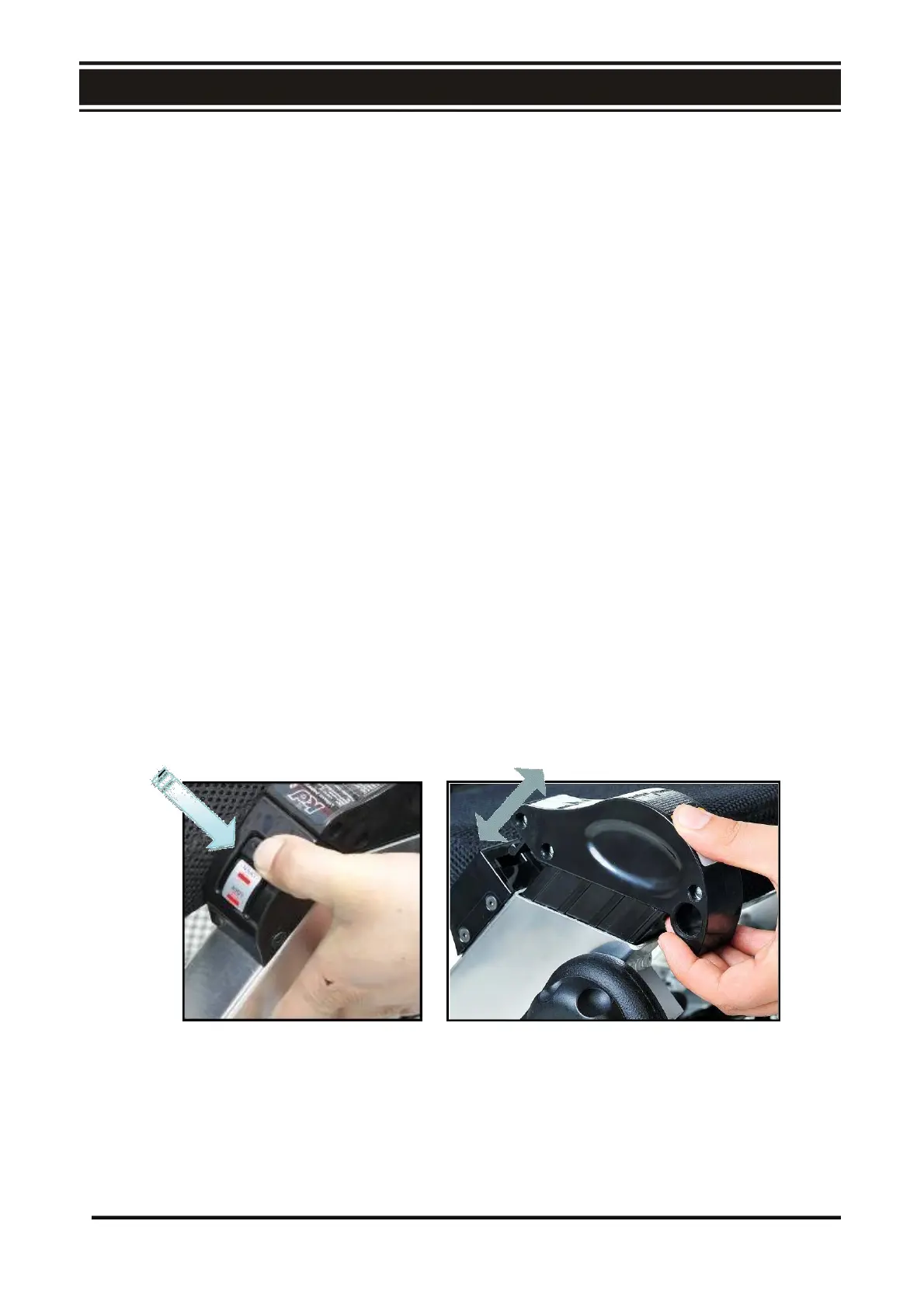
Taking out the battery:
1. Near the edge of the seat base, the batteries are located at the sides of the chair.
2. Press the button (Fig. E1) and hold the battery grip and pull the battery out of the battery
holder (Fig. E2)
E1 E2
23



 To Next Page