17
If the camera has a depth-of-eld preview button, pressing it will re
the ash continuously for 1 second. This is called modeling ash.
It enables you to see the shadow eects on the subject and the
lighting balance. You can re the modeling ash during wireless or
normal ash shooting. This feature is also useful for annoying those
around you.
Modeling Flash
In poorly-lit or low-contrast shooting environments, the built-in auto
focus assist beam will automatically activate to make it easier for
autofocus. The beam will activate only when autofocus is dicult and
turn o as soon as the autofocus is achieved.
If you want to turn o the auto focus assist beam, set the “AF” to “OFF”
in the C.Fn settings.
Auto Focus Assist Beam
Position
Center
Periphery
Eective Range
0.6~10m / 2.0~32.8 feet
0.6~5m / 2.0~16.4 feet
If you nd the auto focus assist beam does not light up,
this is because the camera has achieved autofocus.
To avoid overheating and deteriorating the ash head, do not
re the modeling ash for more than 10 consecutive times. If
you re the modeling ash 10 consecutive times, allow at least
10 minutes’ break for the camera ash.
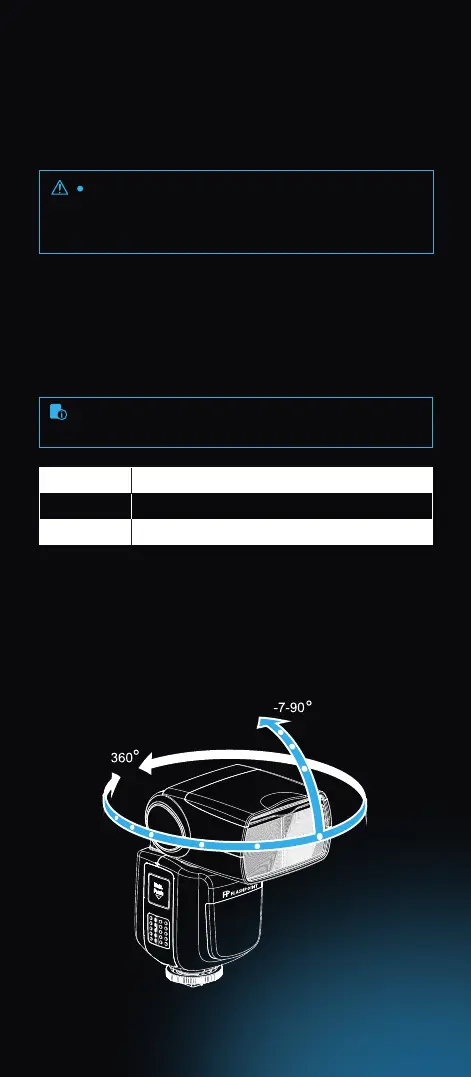
By pointing the ash head toward a wall or ceiling, the ash will
bounce o the surface before illuminating the subject. This can
soften shadows behind the subject for a more natural-looking shot.
This is called bounce ash.
Bounce Flash
To set the bounce direction, hold the ash head and turn it to
the desired angle.



 To Next Page