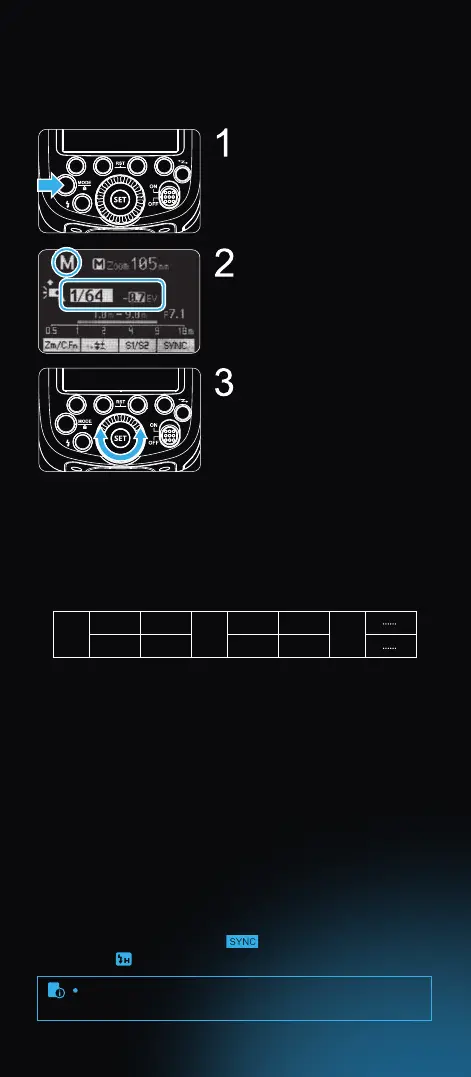
Flash Mode – M: Manual Flash
The ash output is adjustable from 1/1 full power to 1/128th power
in 1/3rd stop increments. To obtain a correct ash exposure, use a
hand-held ash meter to determine the required ash output.
Press < MODE > button so that
< M > is displayed.
Turn the Select Dial to choose
a desired ash output amount.
Press < SET > button again to
conrm the setting.
Flash Output Levels
The following table makes it easier to see how the display changes in
terms of f/stop when you increase or decrease the ash output. For
example, when you decrease the ash output to 1/2, 1/2-0.3, or
1/2-0.7, and then increase the ash output to more than 1/2, 1/2+0.3,
1/2+0.7, and 1/1 will be displayed.
Figures displayed when reducing ash output level→
←Figures displayed when increasing ash output level
1/1 1/2 1/4
1/1-0.3 1/1-0.7
1/2+0.7 1/2+0.3
1/2-0.3 1/2-0.7
1/4+0.7 1/4+0.3
In M manual ash mode, press < S1/S2 > button so that this ash can
be triggered as an optical slave. With this function, the ash will re
simultaneously when the main ash res. Use this mode when ring
another manual powered ash, and in areas where no one else is
doing ash photography.
Press < S1/S2 > button so that this ash can be triggered as an
intelligent optical slave. This is useful when triggering with a TTL
ash. In this mode, the ash will ignore a single “preash” from the
main ash and will only re in response to the second, actual ash
from the main unit. Use this mode when ring a TTL speedlight, and
in areas where no one else is doing ash photography.
Optical Slave S1
Manual O Camera High-speed Setting
Intelligent Optical Slave S2
09
S1 and S2 optic triggering and o camera high-speed mode
are only available in M manual ash mode.
In M manual ash mode, press < > button to select high-speed
mode and < > is displayed.



 To Next Page