
 Need help?
Do you have a question about the FPC BM-Lite and is the answer not in the manual?
Details the BM-Lite module, its pinout, and interface capabilities.
Describes the BM-Lite adapter flex cable and its interface limitations.
Explains the FPC5924 adapter board as a breakout for the flex cable.
Introduces the FPC5832 USB-SPI adapter and its compatibility for the kit.
Guides on installing and verifying Python 3 on Ubuntu.
Lists and explains how to install Python packages for the script.
Details connecting hardware and running the Python script for testing.
Instructions for downloading and installing Python 3 on Windows.
Guides on installing necessary Python packages using pip on Windows.
Explains how to download and install the libusb-win32 filter driver.
Details connecting hardware and running the Python script for testing on Windows.
Lists and describes the command-line arguments for the script.
Provides example commands for starting the script via SPI.
Provides example commands for starting the script via UART.
Outlines specific procedures like sanity check, enrollment, and identification.
Details how to perform a sanity check for software version.
Step-by-step guide for enrolling a fingerprint.
Step-by-step guide for identifying an enrolled fingerprint.
The BM-Lite Development Kit provides a comprehensive solution for integrating fingerprint sensing capabilities into various applications. This kit is designed to facilitate the development and testing of the FPC BM-Lite module, offering a flexible and OS-agnostic platform for developers. The core of the kit is the BM-Lite module itself, a compact fingerprint sensor with a standard 10-pin 0.5 mm pitch Flat Flex Connector for its main interface. This module supports both UART and SPI communication interfaces, with an auto-detection mechanism that identifies the active interface based on data traffic. To prevent interference, input signals for the unused interface should be held in a fixed state. Specifically, when using the SPI interface, the UART RX signal should be held in a fixed state, and conversely, when using the UART interface, the SPI CS signal should be pulled high.
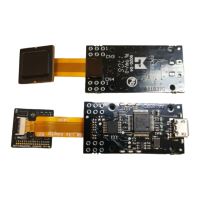
The development kit includes several hardware components to aid in the integration process. The BM-Lite Adapter Flex Cable is designed to support the SPI interface, with the UART TX signal left unconnected and the UART RX connected to Ground. For UART communication, a regular flex cable (not included in the BM-Lite package) is required. The FPC5924 Adapter Board serves as a breakout board for the BM-Lite Adapter Flex Cable, providing accessible connection points. Complementing these, the FPC5832 FTDI USB Adapter acts as an USB-SPI adapter, utilizing an FTDI FT232H converter. Its CN3 connector is pin-compatible with CN2 on the FPC5924, and CN4 is pin-compatible with CN3 on the FPC5924, ensuring seamless connectivity within the kit.
For software development and testing, the kit provides reference source code for host implementation and Python scripts for the host interface. The setup process is detailed for both Linux (Ubuntu 16.04) and Windows (7/10) operating systems. On Linux, users need to ensure Python3 is installed and up to date, followed by the installation of several required Python packages such as pexpect, pyserial, numpy, pillow, pyftdi, and spidev. These packages are essential for the bep_ref.py script, which is used to test the BM-Lite module's functionalities. The process involves unzipping the provided Python scripts, navigating to the directory, and running the bep_ref.py script with appropriate arguments for the chosen interface (e.g., SPI).
On Windows, the setup also begins with installing Python3, with a recommended version of 3.4 or later. Users are advised to select the appropriate installer for their system and ensure "Install launcher for all users" and "Add Python to PATH" options are ticked during installation. Similar to Linux, the required Python packages (pexpect, pyserial, numpy, pillow, pyftdi) must be installed using pip. A crucial step for Windows users, particularly when using the FPC5832 board, is installing an SPI filter. This involves connecting the FPC5832 board to the computer, allowing drivers to install, and then downloading and running the libusb-win32-bin installer. During the filter installation, users must select "Install a device filter" and identify the FPC5832 board as "USB Serial Converter" manufactured by "FTDI" from the list of devices. Once the filter is successfully installed, the FPC5832 board is ready for use with the Python scripts.
The bep_ref.py Python script is a key tool for interacting with the BM-Lite module. It offers various arguments to control communication parameters, such as the interface type (-i or --interface), port name (-p or --port), communication speed (-s or --speed), and timeout duration (-t or --timeout). Additional arguments allow for printing debug information (--debug), collecting KPI data and target logs (--log), and starting the application with a graphical user interface (--gui). Example startup commands are provided for both SPI and UART interfaces on Linux and Windows, demonstrating how to specify the interface, port, and baud rate. It's important to note that for SW version 1.2 and later, all UART communication must be at a baud rate of 115200.
The script facilitates several example procedures for testing the BM-Lite module. A sanity check involves sending a command to get the software version, confirming proper communication. The enrollment procedure guides users through placing a finger on the sensor multiple times until enough images are saved for a successful enrollment. Once enrolled, the fingerprint template can be saved to flash memory. The identification procedure allows users to capture a finger image and identify it against previously enrolled templates. The script provides feedback on whether a match is found or if no templates are enrolled. In case of errors during identification, users are advised to repeat the enrollment procedure. These procedures demonstrate the core functionalities of the BM-Lite module, enabling developers to quickly verify and utilize its fingerprint sensing capabilities.
 General
| Core | ARM Cortex-M0 |
|---|---|
| Operating Frequency | 48 MHz |
| Flash Memory | 128 KB |
| SRAM | 16 KB |
| I/O Interfaces | UART, SPI, I2C |
| ADC Resolution | 12-bit |
| Package | QFN32 |
| Operating Voltage | 1.8V - 3.6V |

 To Next Page