Before Flying
1. Fitting the propeller
1. First prepare the aircraft and the propellers (original 12-inch (#1238 type).
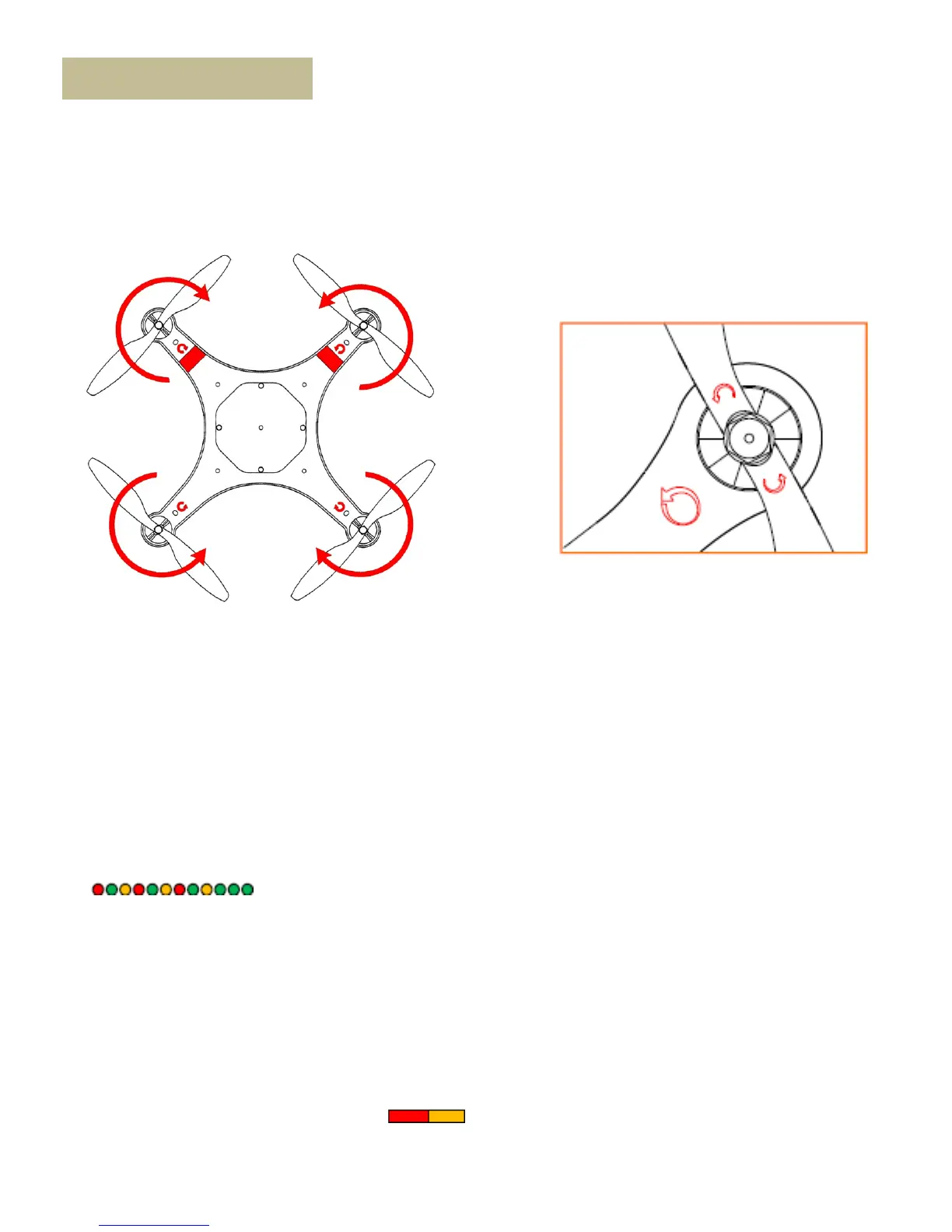
2. Assemble the propellers (the side with rotary mark facing up) to the aircraft. Make sure the rotary mark on the
propeller is the same as the mark on the frame arm. The arrow’s direction stands for the rotating direction of the
motors.
3. Finally fit the propeller nuts.
2. Turn on the transmitter
1. Set the IOC to “OFF” position, and Control Mode switch to GPS Atti. Mode.
2. Turn on the power switch of the Transmitter.
3. Power on the aircraft
1. Place the aircraft on the ground
2. Open the top transparent cover of the Mariner.
3. Put the battery into the compartment with the power cord facing to the power lead.
4. Connect the battery and Mariner by the power lead and make sure the ESC’s work properly. (Correct sound)
5. Connect the LED indication light plug into the battery charging lead.
5. Keep the sticks of the Transmitter and the Aircraft stationary until the system start and self-check has finished
( ).
6. Tie up the battery with the velcro band inside the battery compartment.
7. Close the top transparent cover and fix with the screws (Note: When you are going to fly Mariner on water, please
use the seal-cover, when you are not going to fly it on water, you can use the un-sealed cover).
1. After the system start and self-checking has finished, if the LED blinks Yellow continually, that means the controller
binding fail or lose control signal. Switch on transmitter and then power on Mariner again. When it bind, the red LED
of the receiver box will keep ON.
2. If the LED blinks Red, Yellow and Green continually, that means the IMU data is abnormal. The Mariner will not work,
please connect to the NAZA M Lite Assistant Software and follow the tips to do operation.
3. If it blinks red and yellow lights alternately ( ), that means the compass error is too big, it can be caused by
the following three cases. Please operate the Compass Calibration process.
4 . If it keep blinking red lights fast, that’s mean Low batter or system error. Try to change a full battery.
Notes:
7



 To Next Page