FRANKIA OPERATING MANUAL46 FRANKIA OPERATING MANUAL 47
All LEDs “Current”, “Batt. I”, “Battery full”, “Main Charging”, “Batt. II”, “Power” flash at the same time:
The top 4 selector switches “BORD” are in an invalid position, the device has switched off for safety. Set the desired
battery type according to Page 9 “BORD” battery type (specification, technology). Note: Mains operation on the 230
V AC socket always has priority over 12 V DC/12 V DC booster operation. No further operation or maintenance of the
device is required.
Inverter (optional):
The MT 1700 Si-N sine wave inverter converts the 12 V DC voltage of the on-board batteries into 230 V / 50 Hz sine
wave AC voltage with a continuous output of up to 1700 W. The inverter has an intelligent power saving control with
automatic shutdown. This ensures that no more electricity is used when idling than is absolutely necessary. To protect
the batteries, an undervoltage protection is integrated, which switches the inverter off when the battery voltage drops.
Thanks to the integrated mains switchover, the inverter switches off when connected to the shore connection and the
external power is switched directly to the available vehicle sockets.
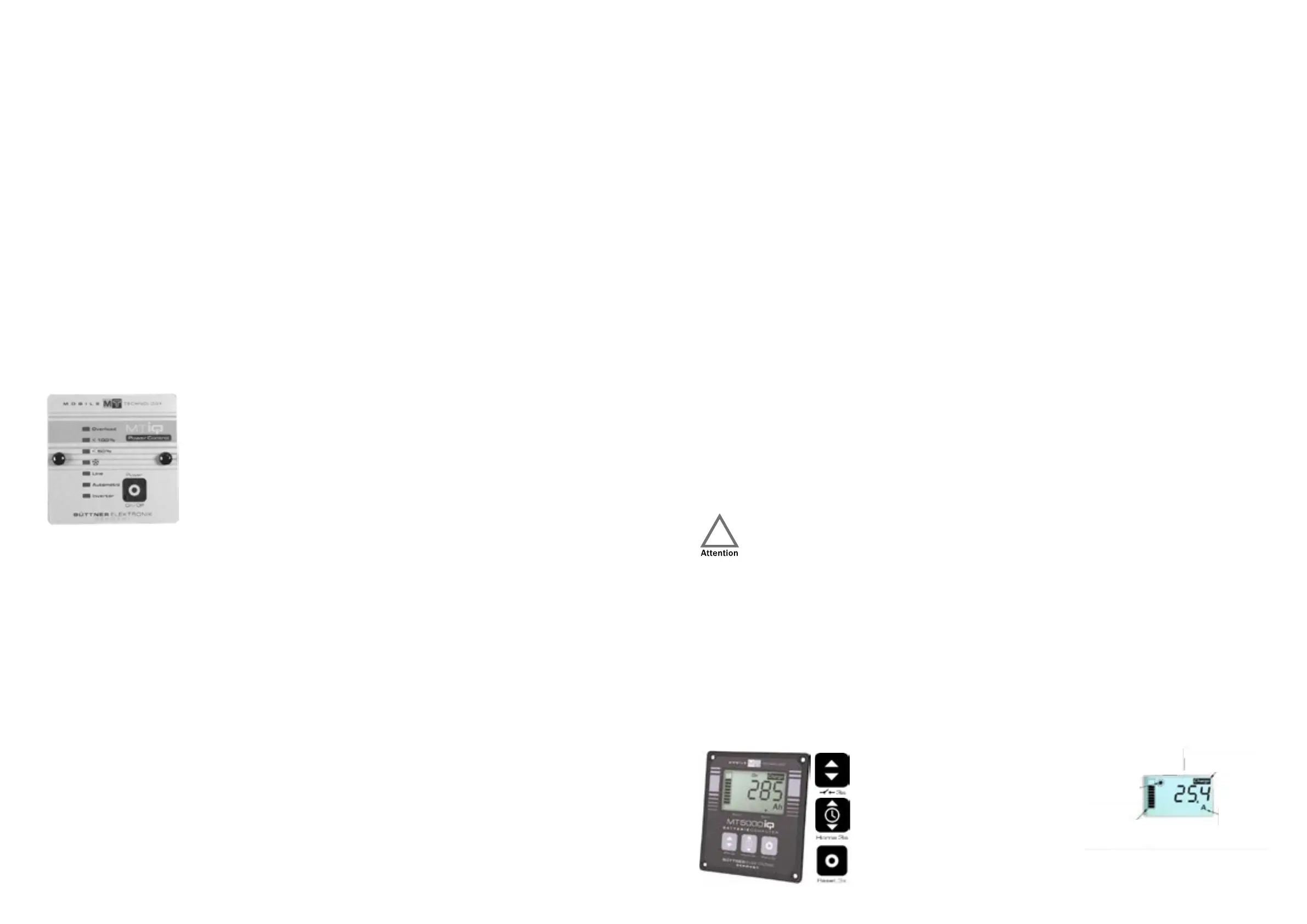
Control panel:
The control panel is located on the left side of the entrance area.
LED displays:
• “Inverter”:
◦ Lights up: The inverter is ready for operation
• “Automatic”:
◦ Lights up: The inverter is in automatic mode.
• “Line”:
◦ Lights up: the motorhome was plugged into 230 volt external power. The applied voltage is switched
through to the sockets.
• „*“:
◦ Lights up: Only active if the inverter is equipped with a climate box and the requirements for operating
the air conditioning system via the inverter are met.
• „<50%“
◦ lights up at a load of approx. 10/20 watts to 50% of the nominal power of the connected device.
• „<100%“
◦ The nominal power is between 50 and 100%.
• „Overload“
◦ The nominal power is greater than 100%. Operation is only possible for a short time. Additional signalling
by an acoustic signal.
Commissioning and function:
The inverter can be operated in an automatic mode or switched on and off manually.
1. Automatic mode: Briefly press the on/off switch.
The inverter is started in automatic mode by briefly pressing the ON/OFF switch. After an internal self-test of the entire
system, signalled by 2 short and one long beep, the inverter starts operating. The green “Inverter” LED indicates that the
device is ready for operation, the “Automatic” LED lights up. There is now 230 V AC on the device socket at the front and
the consumers are supplied. In this mode, the inverter continuously checks the connected load (e.g. TV set). As long as
the TV set is switched on, it requires power (> 25 W). If the TV set is switched off (< 25 W), the inverter recognises this
state and automatically switches to standby mode after an observation time of approx. 30 seconds. All LEDs go out,
only the yellow “Automatic” LED flashes every second. The inverter now checks every second whether a load > 25 W is
connected to the output. If it does not find a consumer in standby mode within the next 5 or 10 minutes, it switches off
completely and can be restarted using the ON/OFF switch. In order to reduce this unnecessary battery load, it makes
sense to use the automatic function.
2.
Manual operation of the inverter without automatic mode: Press and hold the ON/OFF switch for longer than 3 seconds.
If the inverter is to be operated without Automatic mode, e.g. so that also consumers with very low power such as bat-
tery chargers, portable radios or similar can operate without problems, the ON/OFF switch must be operated for more
than 3 seconds when switching on the inverter. After this time, the yellow “Automatic” LED goes out and the inverter is
now in continuous operation. The inverter is switched off again by pressing the ON-OFF switch. In continuous operation,
the battery is loaded even without connected consumers.
The inverter is not completely switched off in automatic mode! Therefore, when working on the 230 V
consumers or the associated installation, the inverter must be disconnected from the 230 V consumers
or installation!
Solar remote display:
Precise display of all important measurements of the solar system. The display is located in the display box above the
entrance door.
The following displays are available:
• Charging current (A), On-board battery voltage (V), Solar power as a bar chart, Solar electricity meter
(Ah and Wh), Time of day, Date
Operation:
Button 1: Switching the solar displays
Button 2: Switching the time and date,
programming the Home screen (3 s)
Button 3: Switching the display on/off, menu (3 s)
urgent charging
solar system
active
Bar diagramm
0...100%
display
unit


 To Next Page