FRANKIA OPERATING MANUAL66 FRANKIA OPERATING MANUAL 67
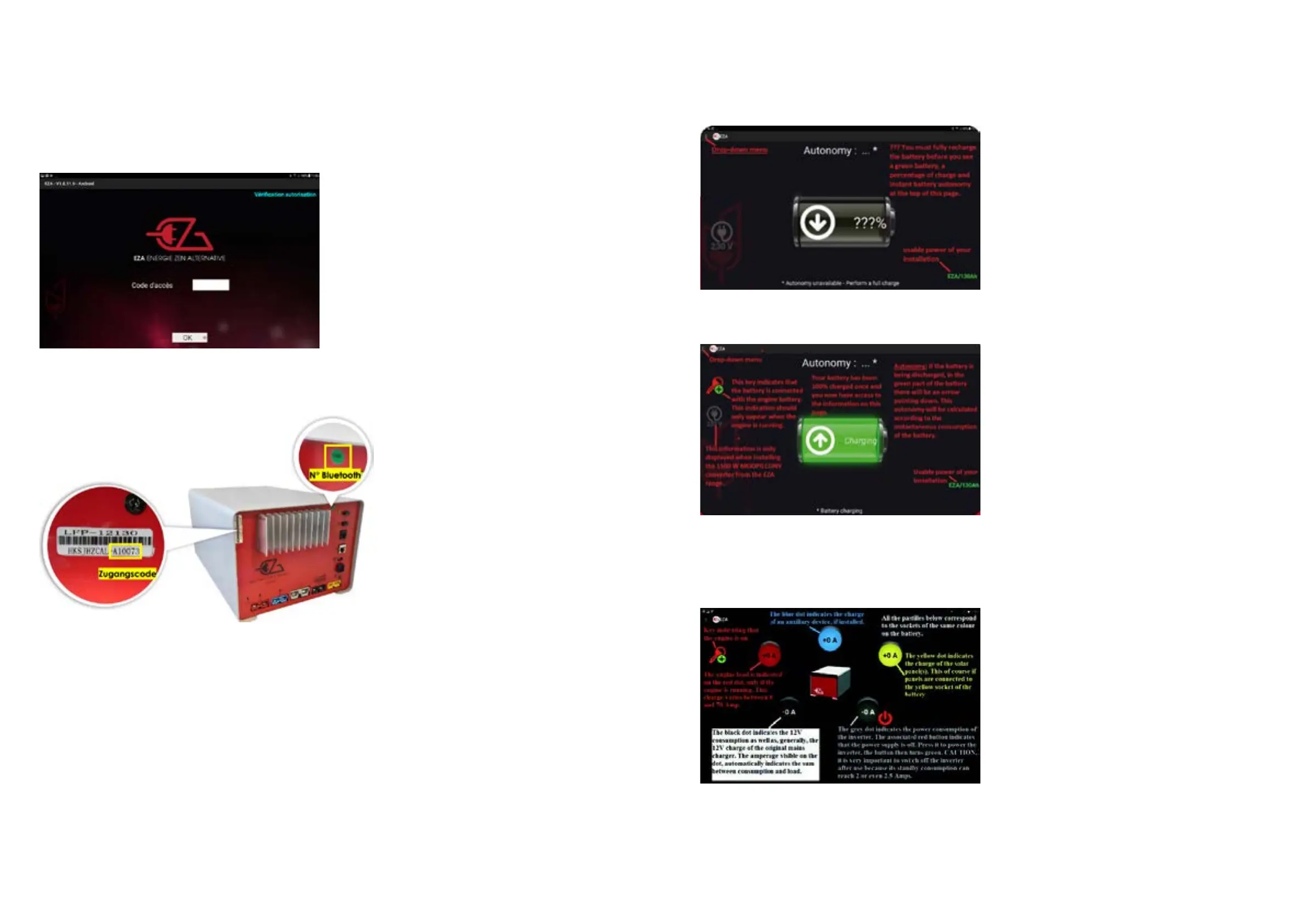
• h. You then access the APP itself via this “Autonomy” screen:
• i. Once the first full battery charge is complete, the first screen looks like this:
• j. To access the next screen “USE”, click on the dropdown menu and then on “USE”. On this screen you
have access to:
◦ Charging and discharging information of the EZA
◦ The ON / OFF button of the grey connector that supplies the inverter
◦ And always the key that indicates that the engine is on or off
• k. To access the “MAINTENANCE” screen, click the drop-down menu and then click on “MAINTENANCE”. On
this screen you can:
◦ Change the language of the App
◦ Show battery voltage
◦ View the health status of the battery
◦ View the number of days remaining or exceeded for a check of the cell balance
Referring to the history: Since the download takes a lot of time, it is better to click on “No” unless this appears to be
required.
• f. The following screen appears:
• g. You need to enter the serial number starting with an A - - - - - followed by 5 numbers (click the white
rectangle) and then click OK. (You can find the access code number in the vehicle documents or as a
sticker on the front panel of the EZA_housing
This number must be communicated in all correspondence.
Once this first connection is made, you should not need to re-enter this information, except:
• If you move the phone or tablet connected to the APP too far from the EZA
• If you switch off EZA
• If the EZA switches off for safety reasons
• If the EZA is charged too low, that it turns off
• When Bluetooth disconnects itself. In this case, you have to close the App or disconnect your EZA from
your phone (or tablet). To do so, select “Settings”, then “Bluetooth” and then “Restart pairing” (see
Section 1c and following)
In extreme cases, you may need to uninstall and reinstall the App.


 To Next Page