Home
Franklin
Electronic dictionary
DBE-1490
Page 36
Franklin DBE-1490 - Page 36
79 pages
Manual
Save Page as PDF
To Next Page
To Next Page
To Previous Page
To Previous Page
Loading...
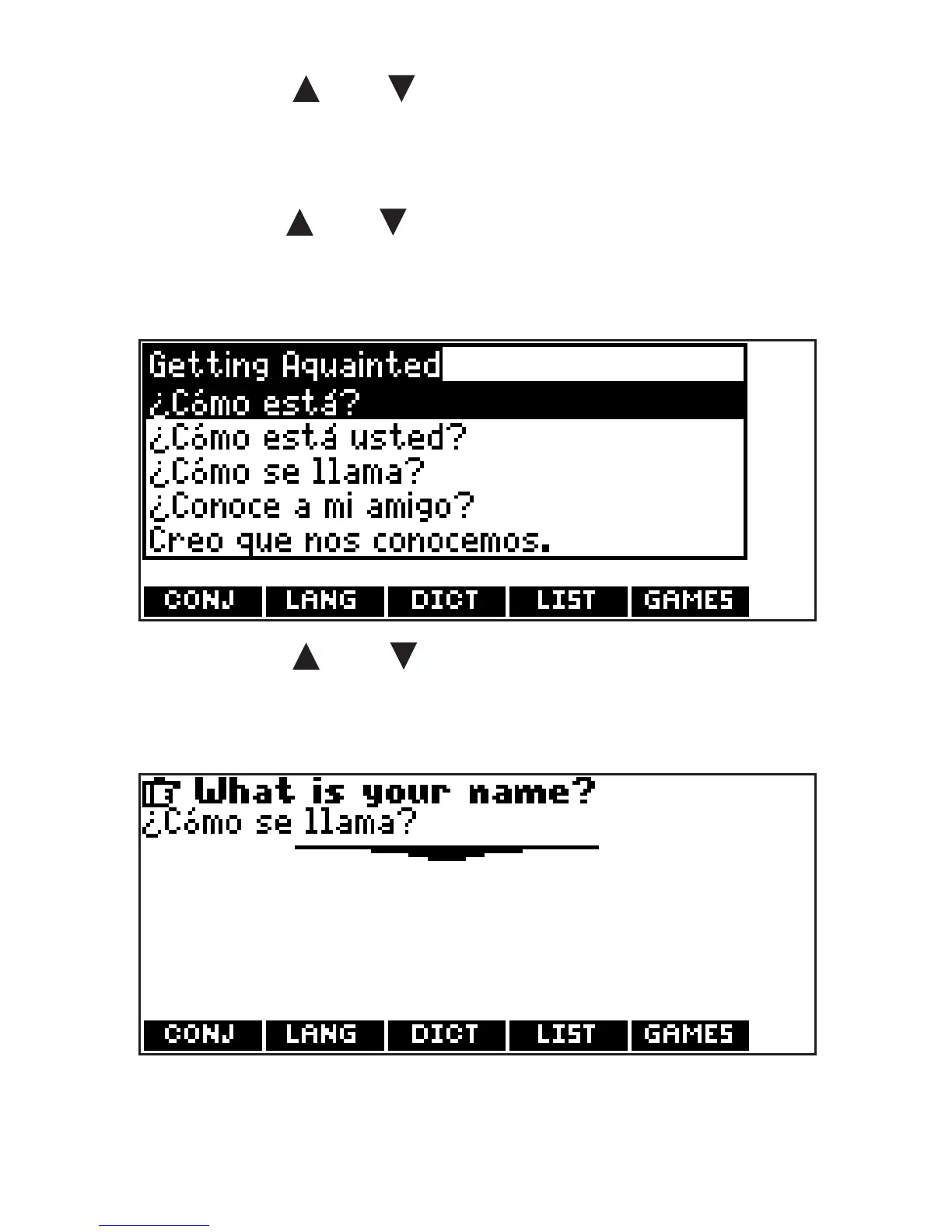
4.
Press o
r to
highlight
the
category you want and press
ENTER.
Press or to
highlight
a
subcategory
, if needed, and press
ENTER
.
5.
Press or to
highlight
the
phrase you want to translate and
then press ENTER.
6.
Press CLEAR or MENU when done.
36
35
37
Table of Contents
Main Page
License Agreement
2
Key Guide
3
Function Keys
4
Combination Keys
6
Direction Keys
7
Replacing Batteries
8
Battery Precautions
10
For Your Information
12
Help Is Always at Hand
12
Changing the Language
13
Using the Main Menu
14
Understanding the Menus
14
Viewing a Demonstration or Tutorial
18
Changing the Settings
19
Translating Words
21
Misspelling Words
23
Choosing Multiple Forms
24
Highlighting Words
25
Finding Letters in Words
27
Advanced Verb Conjugations
28
From the Main Menu
28
English Dictionary
37
Using My Vocabulary List
40
Using Word Lists
51
Playing the Games
56
Changing Game Settings
56
Using the Clock
58
Using the Databank
59
Deleting Entries
61
Using a Password
61
Using the Calculator
63
Using the Metric Converter
66
Using the Currency Converter
67
Resetting Your Product
69
Specifications
71
FCC Notice
72
Disclaimer of Warranties
74
Limited Warranty (U.S. Only)
74
Limited Warranty (EU and Switzerland)
78
Limited Warranty (Outside U.S., EU and Switzerland)
79
Related product manuals
Franklin DMQ-118
25 pages
Franklin DMQ-2110
2 pages
Franklin Dictionary
4 pages
Franklin BOOKMAN DMQ-440
22 pages
Franklin Collins DMQ-119
73 pages
Franklin Collins DMQ-1490
80 pages
Dictionary & Thesaurus MWD-1470
75 pages
Merriam-Webster Dictionary MWD-400
21 pages
Merriam Webster Dictionary MWD-450
26 pages
Talking Children's Dictionary KID-1240
24 pages
The Official SCRABBLE Players Dictionary
20 pages
Collins Crossword Solver CWM-109
4 pages








 To Next Page