錯誤! 使用 [常用] 索引標籤將 Heading 1 套用到您想要在此處顯示的文字。 27
Settings
Set your device options, including Wi-Fi, Mobile Network, Device and Advance Router.
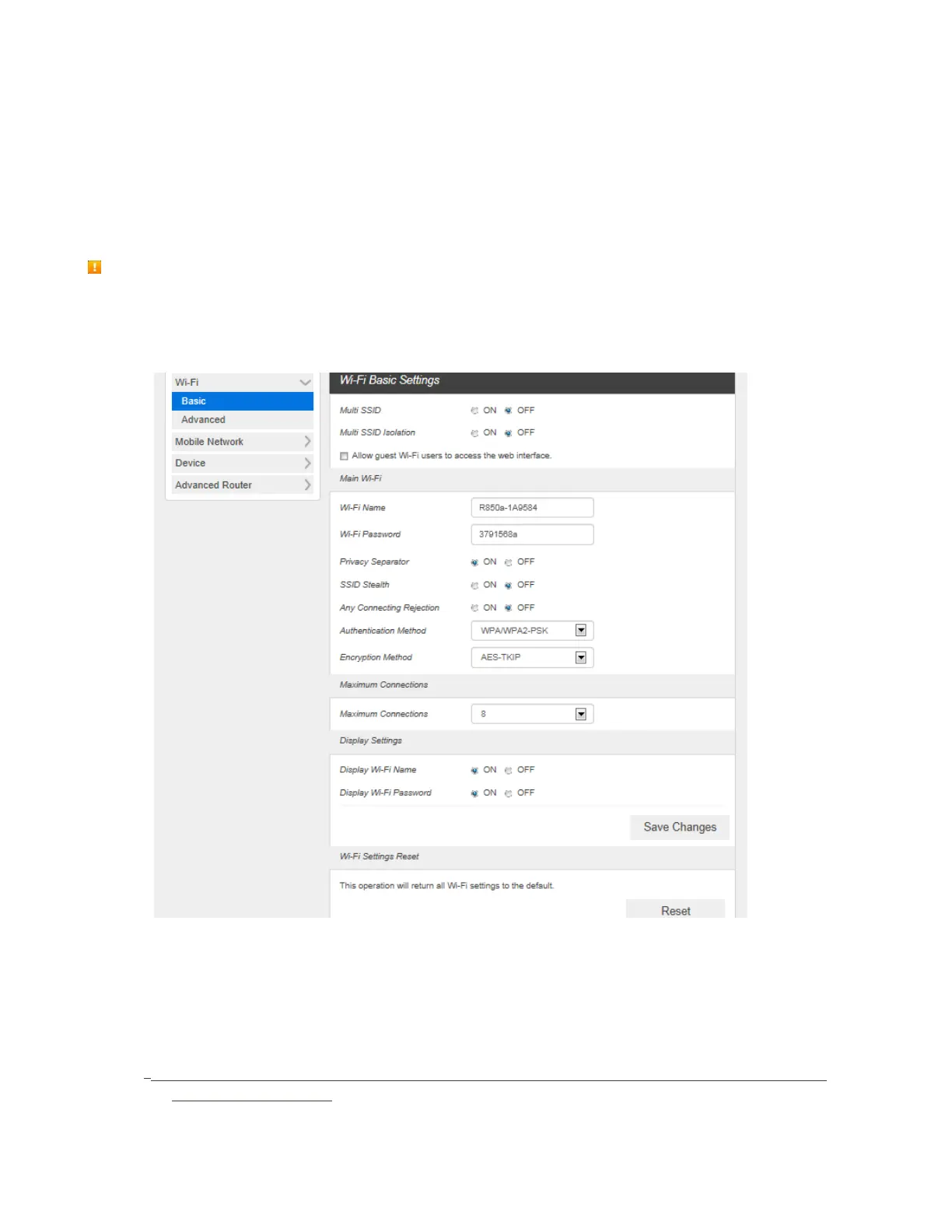
Wi-Fi Basic Settings
Set the basic Wi-Fi settings for your device.
These advanced settings should only be changed for specific circumstances. Changes to the advanced
settings could result in loss of Wi-Fi connection with your devices. Consult your devices’ manuals for Wi-
Fi specifications.
■ From the Web UI, click Settings > Wi-Fi > Basic to display the basic wireless network parameters.
Multi SSID: Select ON if you like to set up a separate guest Wi-Fi network. Your R910 will
broadcast two Wi-Fi Names.
If ON is selected for Multi SSID, Guest Wi-Fi menu will appears below Main Wi-Fi part. And
Main Wi-Fi shared Maximum Connections with Guest Wi-Fi. You can change Guest Wi-Fi
setting. And selected Off, Guest Wi-Fi menu will disappears.
Guest Wi-Fi: If ON is selected for Multi SSIS, Guest Wi-Fi menu will appears. You can change
Guest Wi-Fi settings.



 To Next Page