EasyManua.ls Logo

Frecon FR500A-4T-030G/037PB - User Manual

Default Icon
171 pages
Print Icon
To Next Page IconTo Next Page
Loading...
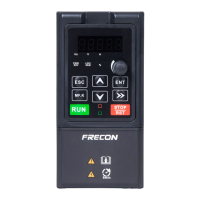
FR500A&FR510A Series Vector Control Inverter
- 1 -
Preface
Thank you for choosing FRECON developed and produced FR500A&FR510A series
vector control inverter.
FR500A&FR510A series vector control inverter is mainly positioned as a high-end market for
OEM customers and the specific requirements of fan and pump load applicationsits flexible design,
both embedded SVC and VF control in one, can be widely used for speed control accuracy, torque
response speed, low-frequency output characteristics and other situations with higher requirements.
This user manual supplies a detailed description of FR500A &FR510A series vector control
inverter includes product characterization, structural features, parameter setting, operation and
commissioning, inspection maintenance and other contents. Be sure to carefully read through the
safety precautions before use, and use this product on the premise that personnel and equipment
safety is ensured.
IMPORTANT NOTES
To illustrate the details of the productspictures in this manual based on products with outer
casing or safety cover being removed. When using this product, please be sure to well install
outer casing or covering by the rules, and operating in accordance with the manual contents.
The illustrations this manual for illustration only and may vary with different products you have
ordered.
The company is committed to continuous improvement of products, product features will
continue to upgrade, the information provided is subject to change without notice.
If you are using have questions, please contact our regional agents or our customer service
center. Customer Service Tel 0755 -33067999.
The company's other products please visit our website. http://www.frecon.com.cn

Table of Contents

Questions and Answers

  • C
    Chase MckinneySep 4, 2025
    What causes a Frecon FR500A-4T-030G/037PB to display Inverter overload and how to resolve it?
    • J
      Jon StephensonSep 4, 2025
      An 'Inverter overload' error on your Frecon Inverter can be caused by a load that is too heavy or a locked-rotor condition on the motor. In this case, reduce the load and check the motor and mechanical condition. Another possible cause is that the AC drive model is of too small a power class, so you may need to select an AC drive of higher power class.
  • B
    Bianca SmithSep 18, 2025
    What does PID feedback loss mean on Frecon FR500A-4T-030G/037PB?
    • J
      Jill ReedSep 18, 2025
      A 'PID feedback loss' in Frecon Inverter means that PID feedback set value is less than F13.24, so check the PID feedback signal or set to an appropriate value F13.24.
  • T
    Taylor VaughanSep 16, 2025
    What causes Motor auto-tuning fault in Frecon FR500A-4T-030G/037PB Inverter?
    • S
      suzanne09Sep 16, 2025
      A 'Motor auto-tuning fault' in Frecon Inverter is caused by the motor and the inverter output terminals are not connected, so check the connection between the inverter and motor. Also, the motor does not disengage the load, so the motor is disengaged load. The electrical fault, so check the motor.
  • S
    Susan ZhangSep 14, 2025
    What does Braking unit fault mean on Frecon FR500A-4T-030G/037PB?
    • M
      Mary ColeSep 15, 2025
      A 'Braking unit fault' in Frecon Inverter means that the brake line failure or damage the brake pipe, so check the brake unit, replace the brake pipe. Also, an external braking resistor is too small, so increasing the braking resistor.
  • E
    Elizabeth BarnesSep 12, 2025
    What does Communication overtime error mean on Frecon FR500A-4T-030G/037PB Inverter?
    • J
      Jocelyn McgrathSep 12, 2025
      A 'Communication overtime error' in Frecon Inverter means that PC is not working properly, so check the PC Connection. Also, the communication line is not normal, so check the communication cable. The communication parameters F15 are set incorrectly, so the communication parameters are set correctly.
  • P
    pamela95Sep 12, 2025
    What does EEPROM read/write fault mean on a Frecon Inverter?
    • M
      Melvin WareSep 12, 2025
      An 'EEPROM read/write fault' on a Frecon Inverter indicates that the EEPROM chip is damaged. To resolve this, replace the main control board.
  • J
    Jessica TerrySep 9, 2025
    What should I check if my Frecon FR500A-4T-030G/037PB reports Power output phase loss?
    • H
      hayneskimberlySep 9, 2025
      If your Frecon Inverter reports a 'Power output phase loss' error, start by checking the cable connecting the AC drive and the motor for any faults and eliminate them. Also, check whether the motor's three-phase winding is normal, as unbalanced AC drive three-phase outputs when the motor is running can cause this issue.
  • A
    Alexis NelsonSep 7, 2025
    What does Module overheat mean on my Frecon FR500A-4T-030G/037PB and how do I fix it?
    • D
      Diane WilliamsSep 7, 2025
      A 'Module overheat' error on your Frecon Inverter indicates that the module is overheating. This could be due to several reasons: the ambient temperature might be too high, so lower it. The air filter might be blocked, so clean it. The fan might be damaged, so replace it. The thermally sensitive resistor of the module might be damaged, so replace it. Or, the inverter module itself might be damaged, so replace it.
  • D
    David HuntSep 6, 2025
    How can I fix a Power input phase loss error on my Frecon Inverter?
    • T
      Taylor LopezSep 6, 2025
      To address a 'Power input phase loss' error on your Frecon Inverter, first check if the three-phase power input is abnormal and eliminate any external faults.
  • S
    Sean ParksAug 21, 2025
    What to do if my Frecon FR500A-4T-030G/037PB shows Accel overcurrent?
    • D
      Deborah YoderAug 21, 2025
      If your Frecon Inverter displays an 'Accel overcurrent' error, it could be due to several reasons. First, check for any grounding or short circuits in the output circuit and eliminate those faults. If the acceleration time is too short, increase it. Also, ensure that your manual torque boost or V/F curve settings are appropriate and adjust them if necessary. Low voltage can also trigger this error, so adjust the voltage to the normal range. If you're starting the motor while it's rotating, either select rotational speed tracking restart or wait for the motor to stop before starting. Remove any sudden loads added during acceleration. Finally, if the AC drive model is too small, select a higher power class AC drive.

Summary

Chapter 1 Safety Precautions

1.1 Safety Considerations

Considers safety aspects during installation, wiring, and operation.

1.2 Precautions

Details specific precautions for motor insulation, thermal protection, and voltage.

Chapter 3 Installation and Wiring

3.2 Installation Direction, Space and Cooling

Details proper installation direction, required space, and cooling methods.

3.6 Wiring and Terminal Configuration

Illustrates and describes wiring methods and terminal functions.

Chapter 4 Operation and Display

4.2 Function Code Operations

Details the procedure for navigating and changing function codes.

Chapter 5 Parameter List

5.2 Standard Function Parameters

Lists and describes the standard function parameters (Group F00).

Chapter 6 Parameter Specifications

Group F01 Frequency Command

Details parameters for setting frequency sources and commands.

Group F02 Start;Stop Control

Specifies parameters for controlling the inverter's start, stop, and direction.

Group F03 Accel;Decel Parameters

Covers acceleration and deceleration time settings and curve types.

Group F04 Digital Input

Details the configuration and functions of digital input terminals.

Group F05 Digital Output

Specifies the functions and delay times for digital output terminals.

Group F06 Analog and Pulse Input

Describes parameters for configuring analog and pulse inputs.

Group F07 Analog and Pulse Output

Details parameters for analog and pulse outputs.

Group F08 Motor Parameters (Motor 1)

Specifies settings for Motor 1, including type, ratings, and auto-tuning.

Group F10 Vector Control Parameters (Motor 1)

Details parameters for vector control of Motor 1, including PI settings and torque control.

Group F11 Protection Parameters

Lists and explains various protection parameters for the inverter.

Group F20 Vector Control Parameters (Motor 2)

Details parameters for vector control of Motor 2, including PI settings and torque control.

Group U01 Fault Record

Lists parameters for recording and viewing fault history.

Chapter 7 Maintenance and Troubleshooting

Appendix B Braking Resistor

Frecon FR500A-4T-030G/037PB Specifications

General IconGeneral
BrandFrecon
ModelFR500A-4T-030G/037PB
CategoryInverter
LanguageEnglish

Related product manuals