23
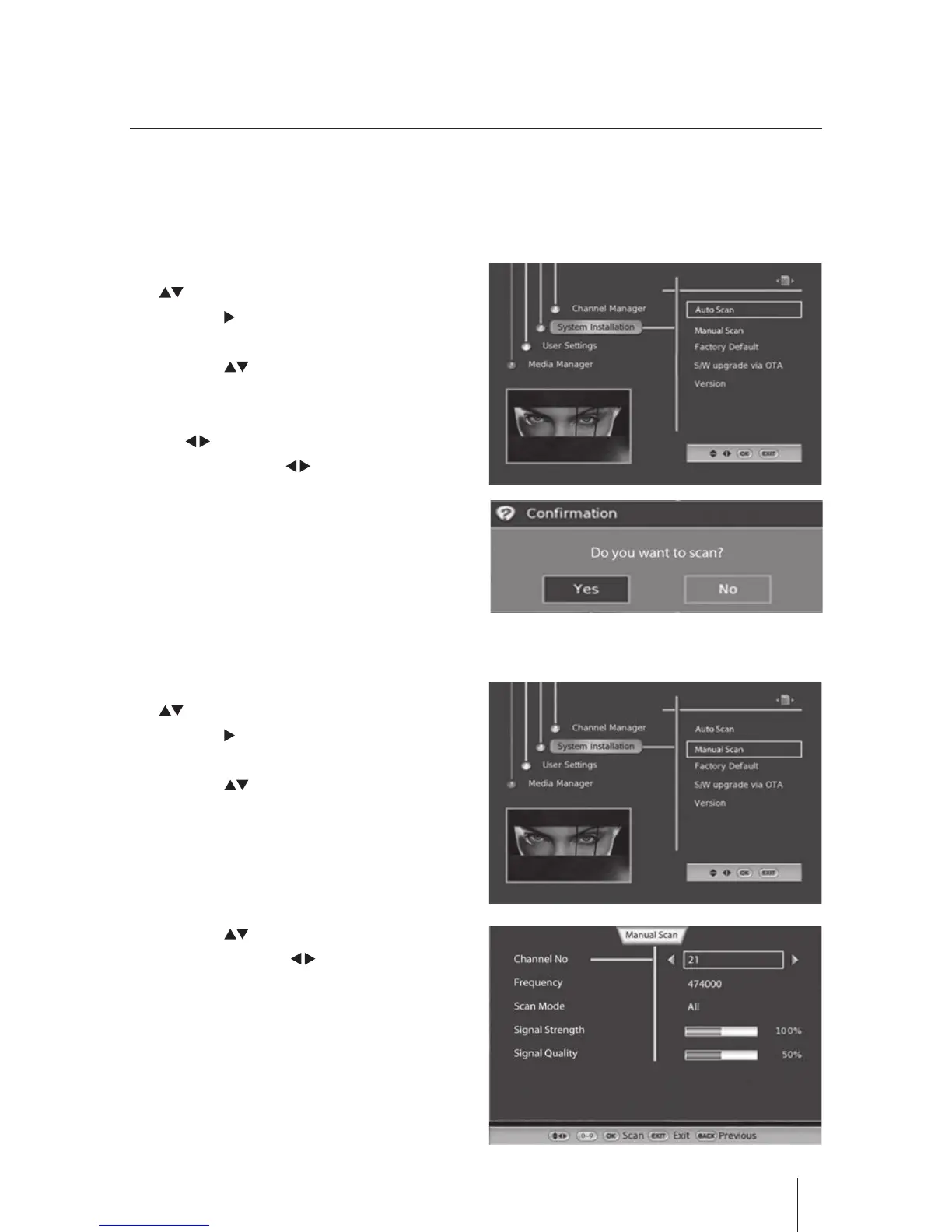
Manual Scan
1. Press the MENU button and then press the
buttons to select System Installation.
Press the button or the OK button to
conrm.
2. Press the buttons to select Manual
Scan and then press the OK button the
menu will be displayed.
3. Press the buttons to select you want,
and then press the butons to set and
press the OK button to conrm.
4. Press the BACK button to return to the
previous menu.
5. Press the EXIT button to exit the menu.
Customising the System Installation
You can load the channels automatically, manually or restore the receiver to its default settings from
the Installation Menu.
Auto Scan
1. Press the MENU button and then press the
buttons to select System Installation.
Press the button or the OK button to
conrm.
2. Press the buttons to select Auto Scan
and then press the OK button to conrm
and the conrmation will be displayed, use
the buttons to select Yes to start auto
scanning, use the buttons to select No
to return to the previous menu.
3. Press the EXIT button to exit the menu.


 To Next Page