6
Product Overview
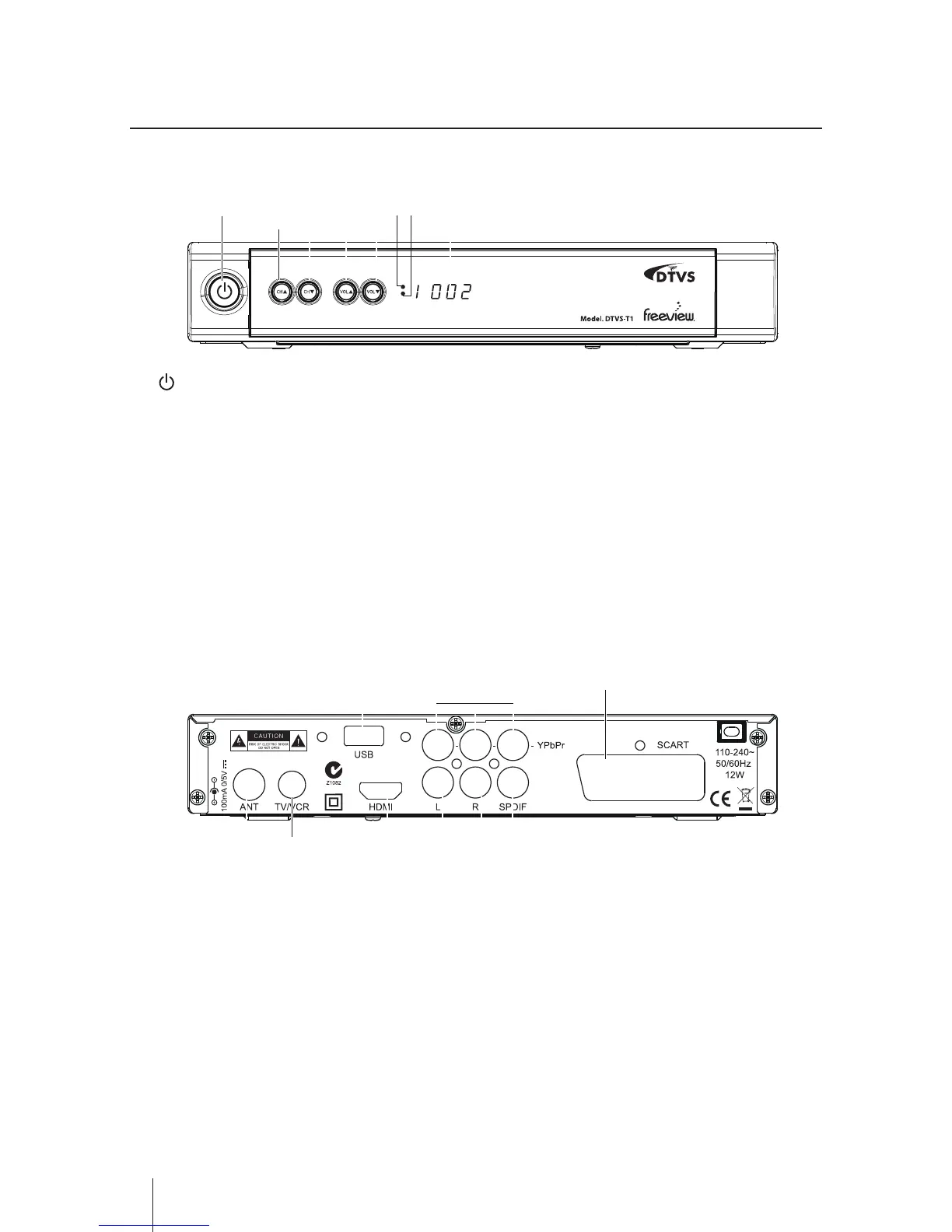
Front Panel
1
1 2 4 65
3 87
4 65
2 3
1. button
To switch the receiver to Stanby mode and On
mode.
2. CH +/- button
- To switch between channels.
- Press to navigate up and down within the
menu setup.
3. VOL +/- button
- To increase and decrease the volume.
- Press to navigate left and right within the menu
setup.
4. LED indicator light 1
Will appear in red when in standby mode.
Will show in green while watching Live TV.
5. IR receiver
6. LED Display
To display the status of the receiver, in playing
menu it shows "MENU"; in watching TV channel it
shows the channel No.; in standby mode it shows
the time; in searching channels it shows "TUNE".
Rear Panel
1. ANT
Connect to your UHF Antenna.
2. TV/VCR
Connect to your TV if supported or your another
receiver.
3. USB
Upgrade for your recevier and Recording via USB
Device.
4. HDMI
Output the high quality video and audio to your
TV via HDMI cable.
5. AUDIO L/R
Connect to your TV or other equipment.
6. SPDIF
Output the digital audio.
7. YPbPr
Output the high quality video to your TV via RCA
cable.
8. SCART
Connect to your TV if supported.


 To Next Page