VYPER
™
VARIABLE SPEED DRIVE
OPERATION
100-200 IOM (FEB 09)
Page 36
PROGRAMMING
Verify that the Vyper
™
is set to Quantum
™
LX control. This can
be accessed with the following keystrokes.
Press: [Configuration→Compressor→Configuration]
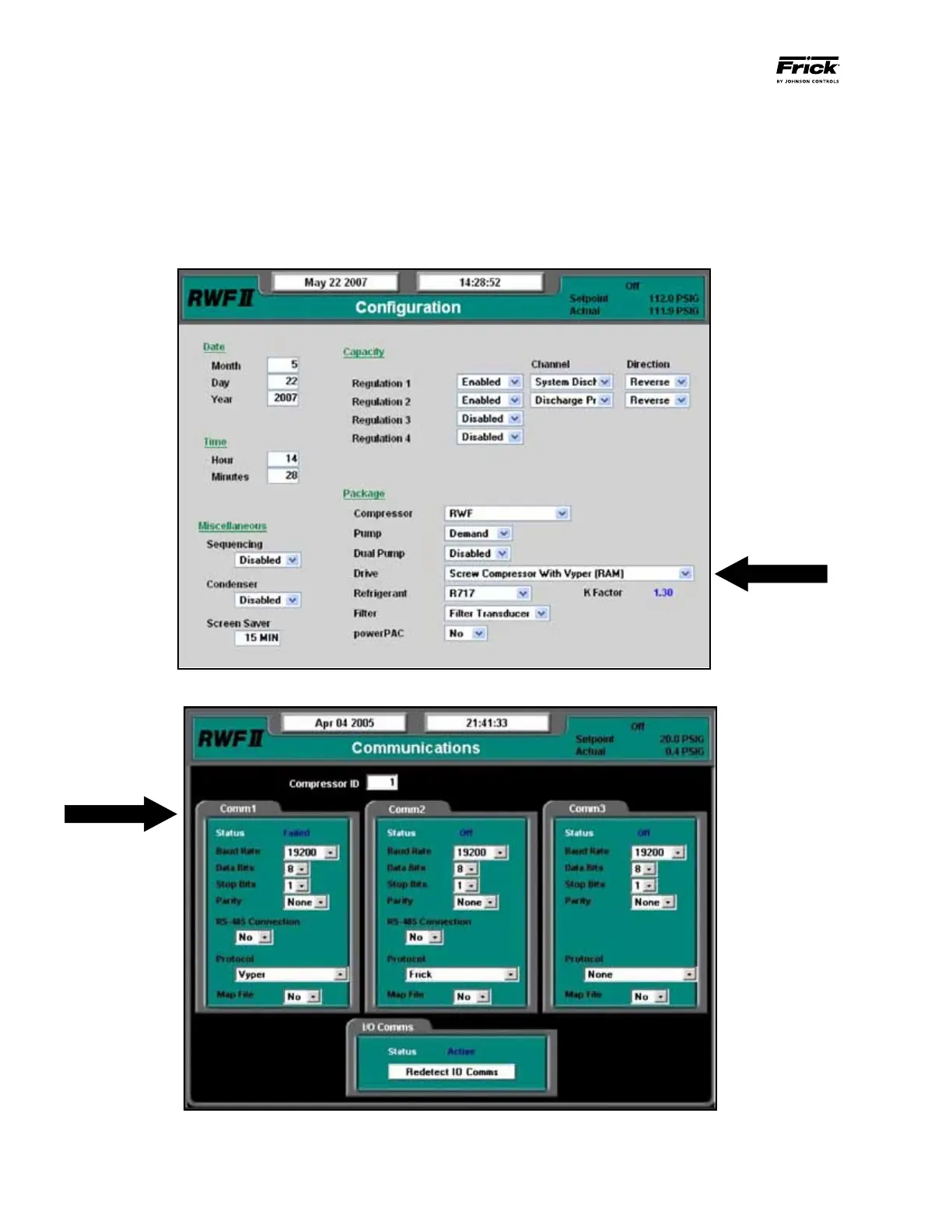
Set all dates, times, Capacity Regulations, and Package-spe-
cific information. Verify that “Screw Compressor with Vyper
™
is selected under the package Drive field. This will allow the
Vyper
™
specific screens to be displayed (See Figure 41).
VYPER
™
/ QUANTUM
™
LX COMMUNICATIONS
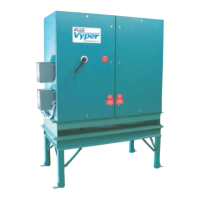
Set the Communications rate between Vyper
™
and
Quantum
™
LX. Make sure that the Comm 1 is set as shown
in Figure 42. Press: [Setpoints→Communications].
Figure 41 - Configuration Screen
Figure 42 - Communications Screen


 To Next Page