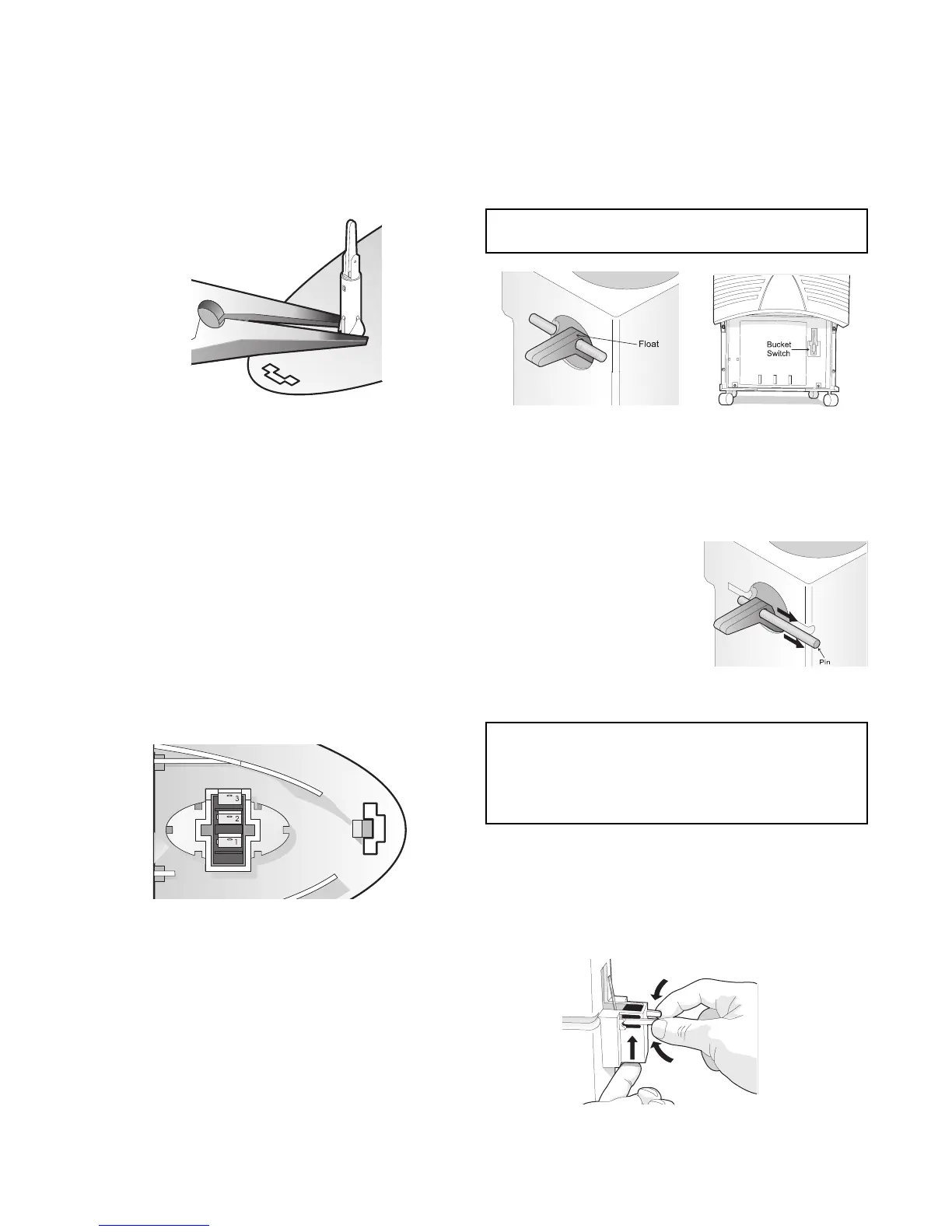
8
Figure 8b
Figure 8c
Figure 8d
To Remove Full Bucket Pilot Light
1. Disconnect dehumidifier from electrical supply.
2. Disconnect three wires connected to two
terminals on pilot light. (See figure 7b.)
3. Using needle nose pliers, squeeze plastic tabs
against pilot light and push light through hole in
assembly. (See Figure 8a.)
To Test Fan Speed Switch (2 speed models only)
1. Disconnect dehumidifier from electrical supply.
2. Disconnect three wires connected to three
terminals on fan switch.
3. Using a multimeter on resistence scale, take
following readings: (See Figure 8b.)
With fan switch in HI:
Terminals 1 & 2 0 ohms
Terminals 1 & 3 max resistence
Terminals 2 & 3 max resistence
With fan switch in LO:
Terminals 1 & 2 max resistence
Terminals 1 & 3 0 ohms
Terminals 2 & 3 max resistence
To Remove Float:
1. Disconnect dehumidifier from electrical supply.
2. Remove bucket. (See procedure To Remove
Bucket on page 6.)
3. Drain any condensate
that may be in the
bucket.
4. Remove pin holding float
to bucket. (See Figure 6e.)
5. Remove float through top
access hole in bucket.
6. Reverse procedure to
reassemble.
Figure 8e
To Remove Fan Speed Switch (2 speed models only)
The Fan Speed Switch is very difficult to remove without
destroying it. Do not attempt to remove the switch unless
it is faulty. Then, it really doesnt matter if the switch is
damaged during removal. However, do be careful not to
damage the control assembly during removal. The new
switch will fit into place nicely once the faulty switch has
been removed.
Bucket Switch
The bucket switch is a Single Pole, Double Throw (SPDT)
device that shuts off the dehumidifier when the bucket is
full. The switch is activated by a float (see Figure 8c)
mounted inside the bucket. The switch is mounted to the
frame directly behind the bucket. (See Figure 8d.)
NOTE: This unit will not operate with the bucket
removed.
NOTE: When reinstalling float into bucket, ensure
the float is positioned so the tongue protrudes
through the front hole in the bucket. Then the pin is
inserted through the hole in the tongue and snapped
into the slot in the bucket.
To Remove Bucket Switch:
1. Disconnect dehumidifier from electrical supply.
2. Remove three electrical leads from terminals on
bucket switch.
3. Squeeze tabs together and push up on switch from
bottom. (See Figure 8f.)
Figure 8f
Figure 8a



 To Next Page