FRITZ!Powerline 546E 10
Buttons, LEDs and LAN Ports
4 Buttons, LEDs and LAN Ports
4.1 Buttons and LEDs
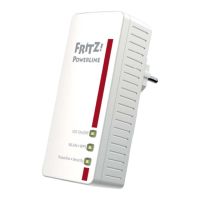
FRITZ!Powerline has three buttons with integrated LEDs.
Button Functions
The buttons have the following functions:
Button Press Function
On/Off briefly Switches the socket on or
off.
WLAN • WPS briefly Switches wireless LAN on or
off.
long (at least
6 seconds)
Starts WPS.
Powerline • Secur
ity
briefly Switches FRITZ!Powerline on
or off.
long (at least
6 seconds)
Establishes a secure power-
line connection.
On/O
WLAN•WPS
Powerline •Security
On/O
WLAN•WPS
Powerline •Security



 To Next Page
 Loading...