FRITZ!Powerline 546E 34
LAN Bridge Operating Mode
14.4 LAN Bridge Operating Mode
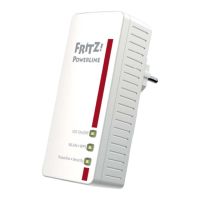
In the LAN bridge operating mode you connect
FRITZ!Powerline 546E to your Internet router (FRITZ!Box) using
the home’s Ethernet wiring or a LAN cable.
Network devices like a PC, notebook, tablet or smart TV can
be connected with FRITZ!Powerline via LAN cable or wireless-
ly. Through FRITZ!Powerline the network devices receive ac-
cess to the home network and the Internet.
Configuring a LAN Bridge
1. Insert one end of a LAN cable into the “LAN 1” port on
the FRITZ!Powerline.
2. Insert the free end of the cable into a LAN socket on your
Internet router (FRITZ!Box) or into a socket of your
home’s Ethernet wiring.
3. Open the user interface (see page 22).
4. Select “System / Operating Mode”.
5. Click the “Change Operating Mode” button.
6. Select “LAN bridge” as the operating mode and click
“Next”. A Wizard starts, which guides you through con-
figuration of the LAN bridge.
Power/DSL
Internet
Festnetz
WLAN
Info
WLAN
LAN LAN
On/O
WLAN•WPS
Powerline •Security



 To Next Page
 Loading...