14
Plugging in op-
tions
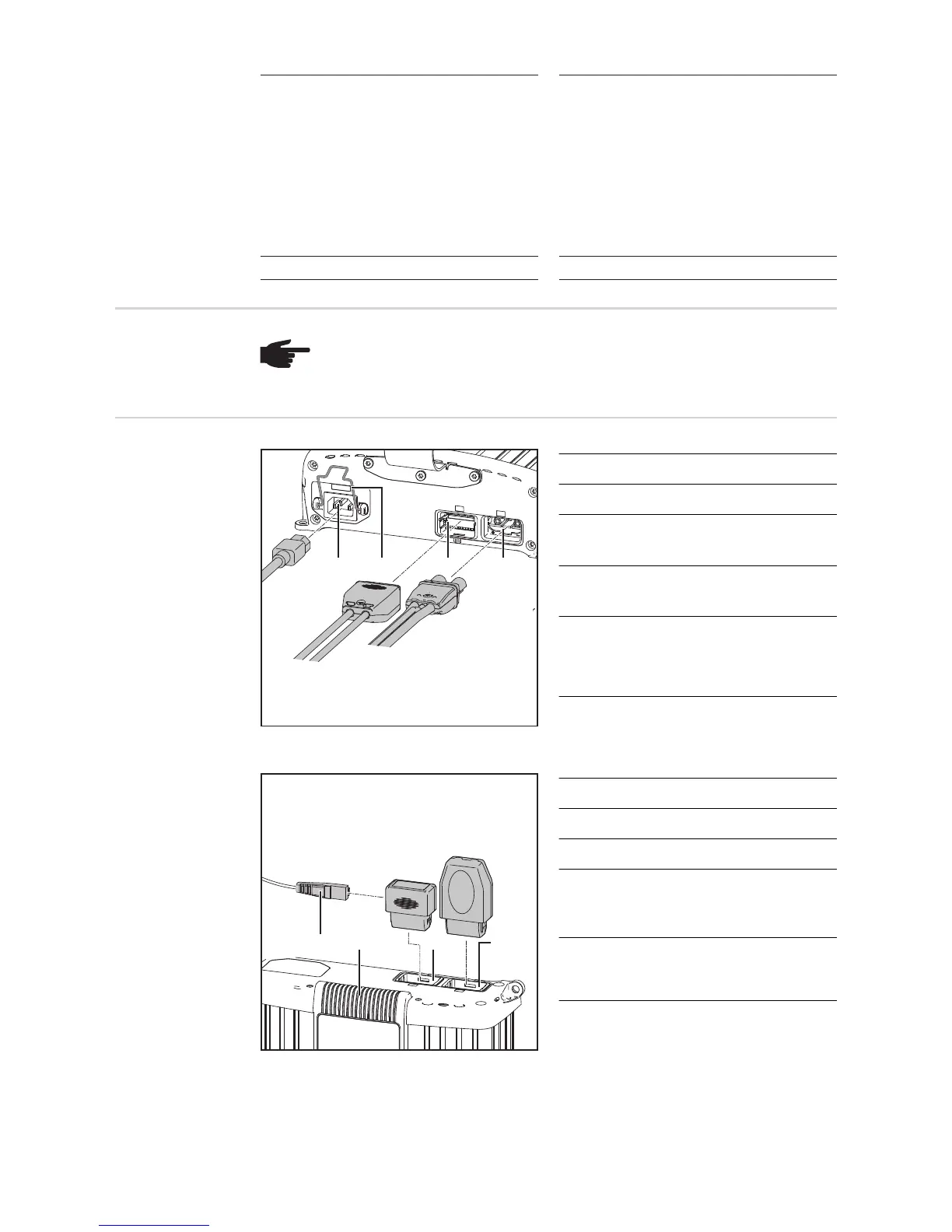
Connections
Bottom of housing
No. Function
(1) AC input - mains socket
(2) Mains cable safety bow
for fitting the mains cable
(3) Connection P2 - I/O port
for options on the I/O port
(4) Connection P1 - charger lead so-
cket
also for external stop and tempera-
ture-controlled charging options
Top of housing
No. Function
(5) Connecting lead
(6) Removable display
(7) Connection P3 - Visual Port
for connecting an internal or exter-
nal display
(8) Connection P4 - Multi Port
for connecting a status lamp, data
communications, etc.
(7) Start/Stop and setup button
- for interrupting and restarting
charging
- for accessing the Setup menu
and selecting the characteris-
tic type (press and hold for 10
s)
(7) Start/Stop, voltage selection and
setup button
- for interrupting and restarting
charging
- for selecting the 12 V / 24 V
charging voltage
- for accessing the Setup menu
and selecting the characteris-
tic type (press and hold for 10
s)
(8) Error indicator (8) Error indicator
NOTE! Danger of damage to charger and accessories. Only plug in options and
system add-ons when the mains plug is unplugged and the charging cables are
disconnected from the battery.
(1)
(3) (4)
(2)
(6) (7) (8)
(5)








 To Next Page