11
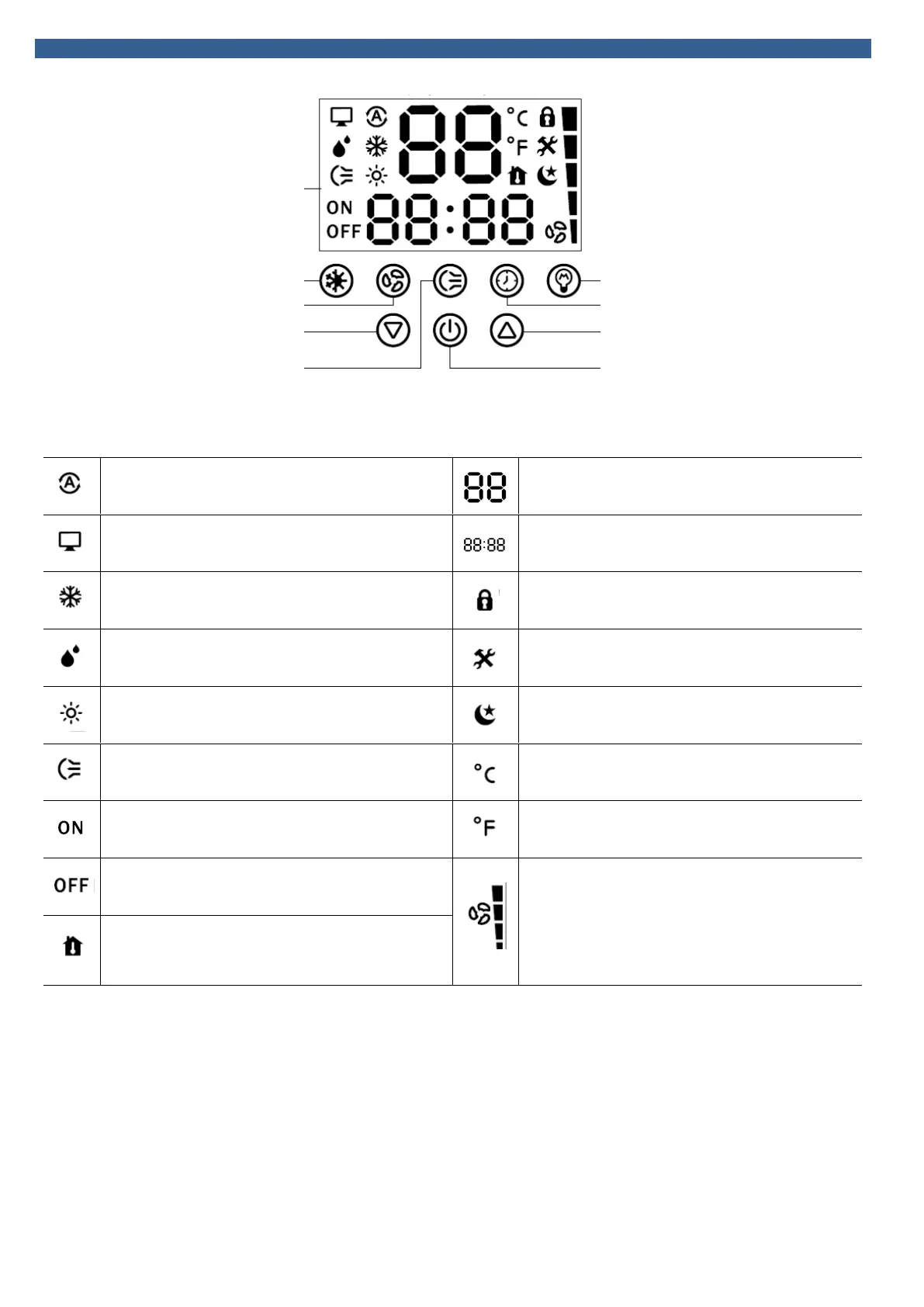
ISTRUZIONI CONTROLLO TOUCH
TOUCH CONTROLLER INSTRUCTIONS
Tasto visualizzazione schermo
Tasto modalità-Mode key Screen displaying button
Tasto velocità-Speed button Tasto ora-Timer key
Tasto in basso-Down key Tasto in alto-Up key
Inserimento velocità-Put the wind key Tasto-Button ON/OFF
SIMBOLOGIA – SYMBOL DESCRIPTION
Auto: attivazione modalità automatica
Auto icon: the automatic mode is on
Temperatura : indica la temperatura impostata e i guasti
Temperature display: it shows temperature and default
code
Networking: rete o gruppo di controllo
Networking icon: networking or group control
Ora : visualizza l’ora corrente
Time display: displays the clock time and timing
Raffrescamento: attivazione modalità raffrescamento
Cooling icon: Cooling mode is on
Blocco : indica lo stato di blocco
Lock icon: displayed when the lock status is on
Deumidificazione : non disponibile
Dehumidification icon: not available
Errore : indica quando l’apparecchio non funziona
Error icon: the unit is not working properly
Riscaldamento : attivazione modalità riscaldamento
Heating icon: the heating mode is on
Modalità notte : indica quando la funzione sleep è attiva
Sleeping mode: displayed when the sleep status is on
Oscillazione alette : mostra l’oscillazione alette
Swing icon: displayed during louver swinging
Unità temperatura : mostra la temperatura con gradi
Celsius
Temperature unit : Celsius temperature is displayed
ON : il segnale indica che l’unità è accesa
ON: displayed when the unit is ON
Unità temperatura : mostra la temperatura con gradi
Fahrenheit
Temperature unit: Fahrenheit temperature is displayed
OFF : il segnale indica che l’unità è spenta
OFF: displayed when the unit is OFF
Ventilatore e velocità : mostra che la ventola è in
funzione e a che velocità è impostata
Fan and fan speed display: it shows the fan status and
the fan speed
Temperatura ambiente : quando la temperatura
impostata è raggiunta, si visualizza questa icona
Room temperature: when the set temperature is reached,
this icon is displayed


 To Next Page