17
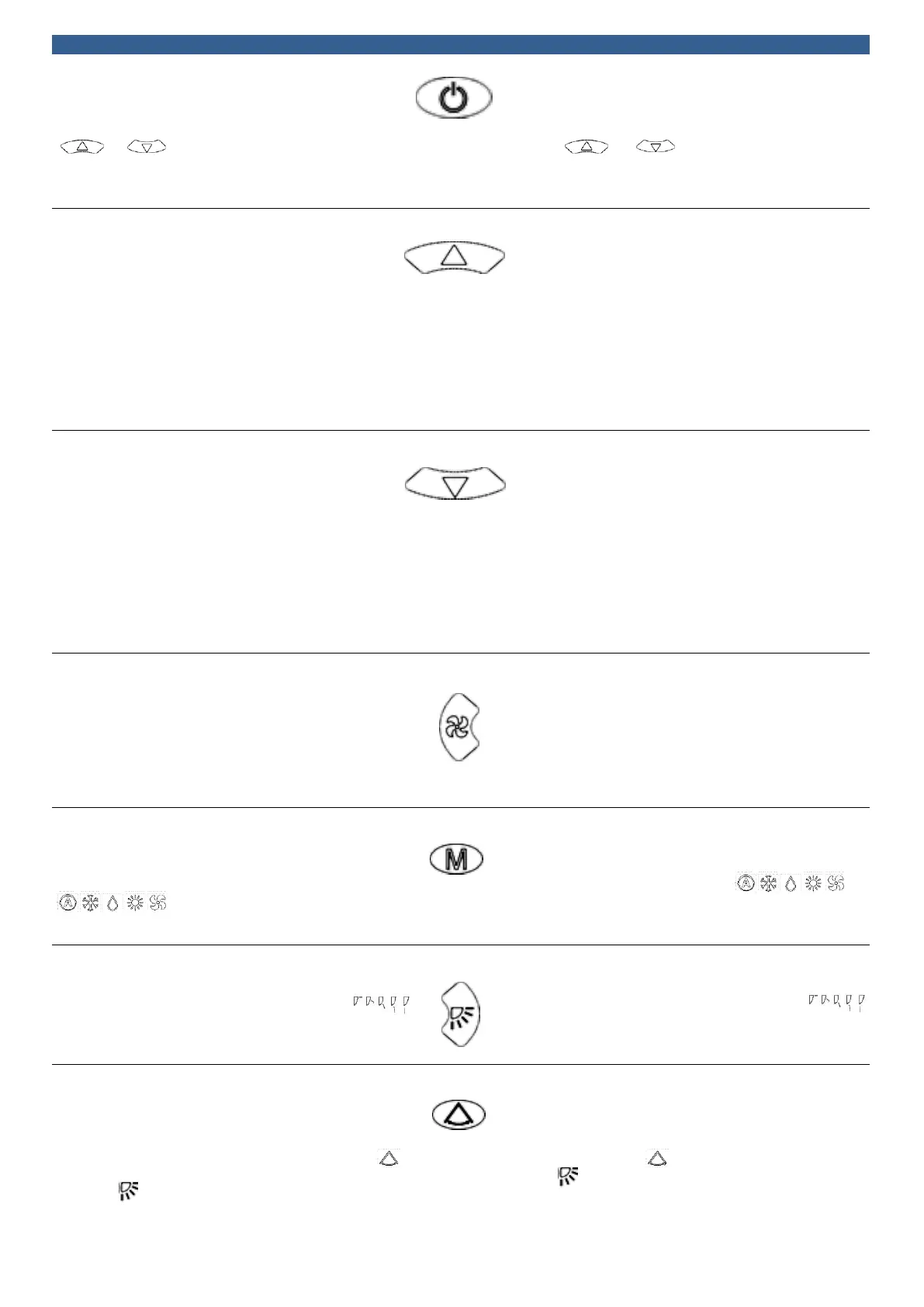
ON / OFF:
Premere il tasto ON / OFF per accendere il fan coil.
Il display mostra la temperatura impostata. In automatico
la temperatura può essere impostata premendo i pulsanti
. e per aumentare e diminuire di 1°C .
A unità spenta, il telecomando mostra solamente lo stato
della batteria, il timer, l’orologio e il simbolo “Time”.
ON / OFF:
Press the ON / OFF button to power on.
The display now shows the set temperature. In auto mode,
the temperature can be set +1°C or -1°C by pressing the
button and . When the unit is switched off,
the remote control shows battery charge, time displayer,
clock and the time sign only.
+ Tasto:
Tasto di regolazione temperatura e orario.
Regolazione temperatura: premere per aumentare la
temperatura di un grado alla volta, massima temperatura è
31°C.
Regolazione orario: premere per aumentare di un’ora alla
volta.
Tenere premuto per 3 secondi per incrementare in modo
continuo l’orario o la temperatura.
La funzione non è attiva a unità spenta.
+ Button :
This button can be used to adjust the timer and set the
temperature. The temperature will increase 1°C for each
pressing. Max setting temperature is 31°C.
The timer will increase 1 hour by each pressing.
A continue increasing of temperature or time will start by
pressing the button for 3 seconds.
This button is no responding when power off or stand by.
- Tasto:
Tasto di regolazione temperatura e orario.
Regolazione temperatura: premere per diminuire la
temperatura di un grado alla volta e la minima
temperatura è 16°C.
Regolazione orario: premere per diminuire di un’ora alla
volta.
Tenere premuto per 3 secondi per diminuire in modo
continuo l’orario o la temperatura.
La funzione non è attiva a unità spenta.
- Button:
This button can be used to adjust the timer and set the
temperature. The temperature will decrease 1°C for each
pressing. Min setting temperature is 16°C.
The timer will decrease 1 hour by each pressing.
A continue increasing of temperature or time will start by
pressing the button for 3 seconds.
This button is no responding when power off or stand by.
Velocità ventilatore:
Premere il pulsante per cambiare la velocità del
ventilatore. Il ventilatore può essere settato come:
Automatico/Bassa/Media/Alta velocità, e può essere
selezioanto in qualsiasi momento ad eccezione di quando
l’unità è spenta.
Fan Speed button:
Press this button to change the fan speed between
Auto/Low/Medium/High speed. It can be selected in any
mode unless the controller is power off or standby.
Pulsante selezione funzionamento:
Premere per scegliere la funzione desiderata tra:
Automatico / Raffrescamento / Riscaldamento / Ventola
. Può essere selezioanto in qualsiasi
momento ad eccezione di quando l’unità è spenta.
Running mode button:
Press the button to select the functioning mode between
Auto / Cooling / Heating / Fan mode .
It can be selected in any mode unless the controller is
power off or standby.
Pulsante oscillazione alette:
Premere per regolare il movimento delle alette tra ----------.
Può essere selezionato in qualsiasi momento ad eccezione
di quando l’unità è spenta.
Swing button:
Press this button to adjust swing status between -----
It can be selected in any mode unless the controller is
power off or standby.
Pulsante di direzione aria:
Premere il pulsante per avviare o interrompere
l'oscillazione. L’angolazione dell'aletta si ferma nella
posizione in cui si preme il pulsante e viene visualizzato
Se si preme nuovamente questo tasto, il visualizzatore
indicherà e riparte l’oscillazione. Non è possibile fare
questa regolazione quando l’unità è spenta o in standby.
Air direction button:
Press the button to start or stop the swing. The air guide
louver will stop at the position once pressed the button.
The display will show , if pressed again the displayer will
show and the swing will start again. The regulation is
not possible when controller is power off or standby.


 To Next Page
 Loading...