EasyManua.ls Logo

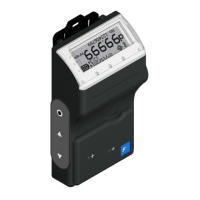
Fuji Electric NRF51 - User Manual

Fuji Electric NRF51
58 pages
Print Icon
To Next Page IconTo Next Page
Loading...
TN5A4215b 1/58
Users Manual
Electronic Personal Dosimeter
(For Gamma(X)-ray and neutron)
NRF51
Fuji Electric Co., Ltd.

Questions and Answers

  • B
    Brian RamosSep 8, 2025
    What to do if there is crack, breakage, or damage on the case of Fuji Electric Measuring Instruments?
    • L
      Lauren MillerSep 9, 2025
      If there is a crack, breakage, or damage on the case, it is likely due to: * Breakage due to drops, etc. Contact a Fuji Electric representative for assistance.
  • J
    James StevensAug 23, 2025
    What to do if the buzzer does not sound on Fuji Electric NRF51?
    • J
      Joseph ReynoldsAug 23, 2025
      If the buzzer does not sound, check for the following possible causes: * Attached exogenous material. * Set frequency failure. * Buzzer lead wire is broken. * CPU malfunction. First, check if there is any dust or foreign material obstructing the buzzer. If the problem persists after removing any dust, contact a Fuji Electric representative.
  • D
    dbowersAug 25, 2025
    How to fix USB communication that does not work on Fuji Electric NRF51?
    • P
      pjamesAug 26, 2025
      If USB communication is not working, the issue could be due to: * Cable malfunction. * Connector malfunction. * CPU malfunction. Check the cable's conduction to ensure there are no issues with the cable itself.
  • H
    huntkevinAug 27, 2025
    What to do if Dose error occurs on Fuji Electric NRF51 Measuring Instruments?
    • M
      mcgeeangelaAug 27, 2025
      If you encounter a dose error, dose accumulation issues, or the displayed dose is unusually high or low, the possible causes are: * LCD malfunction. * Sensor unit malfunction. * CPU malfunction. * Calibration factor trouble: Check the calibration factor. Contact Fuji Electric representative for calibration method. For LCD, sensor unit, or CPU malfunctions, it's best to contact a Fuji Electric representative for assistance.
  • B
    Barbara LewisAug 27, 2025
    How to fix infrared communication if it is unable on Fuji Electric NRF51 Measuring Instruments?
    • E
      ebergerAug 28, 2025
      If infrared communication is not working, consider the following possible causes: * Communication distance is too far: Set the distance between the communication port of NRF51 and the Dosimeter Configuration Tool within 5cm, ensuring they face each other. * Communication port is dirty: Clean the communication part with a soft cloth and check for any exogenous material. * CPU malfunction. * Malfunction of Dosimeter Configuration Tool (or PC). If the issue persists after these steps, contact a Fuji Electric representative.
  • T
    Trevor BrooksSep 22, 2025
    What does 'USB ERROR' mean on Fuji Electric NRF51 Measuring Instruments?
    • B
      butlerloriSep 22, 2025
      The error message “USB ERROR” indicates: * CPU malfunction. Contact a Fuji Electric representative.
  • M
    Mary GriffinSep 16, 2025
    What does 'OPTI ERROR' mean on Fuji Electric Measuring Instruments?
    • C
      Carolyn GarciaSep 16, 2025
      The error message “OPTI ERROR” indicates: * Sensor unit malfunction. * CPU malfunction. Contact a Fuji Electric representative.
  • L
    Lisa CohenSep 18, 2025
    What does 'RTC ERROR' mean on Fuji Electric Measuring Instruments?
    • C
      Christopher JacksonSep 18, 2025
      The error message “RTC ERROR” indicates: * RTC malfunction. * CPU malfunction. Contact a Fuji Electric representative.
  • J
    Jared RobinsonSep 7, 2025
    Why there are no indications on LCD of Fuji Electric Measuring Instruments?
    • B
      Brian SnyderSep 7, 2025
      If there are no indications on the LCD, the possible causes are: * Defective battery connection: Check battery polarity and ensure there is no exogenous material. * Mode switch malfunction. * LCD malfunction. * CPU malfunction. For mode switch, LCD, or CPU malfunctions, contact a Fuji Electric representative.
  • M
    Mark AdamsSep 4, 2025
    What to do if backlight does not light when pressing a mode switch on Fuji Electric NRF51?
    • J
      Joseph TorresSep 4, 2025
      If the backlight does not light when pressing a mode switch, the possible reasons are: * Mode switch malfunction. * LCD malfunction. * CPU malfunction. For these issues, contact a Fuji Electric representative.

Summary

Introduction

Handling Precautions

Precautions for Use

Lists safety guidelines and handling instructions to ensure safe and proper use of the dosimeter.

Overview

Precautions

Operational Conditions

Specifies the environmental conditions, including temperature and humidity, for operating the dosimeter.

Other Requirements

Outlines additional requirements and troubleshooting advice for using the dosimeter, including software interaction.

Description of Parts and Functions

Part Names

Identifies and illustrates the various physical components and parts of the electronic personal dosimeter.

Display Function

Details the various display modes, icons, and indications shown on the NRF51 LCD screen during normal and alarm conditions.

Buzzer Function

Explains the audible signals and beep patterns generated by the NRF51 for different events like turn on/off and data changes.

Dose (rate) Alarm Settings

Describes the initial settings for alarm operations related to accumulated dose and dose rate, including operation timing and indicators.

Operation Time and Battery Alarms

Details alarms for operating time, low battery voltage, and battery empty status, including their settings and indications.

Abnormality Indications

Covers abnormal indications like detector, memory, RTC, device errors, and call button actions, with their operation settings.

Communication Errors

Covers Bluetooth and USB communication errors, including operation timing, indicators, and potential causes.

Wi-Fi Communication

Instructions and specifications for enabling and using Wi-Fi communication for data telemetry and configuration.

Wi-Fi Communication Icons

Explains the meaning of the Wi-Fi and communication prohibition icons displayed during Wi-Fi communication.

Bluetooth Communication

Details how to enable and use Bluetooth communication for connecting with a heart rate monitor and sending telemetry data.

Bluetooth Communication Icons

Describes the meaning of the Bluetooth icon displayed during Bluetooth communication status.

USB Communication

Provides instructions for installing drivers, connecting the device via USB, and enabling USB telemetry mode for data transfer.

USB Communication Icon

Explains the USB icon displayed on the screen to indicate the status of USB connection and communication.

Infrared Communication

Details the procedure for infrared communication, including placement and configuration settings, and important precautions.

Parts Replacement

Battery Replacement Guide

Step-by-step instructions for safely replacing the batteries in the NRF51 dosimeter, including precautions.

Clip and USB Cap Replacement

Instructions for replacing the clip and USB connector cap on the NRF51.

Operational Instructions

Starting Up the NRF51

Guide on how to turn on the NRF51, confirm initial status, and set up date and time.

Normal Operation Display Modes

Details the basic and information display modes, and how to navigate through different data views during normal operation.

Parameter Configuration

Covers setting user name, alarm thresholds, date, time, and other parameters via the configuration menu.

Operation During Alarms

Describes LCD displays and conditions for accumulated dose, dose rate, and operation time alarms.

Abnormality Error Indications

Details indications for detector, memory, RTC, device errors, and emergency alarms, including their causes and impact.

Operation During Communication

Shows LCD indications during infrared, USB, Bluetooth, and wireless telemetry communication.

Care and Maintenance

Daily Check and Maintenance

Procedures and checkpoints for daily visual inspection and maintenance of the NRF51.

Consumable Supplies

Lists consumable parts like battery cap, USB connector cap, and clip, and their replacement criteria.

Specifications

General Specifications

Provides detailed technical specifications for the NRF51, including model, detector, radiation types, and ranges.

Storage Data Information

Details the types of data stored in EEPROM and trend data, including measurement details.

Troubleshooting and Disposal

Troubleshooting Table

Lists common error indications and symptoms with possible causes and suggested solutions for the NRF51.

Troubleshooting Specific Issues

Addresses specific issues like LED not lighting, short operational hours, communication failures, and physical damage.

Disposal of Recyclable Parts

Identifies recyclable parts and provides guidance on their disposal according to regulations.

Calibration Procedures

Determine Reference Dose Value

Method for determining the reference dose value (Ro) for calibration.

Measure and Calculate Calibration Factor

Procedure for measuring dose (R1), calculating the calibration factor (C1), and setting it on the device.

Fuji Electric NRF51 Specifications

General IconGeneral
BrandFuji Electric
ModelNRF51
CategoryMeasuring Instruments
LanguageEnglish

Related product manuals