Cleaning the Machine
65
Maintenance
3
1
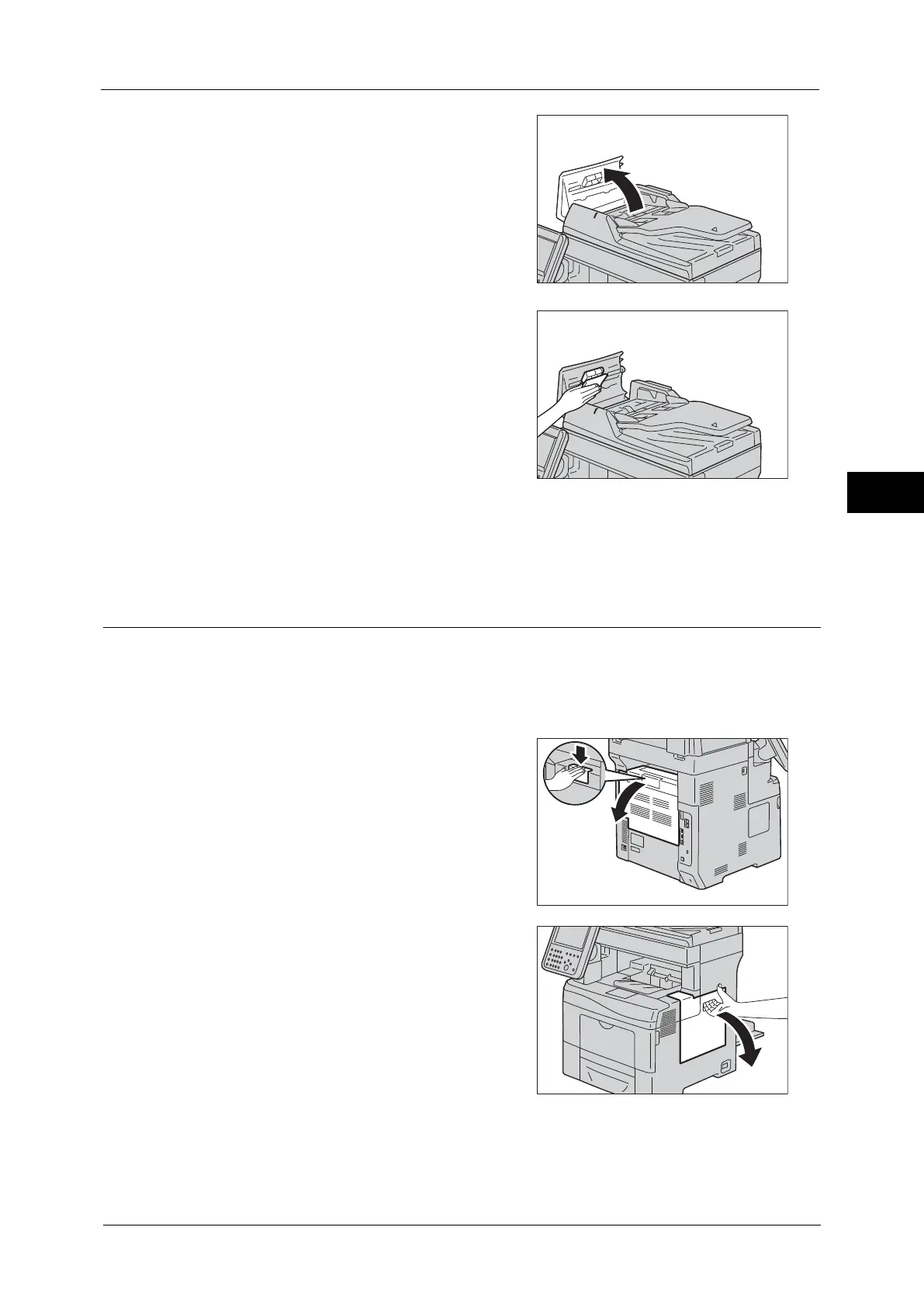
Open the document feeder left cover.
Note • When you fully open the cover, it enters a
fixed position. Open the cover gently.
2
While turning the rollers, wipe them with a soft
cloth moistened with water.
Important • Do not use cleaning agents other than water
or neutral detergent.
• Use a cloth firmly wrung to prevent water
drops from falling into the machine. If water
gets into the machine, it may cause the
machine to malfunction.
Note • If you cannot remove dirt easily, gently wipe
the rollers with a soft cloth moistened with a
small amount of neutral detergent.
3
Close the document feeder left cover until it clicks into place, and confirm that there is no
space between the near or far side of the cover and the document feeder.
Cleaning the Color Toner Density (CTD) Sensor
Clean the CTD sensor only when an alert for the CTD sensor is shown on the control panel.
1
Switch the power off.
2
Switch the main power off and disconnect the power cord and other cables.
3
Open the rear cover.
4
Open the side cover.



 To Next Page
 Loading...