EasyManua.ls Logo

FujiFilm FinePix S8000FD - User Manual

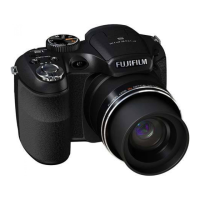
FujiFilm FinePix S8000FD
166 pages
Print Icon
To Next Page IconTo Next Page
Loading...
OWNER’S MANUAL
This manual will show you how to use
your FUJIFILM DIGITAL CAMERA
FinePix S8000fd correctly.
Please follow the instructions carefully.
BL00677-201(1)
Getting Ready
Using the Camera
Advanced Features
Photography
Settings
Camera Connection
Software
Installation
Playback
•Movie
Appendices
Troubleshooting

Table of Contents

Other manuals for FujiFilm FinePix S8000FD

Questions and Answers

  • J
    Joseph ParkerSep 17, 2025
    Why won't my FujiFilm FinePix S8000FD Digital Camera erase a frame?
    • N
      Natalie KempSep 18, 2025
      If erasing a [FRAME] does not work on your FujiFilm Digital Camera, some frames may be protected. Unprotect frames using the camera on which the protection was first applied.
  • L
    Laura SnowAug 25, 2025
    What to do if FujiFilm Digital Camera is not taking pictures?
    • C
      Christine AndrewsAug 25, 2025
      If your FujiFilm Digital Camera isn't taking pictures, it could be due to a few reasons. The memory card or internal memory might be full (insert a new memory card or erase unnecessary frames) or not formatted (format it on the camera). Also, the memory card contact area might be soiled (wipe it with a soft, dry cloth), the memory card could be damaged (insert a new one), the batteries may have run out (load new or fully charged batteries), or the auto power off function may have turned the camera off (turn the camera on).
  • N
    Nancy BrayAug 25, 2025
    What to do if my FujiFilm FinePix S8000FD Digital Camera image is blurred?
    • E
      Eric NelsonAug 26, 2025
      If your FujiFilm Digital Camera images are blurred, here are a few things to check: * The lens may be dirty; clean it. * The AF frame (lit red) and { appeared when taking pictures; check the focus on the subject and take pictures. * appeared when taking pictures; hold the camera steadily to avoid camera shake.
  • M
    Michael HamiltonAug 27, 2025
    What to do if my FujiFilm Digital Camera no longer works correctly?
    • A
      aaron18Aug 27, 2025
      If your FujiFilm Digital Camera is malfunctioning, it might be a temporary issue. Try removing the batteries or disconnecting the AC power adapter briefly, then reload the batteries or reconnect the adapter and try again.
  • L
    Laurie MorganSep 18, 2025
    Why is [CONTINUOUS] not working in frame number setting on my FujiFilm FinePix S8000FD Digital Camera?
    • H
      huffmandylanSep 18, 2025
      If [CONTINUOUS] in the frame number setting is not functioning on your FujiFilm Digital Camera, it could be because you opened the battery cover without turning the camera off when replacing the batteries or Memory Card. Always turn the camera off when replacing these components, as opening the cover without doing so may cause the frame number memory to not function.
  • N
    nelsonphilipSep 23, 2025
    What to do if FujiFilm FinePix S8000FD Digital Camera buttons are not responding?
    • F
      floresandrewSep 23, 2025
      If the buttons on your FujiFilm Digital Camera are not responding, a temporary camera malfunction may be the cause. Briefly remove the batteries or disconnect the AC power adapter, then reload the batteries or reconnect the AC power adapter and try again. Alternatively, the batteries may have run out, so load new or fully charged batteries.
  • E
    Erin JonesSep 9, 2025
    Why does [CONTINUOUS] in the frame number setting not function on my FujiFilm FinePix S8000FD Digital Camera?
    • J
      Jean LongSep 9, 2025
      If [CONTINUOUS] in the frame number setting does not function on your FujiFilm Digital Camera, it may be because you opened the battery cover without turning the camera off when replacing the batteries or Memory Card. Always turn the camera off when replacing these items, as opening the cover without doing so may cause the frame number memory to not function.
  • R
    Raymond HoweSep 10, 2025
    Why are photographed images or movies not recorded on my FujiFilm FinePix S8000FD Digital Camera?
    • J
      Jennifer JohnsonSep 10, 2025
      If photographed images or movies are not being recorded on your FujiFilm Digital Camera, it may be because the AC power adapter was connected or disconnected while the camera was on. Only connect or disconnect the AC power adapter when the camera is off. Failure to do so can result in damage to the Memory Card or malfunctions during PC connection.
  • D
    danieljohnsonSep 3, 2025
    Why is my FujiFilm FinePix S8000FD Digital Camera not recognized by my PC?
    • L
      lesliemcclainSep 3, 2025
      If your PC isn't recognizing your FujiFilm Digital Camera, the USB cable might not be correctly connected to either the PC or the camera. Ensure you set up the camera and connect the USB cable properly.
  • J
    Joseph AndrewsSep 1, 2025
    Why is there no image or sound on the TV from my FujiFilm FinePix S8000FD Digital Camera?
    • D
      Dr. Tracy Pratt MDSep 1, 2025
      If you're not getting any image or sound on your TV from your FujiFilm Digital Camera, consider the following: * The camera may not be correctly connected to the TV; ensure a proper connection. * The A/V cable may have been connected during movie playback; stop movie playback mode before connecting. * The TV input may be set incorrectly; set it to “VIDEO.” * The video output setting may be wrong; change it to [NTSC] or [PAL]. * The TV volume may be too low; adjust the volume.

Summary

Getting Ready

Warning

Using the Camera

Taking Pictures ( AUTO Mode)

Step-by-step guide to taking photos in automatic mode.

Advanced Features - Photography

Setting the Shooting Mode

Guide to selecting and using different shooting modes for optimal results.

Adjusting the Image Brightness ( Exposure Compensation)

How to adjust image brightness using exposure compensation.

Macro; Super Macro (Close-up)

Using the camera's macro modes for close-up photography.

Setting the Flash (Intelligent Flash)

Configuring flash settings, including intelligent and red-eye reduction modes.

Advanced Features - Playback

Using [ F-MODE MENU] (Playback);[PLAYBACK MENU]

Accessing and using playback-related menus for image management.

Advanced Features - Movie

Recording Movies

Steps and considerations for capturing video footage with sound.

Settings

Using the [SET-UP] menu

Navigating and utilizing the camera's setup menu for customization.

Software Installation

Warning Displays

Troubleshooting

Getting ready

Troubleshooting steps related to power supply and battery issues.

Shooting

Troubleshooting common problems encountered during shooting operations.

Focusing

Solutions for difficulties encountered when focusing on subjects.

Specifications

IMPORTANT SAFETY INSTRUCTIONS

Safety Notes

Detailed safety precautions for using the camera correctly.

FujiFilm FinePix S8000FD Specifications

General IconGeneral
Sensor typeCCD
Maximum image resolution3264 x 2448 pixels
Digital zoom5.1 x
Optical zoom18 x
Focal length range4.7 - 84.2 mm
InterfaceUSB 2.0
Digital SLRYes
Power sourceAC / Batt.
Camera shutter speed4 - 1/2000 s
Focal length (35mm film equivalent)27 - 486 mm
Auto focusing (AF) modescentre weighted auto focus, continuous auto focus, multi point auto focus, single auto focus
Super Macro focusing range0.01 - 0.1 m
Macro focusing range (tele)1.2 - 3.2 m
Macro focusing range (wide)0.1 - 0.8 m
Flash modesauto, Red-eye reduction, Slow synchronization, suppressed
Flash range (tele)0.5 - 5.6 m
Flash range (wide)0.5 - 8.8 m
Internal memory58 MB
Compatible memory cardssd, xd
Motion JPEG frame rate30 fps
Maximum video resolution640 x 480 pixels
Display diagonal2.7 \
Display resolution (numeric)230000 pixels
I/O portsA/V
USB version2.0
Scene modesbeach, Children, Close-up (macro), Documents, Fireworks, Museum, Night, party (indoor), Portrait, Sports, Sunset, Landscape (scenery)
Image editingrotating, trimming
White balanceauto, custom modes, daylight, Fluorescent, Incandescent, Shade
Camera playbackmovie, single image, slide show, thumbnails
Self-timer delay2 s
Product colorBlack
Battery typeAA / Ni-MH
Number of batteries supported4
Light exposure modesaperture priority AE, auto, manual, shutter priority AE
Viewfinder typeElectronic
Weight and Dimensions IconWeight and Dimensions
Depth78.9 mm
Width111.3 mm
Height78.2 mm
Weight410 g

Related product manuals