EasyManua.ls Logo

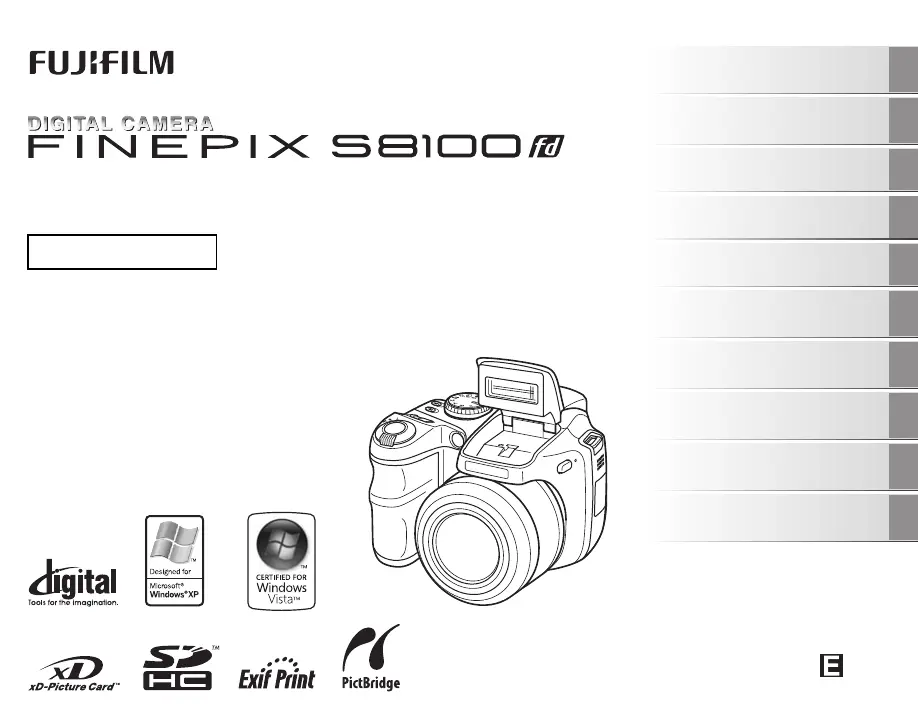
FujiFilm FinePix S8100fd - User Manual

FujiFilm FinePix S8100fd
166 pages
Print Icon
To Next Page IconTo Next Page
Loading...
OWNER’S MANUAL
This manual will show you how to use
your FUJIFILM DIGITAL CAMERA
FinePix S8100fd correctly.
Please follow the instructions carefully.
BL00730-200(1)
Getting Ready
Using the Camera
Advanced Features
Photography
Settings
Camera Connection
Software
Installation
Playback
•Movie
Appendices
Troubleshooting

Table of Contents

Other manuals for FujiFilm FinePix S8100fd

Questions and Answers

  • A
    Anthony WhitakerSep 23, 2025
    Why only 1 frame can be shot even though continuous shooting mode was set on FujiFilm FinePix S8100fd Digital Camera?
    • S
      Scott MunozSep 23, 2025
      If your FujiFilm Digital Camera only shoots one frame even with continuous shooting mode enabled, it's because you're using the self-timer with the [LONG PERIOD] continuous shooting mode. When these two modes are used together, only one frame will be captured.
  • M
    Michelle MckayAug 23, 2025
    What to do if my FujiFilm FinePix S8100fd power cuts out during operation?
    • L
      Lisa WrightAug 25, 2025
      If your FujiFilm Digital Camera suddenly loses power during use, the cause might be: * The batteries have run out, so you should load new or fully charged batteries. * The camera and AC power adapter are not correctly connected, so ensure they are properly connected.
  • K
    Karina CantrellAug 25, 2025
    Why do the batteries on my FujiFilm FinePix S8100fd Digital Camera run out so fast?
    • D
      Dominique VasquezAug 26, 2025
      If your FujiFilm Digital Camera batteries are draining quickly, it could be due to several reasons: * Cold conditions can affect battery life. Try warming the batteries in your pocket before use. * Dirty battery terminals can reduce efficiency. Clean them with a dry cloth. * Old batteries may no longer hold a charge. Replace them with new ones. * Rechargeable batteries might need to be optimized. Use the battery discharging function to restore their full capacity.
  • R
    Ricardo ScottAug 27, 2025
    Why is my FujiFilm FinePix S8100fd Digital Camera not taking pictures?
    • P
      Patrick SchmidtAug 27, 2025
      If your FujiFilm Digital Camera isn't taking pictures when you press the shutter button, consider the following: * Your memory card or internal memory might be full. Try inserting a new memory card or deleting unnecessary files. * The memory card or internal memory may need formatting. Format it using the camera's settings. * A dirty memory card contact area can cause issues. Clean it with a soft, dry cloth. * The memory card itself might be damaged. Try a new one. * The batteries could be dead. Replace them with fully charged ones. * The camera may have turned off automatically. Turn it back on.
  • M
    Miss Lisa Cox PhDAug 27, 2025
    Why is my FujiFilm Digital Camera having difficulty focusing?
    • S
      Stacy ClarkAug 27, 2025
      If your FujiFilm Digital Camera is having trouble focusing, it might be because: * You're taking a close-up shot without Macro mode enabled. Select Macro mode for close-ups. * You're photographing scenery with Macro mode on. Disable Macro mode for landscapes. * The subject isn't suitable for autofocus. Use AF/AE lock or manual focus instead.
  • W
    wjohnsonSep 16, 2025
    What to do if my FujiFilm Digital Camera no longer works correctly?
    • M
      Madison ReyesSep 16, 2025
      If your FujiFilm Digital Camera is not working correctly, it may be a temporary malfunction. Briefly remove the batteries or disconnect the AC power adapter, then reload the batteries or reconnect the AC power adapter and try again.
  • Y
    yrileySep 13, 2025
    Why can't I print with PictBridge from my FujiFilm Digital Camera?
    • Q
      qwilliamsSep 13, 2025
      If you cannot print with PictBridge from your FujiFilm Digital Camera, make sure that the USB cable is correctly connected to the printer and the camera, and verify that the printer is turned on.
  • X
    xpittsSep 15, 2025
    What should I do if the buttons on my FujiFilm FinePix S8100fd Digital Camera are not working?
    • T
      Timothy HernandezSep 15, 2025
      If the buttons on your FujiFilm Digital Camera aren't responding, it might be a temporary malfunction. Try briefly removing the batteries or disconnecting the AC power adapter, then reinsert or reconnect them and try again. Also, ensure that the batteries are not depleted by loading new or fully charged batteries.
  • T
    Thomas GoodwinSep 5, 2025
    Why does my FujiFilm FinePix S8100fd Digital Camera only take one photo in continuous shooting mode?
    • M
      Mr. Brett BauerSep 5, 2025
      If your FujiFilm Digital Camera only takes one photo even when continuous shooting is enabled, it's likely because you're using self-timer with the [LONG PERIOD] continuous shooting mode. Only one frame can be shot in this combination.
  • I
    ipowellSep 3, 2025
    Why can't I set Intelligent Face Detection on my FujiFilm FinePix S8100fd Digital Camera?
    • W
      williamnelsonSep 3, 2025
      If your FujiFilm Digital Camera isn't detecting faces for Intelligent Face Detection, it could be because the Shooting mode is set to ,, ., , , , or .. Try changing the Shooting mode.

Summary

Getting Ready

Loading the Batteries

Instructions for inserting batteries into the camera for operation.

Loading the Memory Card

Steps to insert xD-Picture Card or SD Memory Card into the camera slot.

Turning On and Off

How to power the camera on and off in shooting and playback modes.

Setting the language, date, and time

Initial camera setup for language, date, and time after purchase.

Correcting the Date and Time

Procedure to adjust the camera's date and time settings.

Selecting the Language

Guide to changing the camera's menu and display language.

Using the Camera

Taking Pictures (AUTO Mode)

Basic steps for capturing photos using the automatic shooting mode.

Holding the camera correctly

Proper techniques for holding the camera to ensure stable shots.

Using the Dual Image Stabilizer function

How to reduce camera shake and blur using the IS function.

Taking pictures with the focus and exposure locked

Methods for locking focus and exposure for precise shots.

Viewing the Images

Steps for reviewing captured photos on the camera's LCD monitor.

Erasing the Images;Movies

Instructions for deleting unnecessary photos and videos from memory.

Advanced Features

Photography

Detailed guide to various shooting modes and their settings for optimal results.

Playback

Features and functions for reviewing, managing, and editing recorded images.

Movie

Instructions for recording and playing back video clips with sound.

Settings

Setting Silent Mode

Disables sounds and lights for discreet operation in quiet environments.

Using the [SET-UP] menu

Navigating and changing various camera settings via the setup menu.

Camera Connection

Connecting to a TV

How to display images and videos on a television screen.

Using the AC power adapter

Connecting the camera to external power for extended use.

Connecting Camera Directly to Printer - PictBridge Function

Printing photos directly from the camera to a PictBridge-compatible printer.

Software Installation

Installation on a Windows PC

Step-by-step guide for installing the camera software on Windows.

Installation on a Mac OS X

Step-by-step guide for installing the camera software on Mac OS X.

Connecting to a PC

Procedures for connecting the camera to a computer for data transfer.

Appendices

System Expansion Option

Overview of optional accessories and their system integration.

Accessories Guide

List and description of compatible camera accessories.

Using Your Camera Correctly

Guidelines for proper camera handling, care, and places to avoid.

Warning Displays

Explains on-screen warnings and their remedies for troubleshooting.

Troubleshooting

Getting ready

Solutions for issues related to power supply and initial camera setup problems.

Setting menu etc.

Troubleshooting for LCD display and basic shooting issues.

Shooting

Solutions for problems encountered during basic camera operations and focusing.

Connecting

Addresses issues related to connecting the camera to TVs, PCs, and printers.

Others

Troubleshooting for general camera operation and malfunction issues.

FujiFilm FinePix S8100fd Specifications

General IconGeneral
Megapixel10 MP
Sensor typeCCD
Image stabilizerYes
Image sensor size1/2.3 \
Maximum image resolution3648 x 2736 pixels
Digital zoom5.1 x
Optical zoom18 x
Focal length range4.7 - 84.2 mm
InterfaceUSB
Digital SLRNo
Aperture range (F-F)2.8 - 4.5
Camera shutter speed4 - 1/2000 s
Focal length (35mm film equivalent)27 - 486 mm
FocusTTL
Normal focusing range0.70 - 3.0 m
Auto focusing (AF) modescentre weighted auto focus, continuous auto focus, single auto focus
Super Macro focusing range0.01 - 1 m
Macro focusing range (tele)1.2 - 3.2 m
Macro focusing range (wide)0.10 - 0.80 m
Normal focusing range (tele)1.5 - ∞ m
Normal focusing range (wide)0.7 - ∞ m
Internal memory58 MB
Compatible memory cardssd, xd
Motion JPEG frame rate30 fps
Video formats supportedAVI
Maximum video resolution640 x 480 pixels
Display diagonal2.5 \
Scene modesbeach, Candlelight, Documents, Fireworks, Museum, Night, Panorama, party (indoor), Portrait, Sports, Sunset, Landscape (scenery)
Image editingrotating, trimming
Photo effectsBlack&White
White balanceauto, daylight, Fluorescent, Incandescent, Shade
Camera playbackSlide show
Self-timer delay10 s
Product colorBlack
Battery type4xAA
Battery technologyAlkaline
Light exposure modesaperture priority AE, auto, manual, shutter priority AE
Weight and Dimensions IconWeight and Dimensions
Depth78.9 mm
Width111.3 mm
Height78.2 mm
Weight405 g

Related product manuals