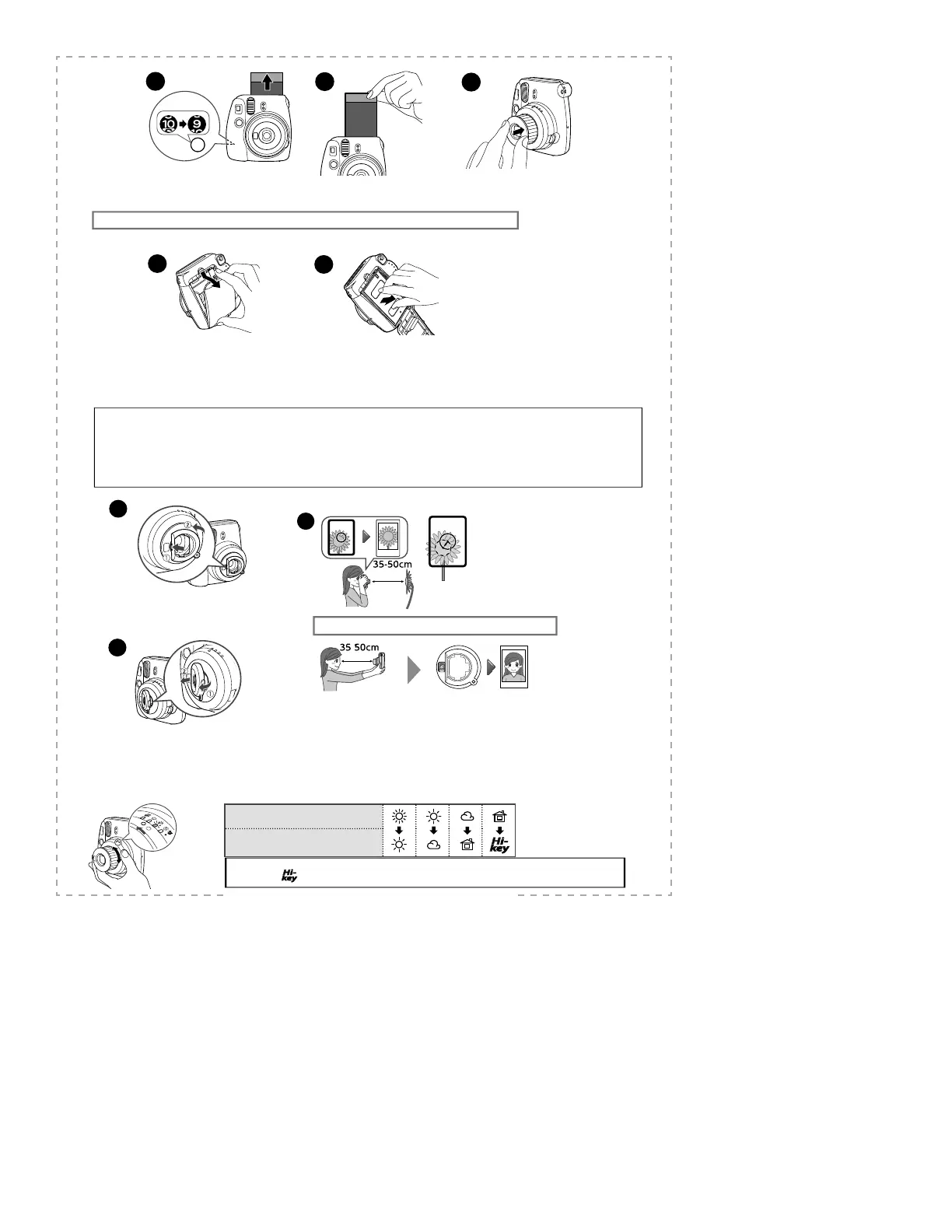
When the fi lm has been ejected
(the camera stops making a sound), grasp
the edge of the fi lm, then take it out.
4
When you have finished taking a photo,
push the lens barrel to turn the camera off .
Every time you take a photo, the number on the
fi lm counter decreases from “10” to refl ect the
number of remaining photos, and “0“ is
displayed when you have used up the fi lm pack.
5
6
You can photograph objects close-up, and can photograph yourself using the self-portrait mirror.
WARNING
• Do not look through the close-up lens at the sun or other strong light. Blindness or vision problems could result.
Caution
• Do not leave the close-up lens in places exposed to strong sunlight. Personal injury or re could result if the lens should accidentally concentrate the
sunbeams on an object or a person.
• Switch o the camera before you attach/detach the close-up lens.
• Never turn the close-up lens when you attach/detach it; otherwise, the tabs on the back may be broken.
Using the Close-Up Lens
Unloading the INSTAX mini fi lm pack
When “0” is displayed on the fi lm counter, unload the fi lm pack following the procedure below and as indicated on the INSTAX mini fi lm pack instructions.
Press down the back cover lock to
open the back cover.
Grasp the rectangular holes on the lm pack, then pull
it out straight.
1
2
Attach the left tab on the back to the left of the
lens (
1
), then attach the right tab (
2
) so that it
clicks into place.
Hold the camera so that the “O” mark in the viewfi nder is
on the upper right of the center of the subject (see the
illustration above), then take a photo.
Lift up the right side of the close-up lens
supporting the left side (
1
), then detach it (
2
).
Hold the camera securely
keeping 35 cm to 50 cm
between you and the edge
of the lens.
Con rm the composition using
the self-portrait mirror, then take
a photo.
1
2
3
Taking self-portraits
[IMPORTANT] Taking a lighter (Hi-Key) picture
Position at which the lamp lights
Position to set the dial for a lighter (Hi-
Key) picture
This camera automatically determines an appropriate brightness for taking any given picture, and informs you by lighting the corresp
onding lamp.
To take a lighter (Hi-key) picture, set the position of the brightness adjustment dial to the position of the mode darker than the mode for which the lamp on the dial lights.
Caution
Do not use the
(Hi-key) function outside; otherwise, the picture may be much lighter (whiter) than you intend.









 To Next Page