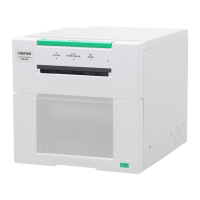
The FUJIFILM instax SHARE SP-2 is a smartphone printer designed to print instant photos from your mobile device. This compact and portable printer allows users to quickly and easily turn digital images into physical instax mini prints.
Function Description
The primary function of the instax SHARE SP-2 is to print images from a smartphone or other iOS/Android device. It connects wirelessly via Wi-Fi to the instax SHARE application, which serves as the interface for selecting, editing, and sending images to the printer. The printer uses 3-color exposure with OLED technology to produce high-quality instax mini instant color film prints. Each film pack contains 10 film sheets and a black film protective cover. The printing process involves inserting a film pack into the printer, selecting an image from the app, and sending it to print. The film cover is automatically ejected when the back cover is closed after loading a new film pack. The printer also features a reprint function, allowing users to print the last image again by pressing the REPRINT button. This stored image persists even if the printer is turned off, though transferring a new image will overwrite it.
Usage Features
To use the instax SHARE SP-2, users must first install the "instax SHARE" application on their Android (Ver 4.0.3 or later) or iOS (Ver 7.1 or later) device. Once the app is installed, the printer needs to be powered on by pressing and holding the POWER button for approximately 1 second.
Battery Insertion and Charging:
The printer is powered by an NP-45S battery. To insert the battery, push up the battery cover lock, open the cover, insert the battery according to the arrow, ensuring the yellow line aligns with the mark on the printer, and then close the cover until it clicks.
For charging, connect the printer to an AC power adapter (supplied with your smartphone) using the provided USB cable, then plug the adapter into an indoor power outlet. The battery remaining LED indicates the charging status:
- Lights red (ON) / Flashes red (OFF): Charging in progress.
- Lights green (ON) / Flashes green (OFF): Charging is more than half completed.
- Lights green, then goes off (OFF): Charging completed.
- Flashes green and red alternately: An error is occurring; stop charging.
Charging from a PC is also possible by connecting the printer directly via USB, but charging may stop if the PC enters sleep mode or may not be possible depending on PC specifications. The charging time is approximately 90 minutes, and printing can occur while charging.
Film Loading:
Film loading is a crucial step. The back cover should not be opened until the film pack is used up, as exposure to light will ruin the remaining film. Only FUJIFILM instax mini Color Film should be used. To load, press down the back cover lock, slide it right to open, hold both sides of the film pack, align the yellow marks on the printer and film pack, and insert it straight. Close the back cover until it clicks, and the black film cover will be automatically ejected.
Connecting and Printing:
For iOS devices, wireless LAN setup involves turning on Wi-Fi in settings and selecting the printer's network name (SSID, found on the bottom of the printer). Once connected, open the instax SHARE app.
When establishing a connection for the first time, the app will detect the printer, and you'll tap "Connect." If multiple printers are detected, select the correct one from the list. You may need to enter a password (default is 1111, which can be reset by turning on the printer while holding the REPRINT button).
After connection, select an image from your gallery or take a picture within the app. Before printing, you can tap the edit icon to add templates or adjust the image. Tap "Connect and print" or "Print" to send the image to the printer. During printing, stabilize the printer on a steady surface. Once the film is ejected, grasp its edge and remove it. The "1 film remaining" LED turns off after each print.
Reprinting and Deleting Images:
To reprint the last image, simply press the REPRINT button once. The last printed image is stored even if the printer is turned off, but it will be overwritten by a new image transfer. Real-time templates cannot be reprinted.
To delete a stored image, press and hold the REPRINT button for more than 5 seconds while the printer is on. The film remaining LED will flash for 1 second, confirming the image deletion.
Unloading Used Film:
When no film is left, all film remaining LEDs flash slowly. To unload, press down the back cover lock, slide it right to open, grasp the rectangular holes on the film pack, and pull it out straight.
LED Indications:
The film remaining LED indicates film count, operation, or errors:
- Flashes rapidly for 1 second: Reprint image deleted, password reset.
- Flashes slowly for 3 seconds: Image transmitted with no film, no reprint image.
- Flashes slowly: No film pack.
- Flashes rapidly: Development or communication error.
The battery remaining LED indicates battery status:
- Green: More than half capacity.
- Red: Low battery, charging recommended.
- Printer turns off after flashing red: No battery capacity, charge immediately.
Troubleshooting:
The manual provides solutions for common issues:
- Printer won't turn on: Charge battery, insert correctly, or press POWER button longer.
- Connection issues: Incorrect password (reset to 1111), communication interrupted (restart printer and app).
- Cannot print: No image stored, no film remaining, or film pack not loaded.
- Film loading issues: Use correct film, align yellow marks, remove and reload film pack.
- Film ejection issues: Pull out jammed film, load new film pack, or turn printer off/on.
- Printed pictures are white/blurred/have lines: Do not open back cover prematurely, do not shake/bend prints, retransmit image, or load new film pack.
- LED status errors: Turn printer on, charge battery, restart app, charge battery within temperature range, or replace battery/cable/adapter.
Maintenance Features
Proper care and maintenance ensure the longevity and optimal performance of the instax SHARE SP-2.
General Printer Care:
- The printer is a precision instrument; avoid getting it wet, dropping it, or exposing it to sand.
- For long periods of disuse, remove the battery and store the printer in a place safe from heat, dust, and moisture.
- Clean the printer with a soft, dry cloth; do not use solvents like thinner or alcohol.
- Keep the film chamber and interior clean to prevent film damage.
- Avoid leaving the printer in hot places (e.g., a car in summer) or damp places for extended periods.
- Keep the printer and prints away from moth repellent gases like naphthalene, as they can affect the device and prints.
- If the printer malfunctions, try resetting it by removing and reinserting the batteries.
- Operate the printer within the temperature range of +5°C to +40°C (+41°F to +104°F).
- Do not use the printer in areas where mobile phone use is prohibited (e.g., aircraft, hospitals).
- If the printer causes radio or TV interference, move it further away from those devices.
Film and Print Care:
- Store film in a cool, dry place, away from extremely high temperatures.
- Use loaded film packs as soon as possible.
- If film has been stored in extreme temperatures, allow it to reach room temperature before printing.
- Always use film before its expiration date.
- Avoid airport checked luggage inspection and strong X-ray illumination, which can fog unused film. Carry the printer and film as carry-on luggage.
- Store developed prints in a cool, dry place, away from strong light.
- Do not puncture, tear, or cut instax mini film.
Battery Handling and Storage:
- Use only the specified NP-45S battery.
- Do not heat, modify, disassemble, drop, short-circuit, or store the battery with metallic objects.
- Do not charge the battery with an unspecified charger.
- If battery fluid contacts eyes, skin, or clothing, flush with clean water and seek medical attention.
- Dispose of used batteries according to local regulations, covering terminals with insulation tape to prevent short-circuiting.
- When cleaning the printer or storing it for an extended period, remove the battery to prevent fire or electric shock.
- If the printer emits smoke, unusual odors, or other abnormalities, turn it off, remove the battery, and contact your FUJIFILM dealer.
- The battery gradually loses charge when not in use; charge it one or two days before use.
- Battery capacity decreases in low temperatures; keep a spare charged battery in a warm place.
- Do not attempt to charge a fully charged battery, but it does not need to be fully discharged before recharging.
- The battery may become warm after charging or use, which is normal.
- The battery can be recharged approximately 300 times at normal temperatures. Replace it when its charge-holding capacity noticeably decreases.
- For extended storage, remove the battery and store it in a dry place between +15°C and +25°C (+59°F to +77°F), away from temperature extremes. Deplete the battery fully before storing.
- Do not affix stickers or objects to the battery, tear its label, or allow terminals to become dirty.
Wireless Network Devices Cautions:
- Use the printer only as part of a wireless network and in the country where it was purchased.
- FUJIFILM is not liable for damages from unauthorized use or use in high-reliability applications (e.g., medical devices).
- The security of data transmitted over wireless networks is not guaranteed.
- Avoid using the device near magnetic fields, static electricity, or radio interference (e.g., microwave ovens) to prevent signal disruption.
- The wireless transmitter operates in the 2.4 GHz band using DSSS and OFDM modulation.
- To prevent interference with commercial, educational, medical, and RFID tracking devices operating on the same frequency, confirm RFID transmitters are not in operation before use. If interference occurs, choose a new operating frequency or contact a FUJIFILM representative.
- Certification marks are located inside the film chamber.



 To Next Page

 General
 Weight and Dimensions