83
Menus
Using the Menus: Shooting Mode
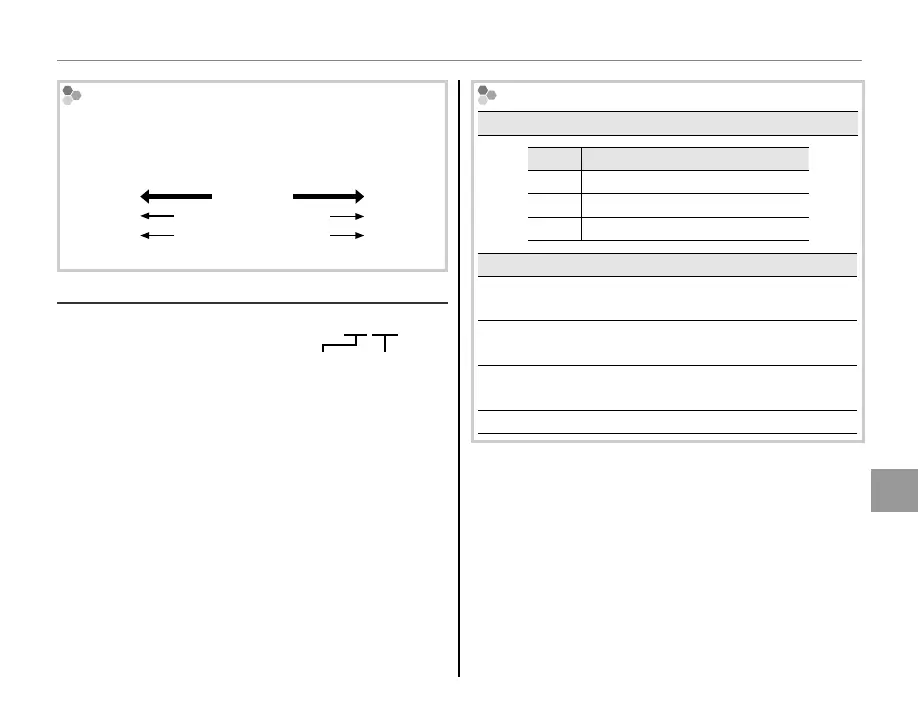
ISO
Higher values can reduce blur; note, however, that
mottling may appear in pictures taken at high sen-
sitivities.
100
ISO
12800
Bright
Scene
Dark
Less
noticeable
Noise
(mottling)
More
noticeable
O
IMAGE SIZE [
O
4 : 3
]
Choose the image size and
aspect ratio at which pictures
are recorded. Large pictures
can be printed at large sizes with no drop in qual-
ity, while small pictures require less memory, al-
lowing more pictures to be recorded.
Size Versus Aspect Ratio
Size
Option
Prints at sizes up to
O
34 × 25 cm (13.5 × 10 in.)
P
24 × 18 cm (9.5 × 7 in.)
Q
17 × 13 cm (7 × 5 in.)
Aspect ratio
4 : 3:
Pictures have the same proportions as the camera
display.
3 : 2:
Pictures have the same proportions as a frame of
35 mm film.
16 : 9: Suited for display on High Definition (HD) de-
vices.
1 : 1: Pictures are square.
Aspect ratio
O 4 : 3
Size



 To Next Page