REACH MAP
Field Procedures 3 13
th
Edition, 2011
SETTING MENUS FOR THE FUJI XP10 DIGITAL CAMERA
Under normal circumstances, when the camera is turned on it will have already appropriate
settings. However, should the settings be changed, the following instructions show how to go
through the setting menus and select the proper options.
DATE/TIME will appear just for a few seconds when you first turn on the camera. Confirm that
these are correct. If not, see instructions below.
INITIAL SCREEN: After the date disappears, the screen should show a view of whatever the
lens is looking at, with various types of information on the screen and no grid. If there is no
information on the screen, or there’s a grid, double-click the DISP/BACK button until the grid is
gone and the information shows. (There are three possible views: information with grid,
information only, and no information.)
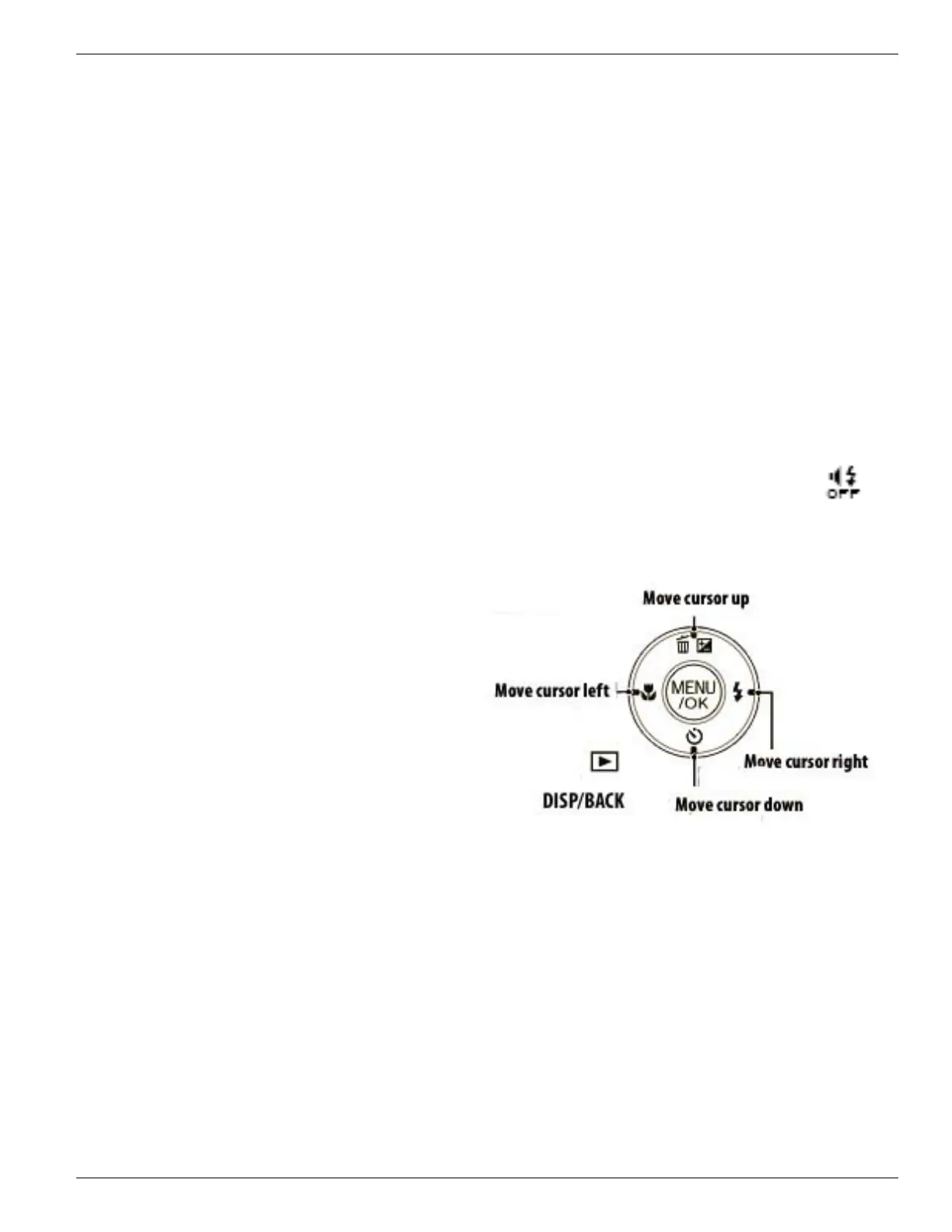
About the DISP/BACK button: This button, located at the bottom underneath MENU/OK
button and the playback arrow, is easily pushed by mistake.
AVOID “SILENT” MODE: If the display shows the SILENT mode symbol at top center: ,
get out of it by pressing and holding the DISP/BACK button until that symbol goes away.
STREAMKEEPERS’ PREFERRED MENU
CHOICES: This procedure makes use of
selection buttons on the back of the camera as
illustrated on the right.
(continued on next page)










 To Next Page