E-8
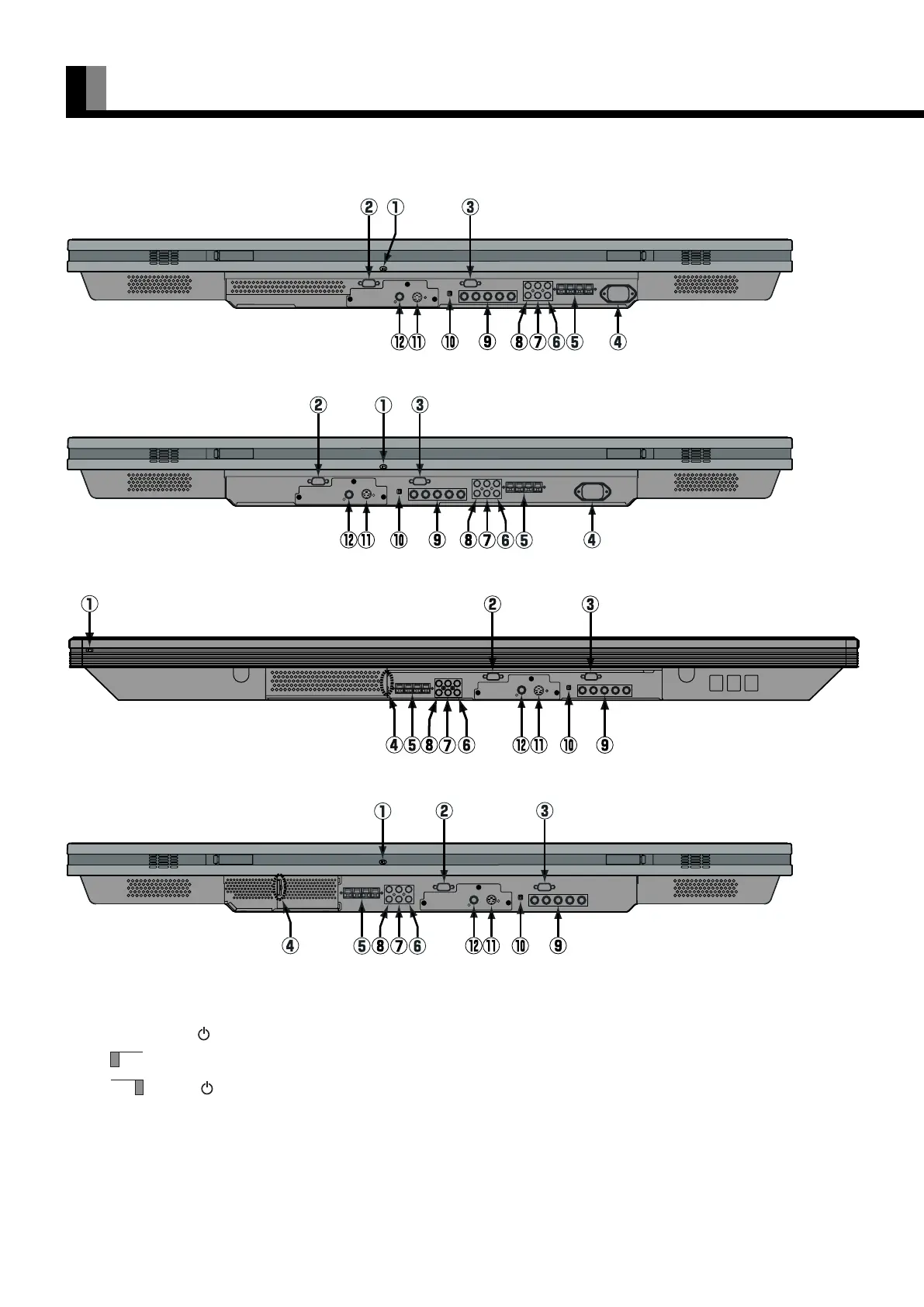
1 OFF/STD-BY switch
OFF :
The power indicator lamp goes off, and the power can’t be turned on by the power button. The power is partly supplied.
STD-BY :The power indicator lamp lights red, and the power can be turned on or off by the power button.
2 RS-232C terminal (RS-232C)
This terminal is provided for you to control the display from the PC. Connect it to the RS-232C terminal on the PC.
When connecting a cable, attach a ferrite core to the cable. (See P. E-13.)
3 RGB1 input terminal (RGB1 INPUT/mD-sub)
Connect this terminal to the PC’s display (analog RGB) output terminal or decoder (digital broadcast tuner, etc.) output terminal.
PART NAMES AND FUNCTIONS (Continued)
Bottom (42” VCA 10/11/12 type)
Bottom (50”)
Bottom (42” HCA type)
Bottom (42” VCA 20/21/22 type)
E-P42VCA10-OV(07-15) 03.1.20, 13:13Page 8 AdobePageMaker6.5J/PPC











 To Next Page