EasyManua.ls Logo

Fukuda Denshi DynaScope 7000 Series - User Manual

Fukuda Denshi DynaScope 7000 Series
475 pages
Print Icon
To Next Page IconTo Next Page
Loading...
Operation Manual
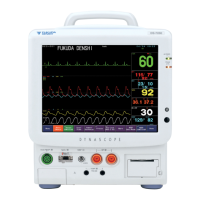
DynaScope 7000 Series
Patient Monitor
DS-7000
System
0086
Ver.06
《MonitoringOperation》

Table of Contents

Other manuals for Fukuda Denshi DynaScope 7000 Series

Questions and Answers

  • E
    Edward DavisSep 23, 2025
    What to do if the 'Check Electrodes' message is displayed on Fukuda Denshi DynaScope 7000 Medical Equipment due to poor electrode contact?
    • N
      nicolewoodSep 23, 2025
      Replace all the electrodes, ensuring you use the same type of electrodes.
  • J
    joshua33Aug 25, 2025
    What to do if the 'Check Electrodes' message is displayed on Fukuda Denshi DynaScope 7000?
    • L
      Leah MccallAug 25, 2025
      If you see a 'Check Electrodes' message, it means an electrode is detached or not making good electrical contact with the skin. Ensure all electrodes are properly attached.
  • D
    Derek CampbellAug 25, 2025
    Why is the cuff not inflating on my Fukuda Denshi DynaScope 7000, even though the pump is running?
    • M
      Michael WilliamsAug 26, 2025
      The air hose may not be firmly connected, causing air leakage. Check if the air hose is properly connected. Also, the cuff size may not match the selected patient type; verify that the cuff size is appropriate for the patient.
  • R
    Ryan RodriguezAug 26, 2025
    How to fix a blurry display on Fukuda Denshi DynaScope 7000 Medical Equipment?
    • V
      Valerie SmithAug 27, 2025
      Adjust the display brightness to an appropriate level. Also, check if the monitor is set to night mode and cancel it if necessary.
  • G
    Gary MillerAug 27, 2025
    What to do if Fukuda Denshi DynaScope 7000 keeps restarting?
    • R
      robert10Aug 27, 2025
      The memory data may have been corrupted due to noise. Set the rotary switch inside the maintenance cover to the initial setting (F), then turn the power ON again. After the program starts, return the rotary switch to '0'. If the issue continues, consider a faulty CPU board.
  • G
    Gordon JonesSep 14, 2025
    What does the “CVA Detected” message mean on Fukuda Denshi Medical Equipment?
    • R
      ronald43Sep 14, 2025
      Heartbeat is interfering and superimposed with the respiration waveform. Place the electrode where the heartbeat will be less likely to interfere.
  • A
    Alexandra ValdezSep 12, 2025
    Why can't I read or write to the CF card in my Fukuda Denshi DynaScope 7000?
    • D
      Dylan WarrenSep 12, 2025
      The CF card is not formatted. Format the card on the DS-7000. If the problem persists, a faulty CPU board or CF card may be the cause.
  • H
    Heather AguilarSep 13, 2025
    Why is the BP waveform not properly received above 100mmHg on my Fukuda Denshi DynaScope 7000?
    • E
      Evan NielsenSep 13, 2025
      The BP waveform and scale do not match. When the BP waveform is above 100mmHg, set the BP scale above 100mmHg.
  • G
    Gary WalkerSep 4, 2025
    Why does my Fukuda Denshi DynaScope 7000 repeat measurements or display '? ? ?'?
    • B
      Brian MendezSep 4, 2025
      The measurement accuracy is unreliable due to body motion artifact. Ensure the patient stays as still as possible during the measurement.
  • J
    Jessica NixonSep 2, 2025
    What does 'TEMP not connected' mean on Fukuda Denshi DynaScope 7000 and how to fix it?
    • N
      nicholaspetersonSep 2, 2025
      This message appears when the temperature sensor is disconnected during temperature monitoring. To resolve this, plug in the temperature sensor. This will clear the message and silence the alarm.

Summary

DS-7000 Operation Manual

Monitoring Operation

Procedures and guidance for monitoring operations.

Preface

Safety Precautions

Essential safety guidelines and warnings for operating the equipment.

Chapter 1 General Description

General Description

Provides an outline of the DS-7000 equipment.

Names of Parts and Their Functions

Identifies and describes the functions of the main parts of the DS-7000.

Chapter 2 Basic Operation

Basic Operation

Core operational procedures for monitoring patients.

The Description of the Display

Details the various elements displayed on the monitor screen.

Chapter 3 Vital Application

To Measure the NIBP

Procedure for performing Non-Invasive Blood Pressure measurements.

To Measure the Cardiac Output

Procedure for measuring cardiac output using the thermodilution method.

Arrhythmia Analysis Definition, etc.

Explains arrhythmia analysis definitions, parameters, and setup.

Chapter 4 Monitoring Setup

Display Configuration Setup

How to configure the display modes for optimal viewing.

Alarm Setup

How to set up and manage all alarm parameters and conditions.

Chapter 5 Admit; Discharge of a Patient

Admitting a Patient Name, Sex, and Age

Procedure for entering patient demographic and age information.

Monitoring Mode Selection

How to select and configure monitoring modes for alarm and display.

Suspend; Resume Monitoring

How to temporarily suspend and resume patient monitoring.

Chapter 6 Parameter Setup

ECG

Setup and configuration options for ECG monitoring.

Non-Invasive Blood Pressure

Settings and configurations for NIBP monitoring.

Multigas Data (MGU-701;702;Poet IQ, MGU-801 P;802;803)

Setup for multigas concentration measurements.

Chapter 7 Function

ST Measurement

Procedures for ST segment measurement, display, and alarm setup.

Arrhythmia Analysis Definition, etc.

Explains arrhythmia analysis definitions, parameters, and setup.

Full Disclosure Waveform Recording

Procedures for recording and displaying full disclosure waveforms.

Chapter 8 Installation

Precautions for Installing the Equipment

Environmental conditions and precautions for installing the DS-7000.

Wired Network Construction

Steps for setting up a wired network connection (DS-LAN).

Wireless Network Construction

Steps for setting up a wireless network connection.

Chapter 9 Initial Settings

Alarm Mode Setup

Procedure for programming and configuring alarm modes.

Display Mode Setup

Procedure for programming display configurations for various modes.

User Keys

How to program and assign functions to user keys.

Chapter 10 Maintenance

Troubleshooting

Guidance on diagnosing and resolving common equipment issues.

Periodic Replacement Parts

Lists components that require periodic replacement and their intervals.

Chapter 11 Technical Information

Specification; Performance

Detailed specifications and performance characteristics of the DS-7000.

Chapter 12 Accessories

Optional Accessories

Lists optional accessories available for purchase for the DS-7000.

Fukuda Denshi DynaScope 7000 Series Specifications

General IconGeneral
CategoryMedical Equipment
TypePatient Monitor
DisplayColor LCD
Paper Speed25/50 mm/s
Input Impedance≥10 MΩ
Power SupplyAC power, Rechargeable battery
ECGYes
RespirationYes
SpO2Yes
NIBPYes
TemperatureYes
StorageInternal memory
Operating Humidity30% to 85% (non-condensing)
WeightApprox. 5 kg (including battery)

Related product manuals