24
EN
[Aspect Ratio]
Display modes can be selected when your TV receives
a 16:9 or 4:3 video signal. Three types of display
modes can be selected for a PC Input signal.
2 Use Ÿ / ź to select [Aspect Ratio], then press
OK.
3 Use Ÿ / ź to select the TV screen display mode
you want, then press OK.
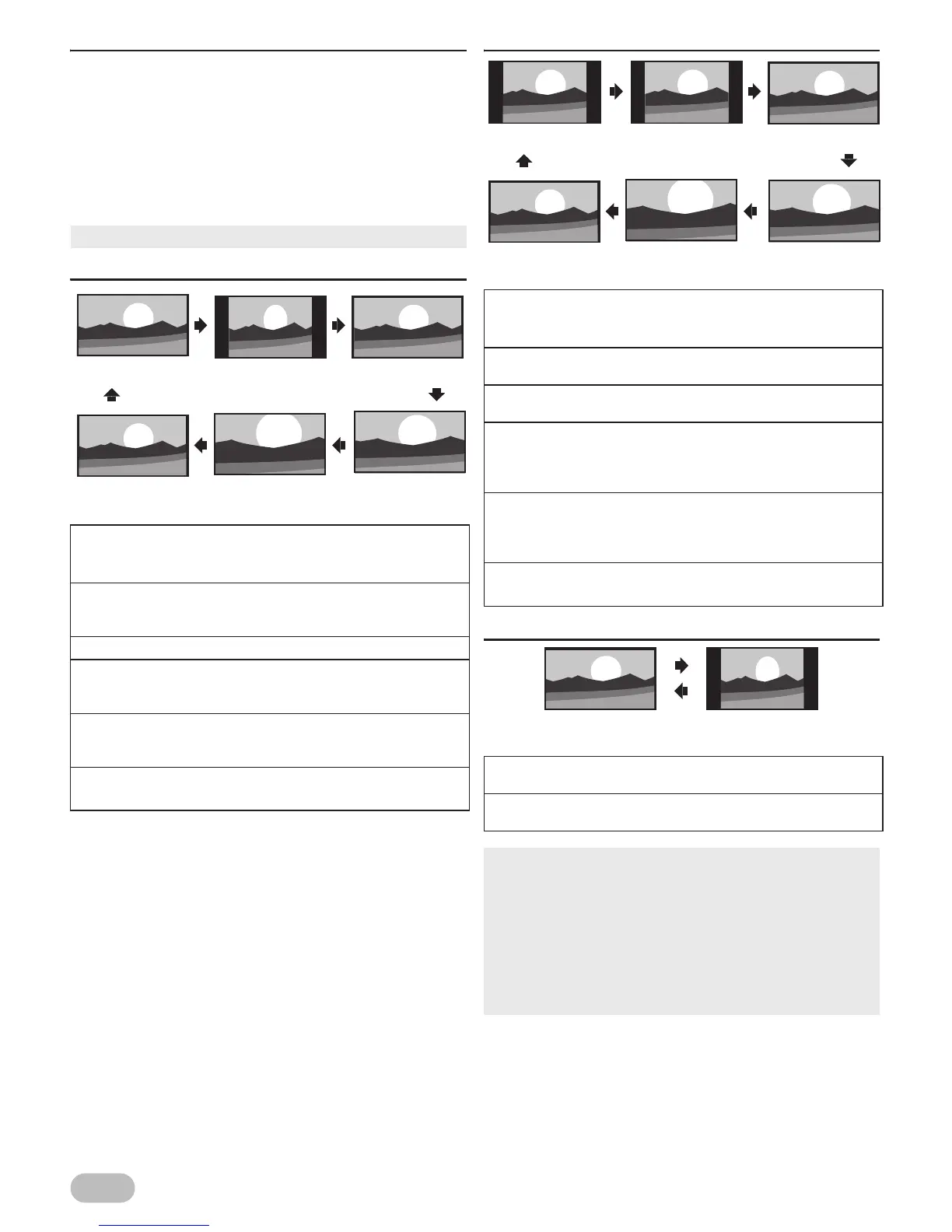
For 16:9 video signal
For 4:3 video signal
For PC Input signal
• You cannot set screen display mode in playback mode.
[Auto]
: Displays a proportionally stretched picture
automatically.
*DTV, ATV, AV, SCART only
[4:3]
: Displays a 16:9 picture at a 4:3 size.
The picture is shortened horizontally. Sidebars
appear on both edge of the TV screen.
[16:9]
: Displays a 16:9 picture at its original size.
[Zoom1]
: Displays a picture at its enlarged size without
changing its horizontal and vertical ratio. This
crops out all sides of the picture.
[Zoom2]
: Displays a picture at its enlarged bigger size
without changing its horizontal and vertical ratio.
This crops out all sides of the picture.
[Full Screen]
: Displays a picture at its original size.
*DTV, HDMI only
[Auto]
: Displays a proportionally stretched picture
automatically.
*DTV, ATV, AV, SCART only
[4:3]
: Displays a 4:3 picture at its original size.
Sidebars appear on both edge of the TV screen.
[16:9]
: Displays a 4:3 picture at a 16:9 size; the picture
is stretched more horizontally.
[Zoom1]
: Displays a 4:3 picture at a 16:9 size; at its
enlarged size without changing its horizontal
and vertical ratio. This crops out all sides of the
picture.
[Zoom2]
: Displays a 4:3 picture at a 16:9 size. At its
enlarged size bigger than
[Zoom1]
without
changing its horizontal and vertical ratio. This
crops out all sides of the picture.
[Full Screen]
: Displays a picture at its original size.
*DTV, HDMI only
[4:3]
: Displays a picture at a 4:3 size. Sidebars appear
on both edges of the TV screen.
[16:9]
: Displays a picture at a 16:9 size; the picture is
stretched more horizontally.
• This unit can also be connected to your PC that has a DVI
terminal. Use an HDMI-DVI conversion cable for this video
connection and it requires stereo mini plug conversion
cable for analog audio signal as well.
• Refer to 16:9 video signal on this page if PC has HDMI
Output.
• PC resolution standards: 753P series - 1920 x 1080
553/553P series - 1360 x 768
For details, refer to “Input Resolution” (p. 32)


 To Next Page