4
EN
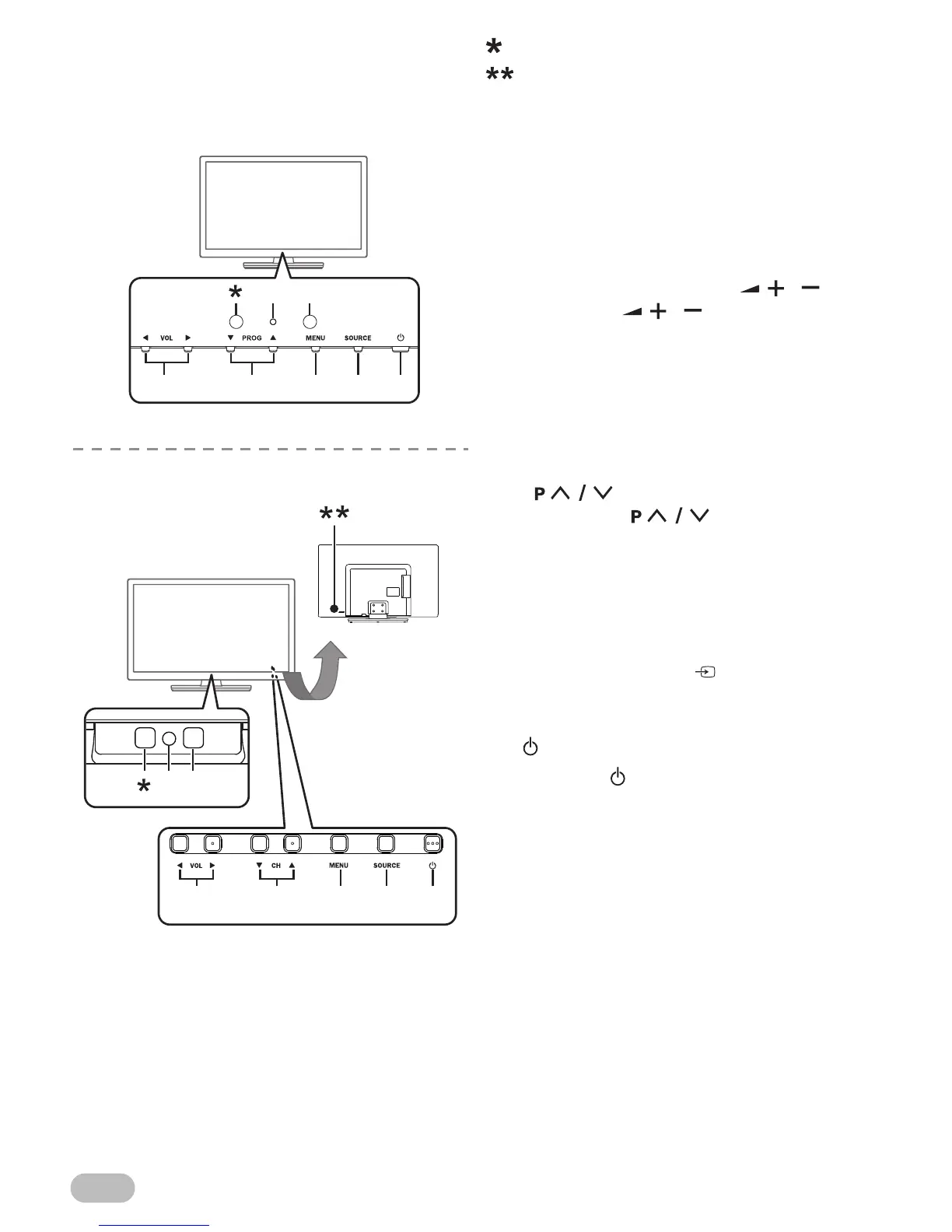
Control panel
This window has no function.
Keys on Rear.
Control Keys are located on the Rear side of the
TV.
1. Standby / Power indicator
(Power on : no light, Standby : red)
2. Infrared sensor window
Receive the infrared rays transmitted from the
remote control.
3. VOL Ż / Ź
• Watching TV, VOL Ż / Ź on the front panel
works the same function as / .
Refer to “9. / ” (p. 3).
• On the menu, VOL Ż / Ź on the front panel
works the same function as Ż / Ź (cursor).
4. CH Ÿ / ź (46FD753P)
PROG Ÿ / ź (39FL753P/32FL553P/32FL553/
29FL553P/29FL553/24FL553P/24FL553)
• Watching TV, PROG Ÿ / ź and CH Ÿ / ź on
the front panel works the same function as
.
Refer to “19. ” (p. 3).
• On the menu, PROG Ÿ / ź and CH Ÿ / ź on
the front panel works the same function as Ÿ /
ź (cursor).
5. MENU
Refer to “7. MENU” (p. 3).
6. SOURCE
Refer to “13. SOURCE ” (p. 3).
• On the menu, SOURCE on the front panel
works the same function as OK.
7. (Power)
Refer to “1. (Power)” (p. 3).


 To Next Page