15
EN
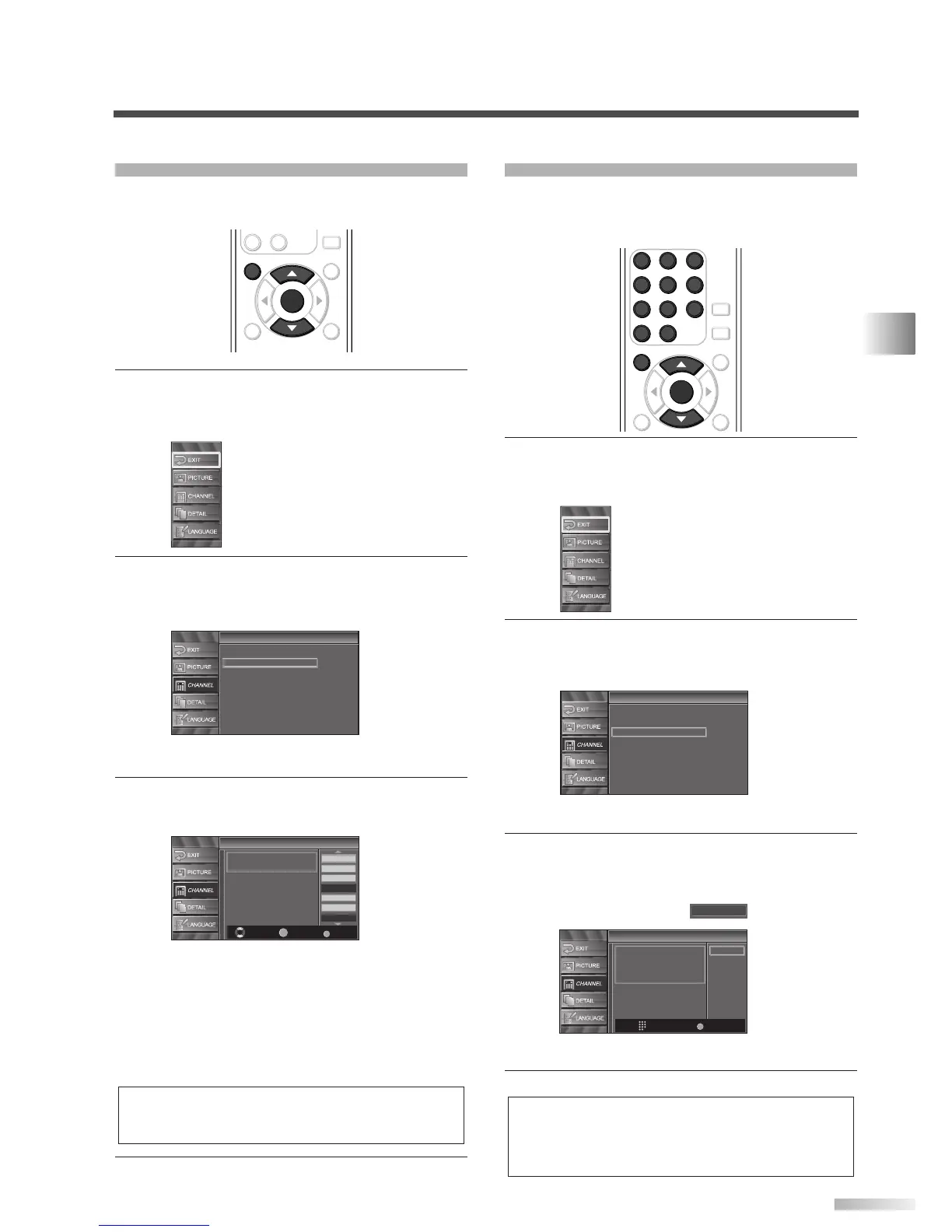
CHANNEL SETTINGS
CHANNEL LIST
This function lets you remove undesired channels
from the Channel Registration List.
1
Display the setup screen.
• Press
[SETUP].
The following setup screen appears.
2 Select “CHANNEL” and press [ENTER] to con-
firm.
• Using [
K
/
L
], select “Channel List”.
• Press
[ENTER].
3 Select the channel you want to remove.
• Using
[
K
/
L
], select the channel.
• Press
[ENTER] to highlight the channel select-
ed for removal. You will not be able to select the
channel again using
[CH
K
/
L
].
• To reactivate the removed channel, highlight it
and press
[ENTER].
• When you remove a major channel, you
remove its minor channels, too.
4 To exit the setup, press [SETUP].
NOTE:
• The channel with “DTV” indicated on the display is ATSC,
otherwise the channel is NTSC.
Channel List
Channel List
DTV 8
DTV 8
DTV 6
DTV 6
9
9
DTV 48
DTV 48
58
58
27
DTV 67
Ch Select Watch/Skip Back
BACK
ENTER
Highlight channels for
Ch Up/Down key selection.
Channel
Channel
Autoscan
Channel List
Manual Register
Antenna
ENTER
STILL
SETUP
BACK
SCREEN
MODE
INFO
CH RETURN
-
0
ENTER
SETUP
MANUAL REGISTER
This function lets you manually add channels not
memorized due to poor broadcast strength during
AUTOSCAN.
1
Display the setup screen.
• Press
[SETUP].
The following setup screen appears.
2 Select “CHANNEL” and press [ENTER] to con-
firm.
• Using
[
K
/
L
], select “Manual Register”.
• Press
[ENTER].
3 Select the channel you want to add.
• Using
[the Number buttons], select your
desired channel.
• Select “Register” with
[ENTER].
4 To exit the setup, press [SETUP].
NOTES:
• If set up completes successfully, “Registered to the Channel
List” is displayed.
• If Video 1 is being used, set up will not be completed suc-
cessfully and “Unavailable” will be displayed on the screen.
Manual Register
Manual Register
For Analog channels,
select a channel to register
using number keys.
For Digital channels,
you must perform Autoscan function.
Register
Ch Change
11
Back
BACK
Channel
Channel
Autoscan
Channel List
Manual Register
Antenna
ENTER
AUDIO
STILL
SETUP
BACK
SCREEN
MODE
INFO
1 2 3
4 5 6
7 8 9
-
0
ENTER
SETUP
1 2 3
4 5 6
7 8 9
-
0



 To Next Page