17
EN
CHANNEL SETTINGS
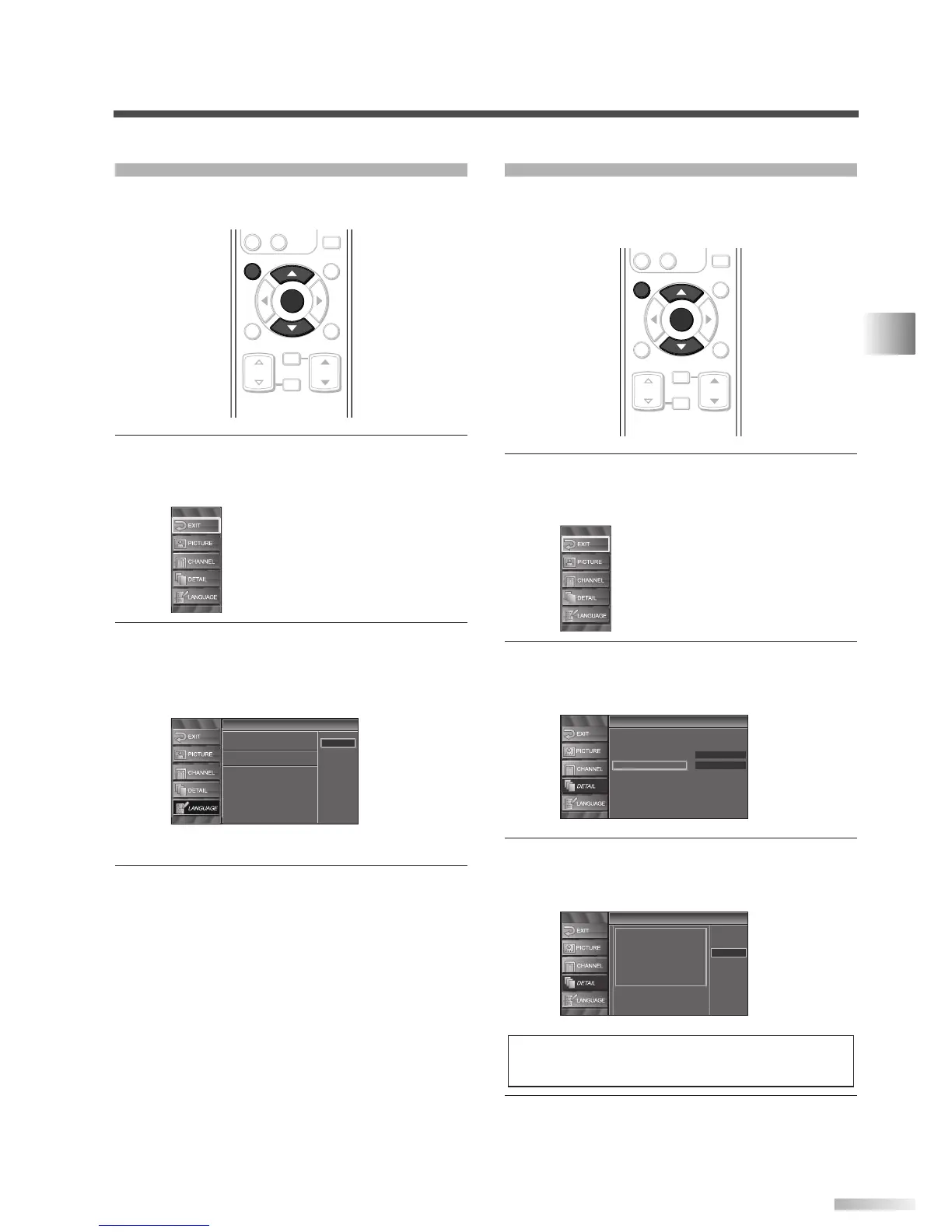
LANGUAGE SELECTION
You can choose English, Spanish, or French as
your on screen language.
1
Display the setup screen.
• Press
[SETUP].
The following setup screen appears.
2 Select “LANGUAGE” and press [ENTER] to con-
firm.
• Using [
K
/
L
], select “English”, “Español” or
“Français”.
• Press
[ENTER].
3 To exit the setup, press [SETUP].
Language
Language
Select the language for setup display.
Elija idioma de preparación.
Sélectionner langue écran config.
Español
Français
English
ENTER
STILL
SETUP
BACK
SCREEN
MODE
INFO
CH RETURN
MUTE
VOL. CH
-
0
ENTER
SETUP
SETTING THE PANEL SAVER
Panel saver prevents the display from being etched
by an unchanging image. You can specify a setting
for it.
1
Display the setup screen.
• Press
[SETUP].
The following setup screen appears.
2 Select “DETAIL” and press [ENTER] to confirm.
• Using
[
K
/
L
], select “Panel Saver” and press
[ENTER] to confirm.
3
Switch the Panel Saver mode.
• Using
[
K
/
L
], select “Strong”, “Weak” or “Off”
and press
[ENTER] to confirm.
4 To exit the setup, press [SETUP].
NOTE:
• "Weak" moves 1 pixel every 5 minutes and "Strong" moves
1 pixel every minute. This prevents burn-in.
Panel Saver
Panel Saver
This function is useful for
burn-in reduction of the display
panel by shifting the picture
element.
Select the level for effect.
Strong
Weak
Off
Detail
Detail
Closed Caption
V–chip
HDMI Audio
Panel Saver
Auto
Off
ENTER
STILL
SETUP
BACK
SCREEN
MODE
INFO
CH RETURN
MUTE
VOL. CH
-
0
ENTER
SETUP



 To Next Page