6-2 A7340EA
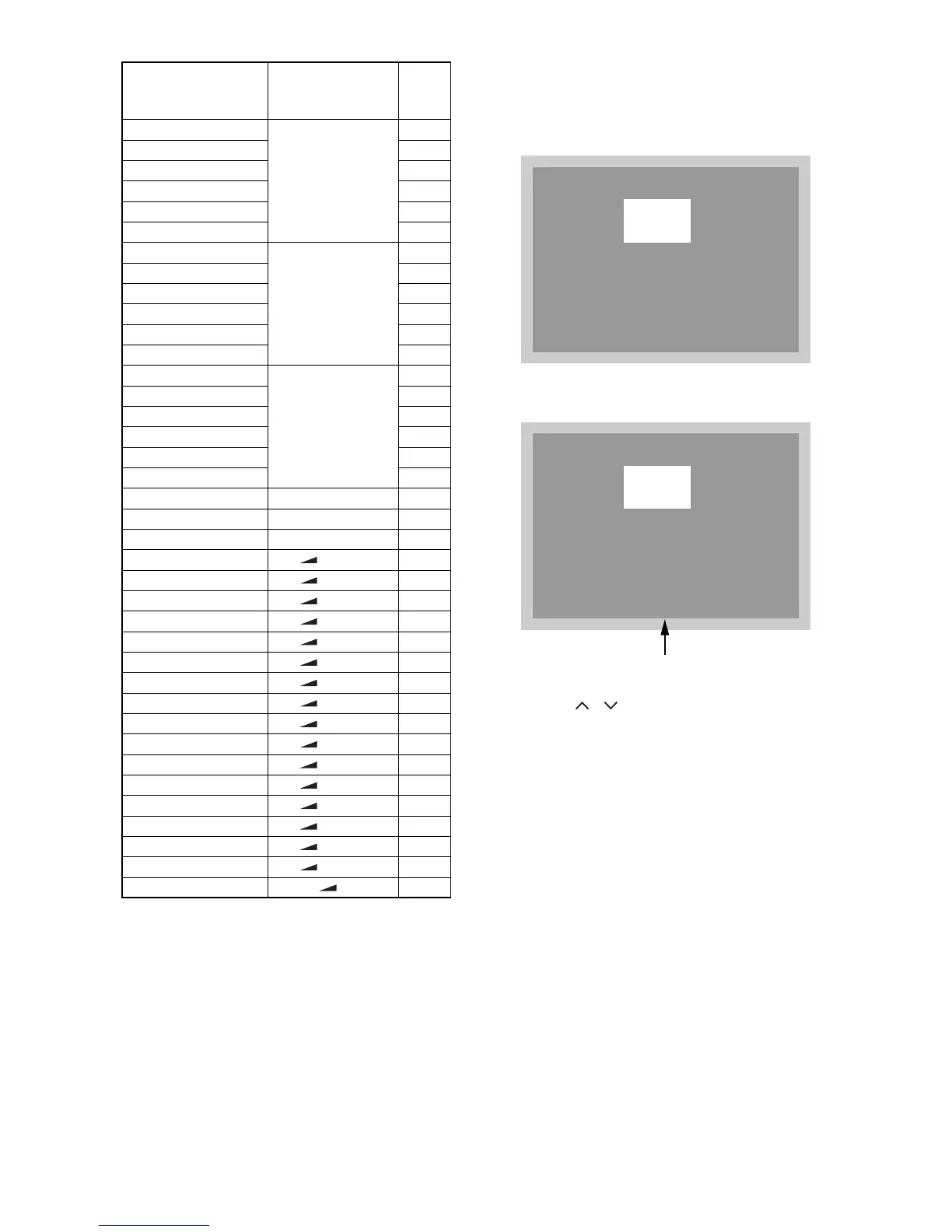
2. Flicker Adjustment
1. Enter the Service mode.
2. Press [2] button on the remote control unit.
The following screen appears.
3. If Flicker Adjustment is not fit, the screen becomes
the following.
4. Press [P / ] buttons on the remote control
unit so that flash stops.
BRT(NTSC)
[SETUP(NTSC)]
→ [2]
122
CNT(NTSC) 170
CLR-R(NTSC) 92
CLR-B(NTSC) 92
TNT(NTSC) 135
SHR(NTSC) 143
S-BRT(NTSC)
[SETUP(NTSC)]
→ [3]
122
S-CNT(NTSC) 190
S-CLR-R(NTSC) 92
S-CLR-B(NTSC) 92
S-TNT(NTSC) 135
S-SHR(NTSC) 143
C-BRT(NTSC)
[SETUP(NTSC)]
→ [4]
122
C-CNT(NTSC) 170
C-CLR-R(NTSC) 119
C-CLR-B(NTSC) 119
C-TNT(NTSC) 135
C-SHR(NTSC) 143
BRIGHT [0] 0
NORMAL [0] 40
DARK [0] 95
COR(C/D/S-1) [ -] → [1] 128
COG(C/D/S-1) [ -] → [2] 128
COB(C/D/S-1) [ -] → [3] 128
DR(C/D/S-1) [ -] → [4] 128
DG(C/D/S-1) [ -] → [5] 128
DB(C/D/S-1) [ -] → [6] 128
SBR(C/D/S-1) [ -] → [7] 0
SBB(C/D/S-1) [ -] → [9] 0
C-COR(C/D/S-2) [ -] → [1] 128
C-COG(C/D/S-2) [ -] → [2] 128
C-COB(C/D/S-2) [ -] → [3] 128
C-DR(C/D/S-2) [ -] → [4] 128
C-DG(C/D/S-2) [ -] → [5] 128
C-DB(C/D/S-2) [ -] → [6] 128
C-SBR(C/D/S-2) [ -] → [7] 0
C-SBB(C/D/S-2) [ -] → [9] 0
LAST POWER [ -] OFF
ITEM
BUTTON
(on the remote
control)
DATA
VALUE
VCOM
128
VCOM
128
FLASH (Go and Off)


 To Next Page