2-4 LTVP_ISP
Safety Check after Servicing
Examine the area surrounding the repaired location
for damage or deterioration. Observe that screws,
parts and wires have been returned to original posi-
tions. Afterwards, perform the following tests and con-
firm the specified values in order to verify compliance
with safety standards.
1. Clearance Distance
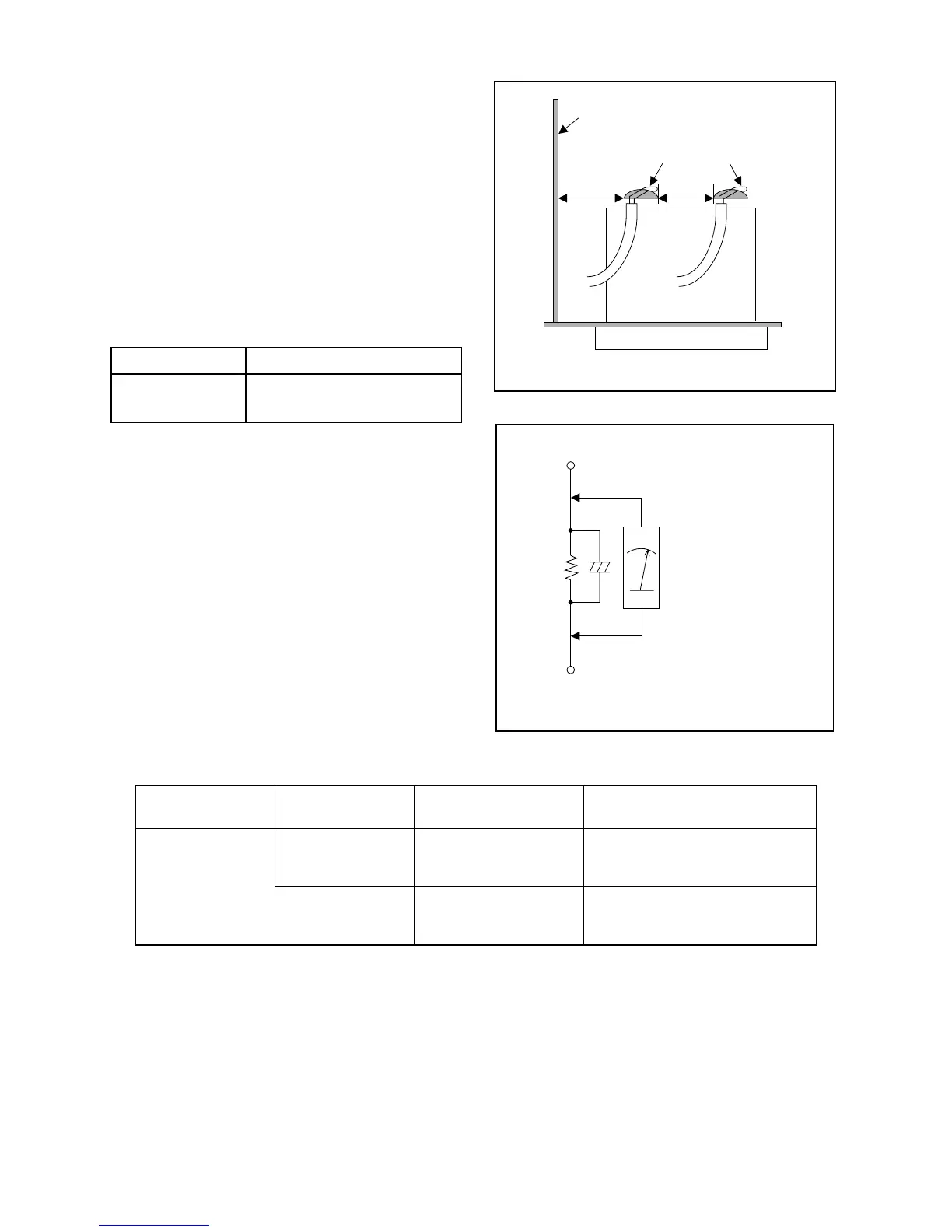
When replacing primary circuit components, confirm
specified clearance distance (d) and (d') between sol-
dered terminals, and between terminals and surround-
ing metallic parts. (See Fig. 1)
Table 1 : Ratings for selected area
Note: This table is unofficial and for reference only.
Be sure to confirm the precise values.
2. Leakage Current Test
Confirm the specified (or lower) leakage current be-
tween B (earth ground, power cord plug prongs) and
externally exposed accessible parts (RF terminals, an-
tenna terminals, video and audio input and output ter-
minals, microphone jacks, earphone jacks, etc.).
Measuring Method : (Power ON)
Insert load Z between B (earth ground, power cord
plug prongs) and exposed accessible parts. Use an
AC voltmeter to measure across both terminals of load
Z. See Fig. 2 and following table.
Table 2: Leakage current ratings for selected areas
Note: This table is unofficial and for reference only. Be sure to confirm the precise values.
AC Line Voltage Clearance Distance (d), (d’)
220 to 240 V
≥ 3mm(d)
≥ 6 mm(d’)
Fig. 1
Chassis or Secondary Conductor
Primary Circuit
d' d
Fig. 2
AC Voltmeter
(High Impedance)
Exposed Accessible Part
B
One side of
Power Cord Plug Prongs
Z
AC Line Voltage Load Z Leakage Current (i)
One side of power cord plug
prongs (B) to:
220 to 240 V
2kΩ RES.
Connected in
parallel
i≤0.7mA AC Peak
i≤2mA DC
RF or
Antenna terminals
50kΩ RES.
Connected in
parallel
i≤0.7mA AC Peak
i≤2mA DC
A/V Input, Output



 To Next Page