Recording Playback Editing
Introduction
Connections
Basic Setup Function Setup VCR Functions
Others Español
CONNECTION
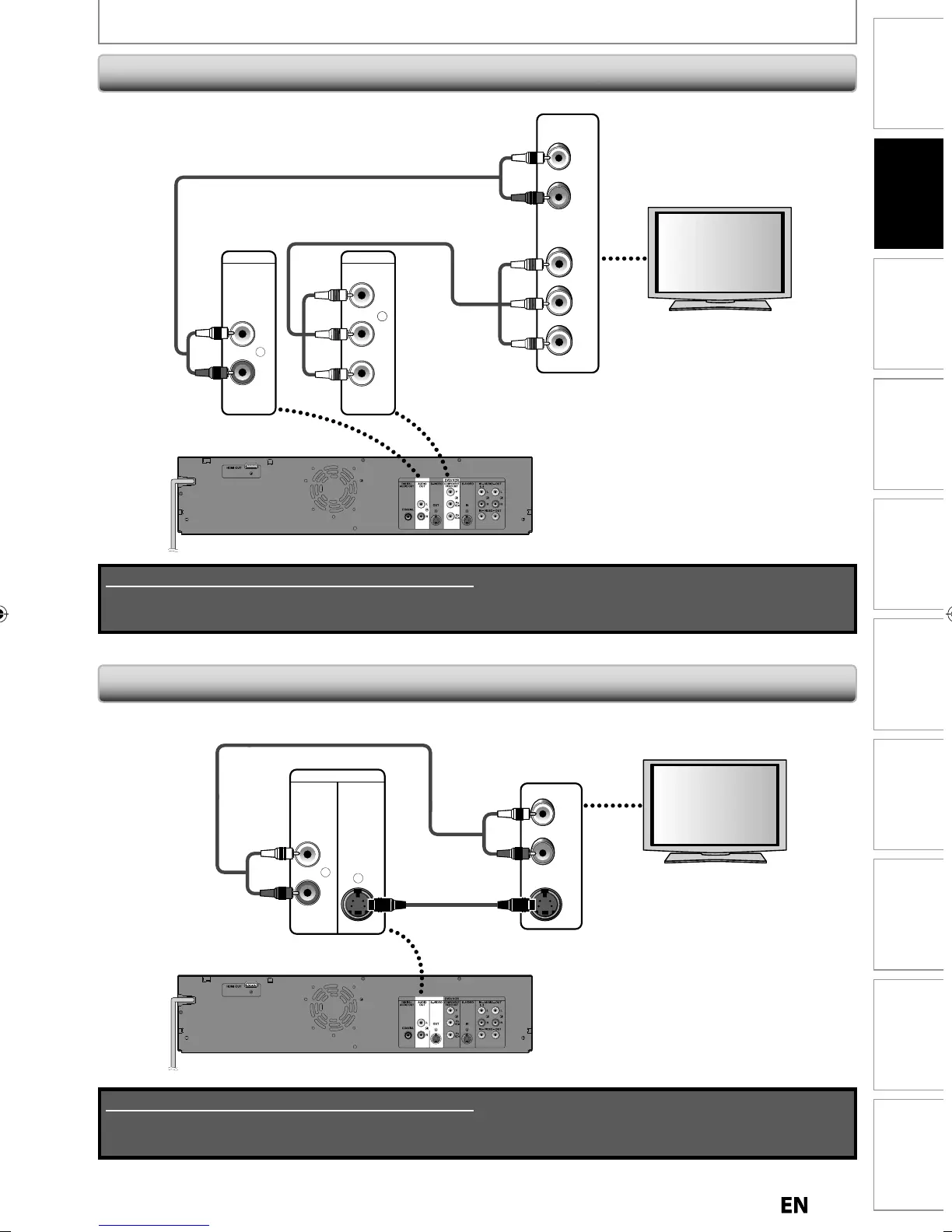
Connecting to a TV wit
Component Vi
eo Input
ac
s
Connecting to a TV wit
an S-Vi
eo Input Jac
rear of this unit
S-VIDEO
OUT
AUDIO
OUT
L
R
RCA audio cable
AUDIO IN
L
R
S-VIDEO IN
S-video cable
L
R
RCA audio cable
DVD / VCR
Y
P
B
/CB
PR
/CR
COMPONENT
VIDEO OUT
AUDIO
OUT
(Green)
(Blue)
(Red)
RCA component video cable
(Green)
(Blue)
(Red)
Y
P
B
/CB
PR
/CR
COMPONENT
VIDEO IN
AUDIO IN
L
R
rear of this unit
Supplied cables used in this connection are as follows:
• RCA audio cable (L/R) x 1
Please purchase the rest of the necessary cables at your local store.
Supplied cables used in this connection are as follows:
• RCA audio cable (L/R) x 1
Please purchase the rest of the necessary cables at your local store.



 To Next Page