-10-
Bluetooth Adapter
Switching on and off and Ignition sense
Continue reading in the „Pairing a new device“ section when putting into opera-
tion for the first time. Continue reading in the „Pairing a known device“ section
during normal operation.
Switching on and off and Ignition sense
With the ignition switched on the adapter is fully functional. After switching off the
ignition, the Bluetooth adapter is switched off as long as no active conversation
is underway. If a conversation is underway when the ignition is switched off, it is
not switched off/decoupled until the conversation is ended.
After switching on the ignition, the system is automatically started by pressing
the "Accept" button or automatically after max. 40 seconds and begins searching
for the telephone that was last paired.
Pairing a device
A telephone can be found and paired automatically or via the device search. When
the ignition of the vehicle is switched on, an automatic attempt is carried out to
pair the telephone that was last used. If the device from the user profile that was
last paired is not found or if the user profile that was last paired was reset in the
meantime (see „Deleting a user“ section), the menu skips to the Change user
menu. In the event of a successful device search, the phones in the receiver's
range are displayed.
Pairing a new device
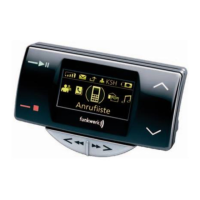
After a device search, the name of the required telephone can be entered using
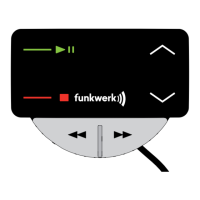
the Scroll forwards (4) and Scroll back (3) buttons. The randomly-generated pai-
ring PIN is shown in the display by pressing the Accept button (1).
After successfully entering the pairing PIN in the telephone, the pairing process
begins between the telephone and the Bluetooth adapter. Depending on the type
of telephone used, further operating steps may be required for the telephone.
After a successful pairing process, the device is ready for operation and shows
the inactive screen.
Pairing a known device
If a telephone was already paired with the Bluetooth adapter and the telephone
is saved as a user, it is shown in the Change user menu. The telephone is paired
by pressing the Accept (1) button. It is not necessary to repeat the PIN entry.
During the pairing, the message „Seeking mobile phone“ appears on the display
of the Bluetooth adapter. After the successful pairing process, the device is ready
for operation and shows the inactive screen.


 To Next Page