EasyManua.ls Logo

Funkwerk Audio 2000 - User Manual

Funkwerk Audio 2000
20 pages
To Next Page IconTo Next Page
Loading...
Funkwerk Dabendorf GmbH
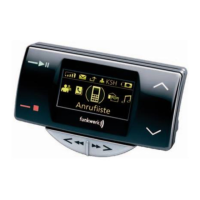
Audio 2000 Hands-Free car Kit
096 8076 1.01
Bluetooth Adapter
Operating Manual

Questions and Answers

Funkwerk Audio 2000 Specifications

General IconGeneral
CategoryAutomobile Accessories
BrandFunkwerk
ModelAudio 2000
Input Voltage12V DC
CompatibilityUniversal
Power Output4 x 50 Watts
Signal-to-Noise Ratio90dB

Summary

Safety Instructions

Personal Injury Warnings

Inappropriate installation may cause personal injuries or disable safety equipment. Follow installation manual.

Road Safety Considerations

Talking while driving reduces concentration. Refrain from phone use in complex traffic situations.

Proper Use Guidelines

The Bluetooth adapter is intended exclusively for use with the Audio 2000 handsfree system in motor vehicles.

Putting into Operation

Initial Setup Procedure

First pairing in stationary vehicle. Phones with 'handsfree' profile are supported. System activated by ignition or Accept button.

Device Pairing Procedures

Pairing a New Device

Search for phones, enter PIN using Scroll buttons, and confirm with Accept. Requires phone to be visible.

Pairing a Known Device

Pair a previously paired phone by pressing Accept. No PIN entry needed. Shows 'Seeking mobile phone' during process.

Making Calls

Dialing from Phone Book

Access phone book via Scroll buttons or Options button. Press Accept to dial the number.

Dialing from Call Register

Access dialled, received, or missed calls via main menu or Accept button. Press Accept to call.

Handling Incoming Calls

Signalled acoustically and optically. Ringtone from phone or generated ringtone plays. Shows caller name/number.

Test Connection Procedure

Troubleshooting Common Issues

Troubleshooting System Reactions

No System Response After Ignition

Cause: System is manually/automatically started. Solution: Connect adapter, manually start or wait 40s.

No Display or System Response

Cause: Power supply unavailable or adapter not specified. Solution: Check fuse/connections, use specified adapter.

No Response to Accept Button

Cause: Power supply unavailable. Solution: Ensure ignition is on, check fuse/connections.

Customer Support Hotline

Related product manuals