-11-
Making calls
Bluetooth Adapter
Deleting pairing of a device
If the BT connection is disconnected, e.g. through removal from the vehicle or
switching off the telephone, after a few seconds the message „No BT connection“
appears on the display of the Bluetooth adapter and the Bluetooth adapter sub-
sequently changes to the Change user menu.
A new connection can be established by switching the ignition of the vehicle off
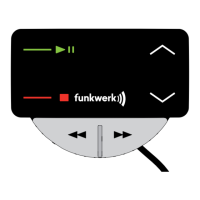
and on or by pressing the Accept button (1). Also see „Changing user“ section.
Please continue reading in the „User options“ section under Login/Logout for a
manual disconnection.
Making calls
The Bluetooth adapter offers the possibility of placing a call using the phone book
or the call register that is loaded at every pairing.
The call registers are loaded first. Loading the phonebook may take more time
depending on the size of the phonebook.
Placing a call from the phone book
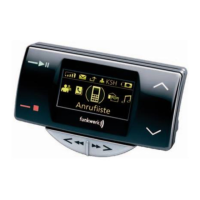
When the Bluetooth adapter shows the inactive screen, the phone book entries
can be displayed by pressing the Scroll forwards (4) or Scroll back (3) buttons.
Alternatively, you can change to the phone book via the main menu by pressing
the Options button (5). Pressing the Accept button shows the numbers stored
under the names. Pressing the Accept button again establishes a call to the dis-
played number.
Placing a call from the call register
Depending on the telephone, up to three call registers are available: the list of the
dialled numbers, the list of the received calls and the list of the missed calls.
The lists can be reached via the main menu. The list of dialled numbers can also
be reached from the inactive screen by pressing the Accept button (1).
Pressing the Accept button shows the numbers stored under the names. Pres-
sing the Accept button again establishes a call to the displayed number.
The list of the dialled numbers is only loaded from the telephone after being pai-
red. The list is supplemented if a call is made via the Bluetooth adapter. The list
is not updated if the number is selected on the telephone.
Incoming calls
Incoming calls are acoustically signalled in the vehicle and optically signalled in
the display of the Bluetooth adapter. Depending on the phone, the ringtone of the
phone or a generated ringtone is emitted through the vehicle speakers. The num-


 To Next Page