-9-
Putting into operation
Bluetooth Adapter
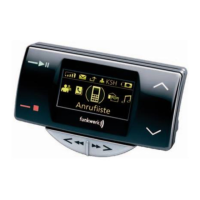
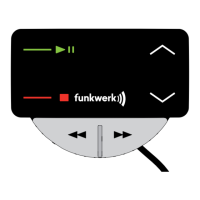
Bluetooth adapter control elements
The Bluetooth adapter has five buttons which can be used to control it:
1 - Accept
2 - Reject/Hang up
3 - Scroll back
4 - Scroll forwards
5 - Options button
Putting into operation
For reasons of safety, the first pairing process should be carried out
in a stationary vehicle
With this BT adapter, BT-capable mobile phones can be operated that have the
„handsfree“ BT profile available. Certain functions are not available with all BT-
capable mobile phones. In case of doubt, please refer to the compatibility list on
www.fwd-online.de
.
The BT adapter has a menu-controlled user guidance. From the inactive screen,
you generally reach the main menu using the Options button (5), where the sub-
menus are then accessible.
The Bluetooth adapter is activated by switching on the ignition of the vehicle.
Press the "Accept" button to start up the system. If this button is not pressed, the
system is started automatically after max. 40 seconds. Before putting the Blue-
tooth adapter into operations, the Bluetooth connection in the telephone must be
activated. Furthermore, the Bluetooth interface of the telephone must be swit-
ched to visible for other devices (Caution: certain telephones switch themselves
back to invisible after a short time) and the telephone must be assigned a distinct
name in the Bluetooth menu. Please read the operating instructions for your
phone for more information on this.
The first time you put your Bluetooth adapter into operation, the user is prompted
to select the required menu language.
Select the required language using the buttons Scroll
forwards (4) and Scroll back (3).
Save the selection using the Accept button (1).
The language is now set for all users. It is possible to set the language individually
for each user profile when the affected user profile is paired. The Bluetooth adap-
ter automatically searches for visible Bluetooth devices in the receiver's range.
1
2
3
4
5
Language 1/4
English


 To Next Page