-8-
Bluetooth Adapter
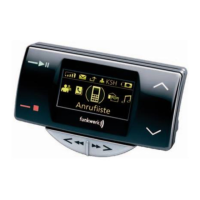
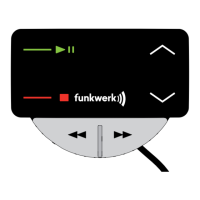
Display and control elements
Latching the Bluetooth Adapter into the cradle
The Bluetooth must be pushed upwards into the cradle. In the Bluetooth Adapter
there is a spring mechanism which guarantees secure support.
Taking the Bluetooth Adapter out of the cradle
It is only necessary to take the Bluetooth
Adapter out
of the cradle if you wish to disconnect the adapter
completely from the hands-free speaking system, e.g.
to connect another telephone holder. The handset
operation possible in conventional holders is not faci-
litated here. To take the Bluetooth out of the cradle, tilt
it against the spring pressure and push it upwards and
out of the cradle.
Display and control elements
Outgoing and incoming calls as well as the entries made by the user are shown
in the Bluetooth adapter display.
If the system shows the inactive screen and is thus ready for operation, the name
of the network provider is shown on the display. If no provider is known by the
telephone, the Bluetooth name of the currently paired telephone is shown.
If the rechargeable battery status is less than 10
percent, a warning symbol appears in the inactive
screen.
9%


 To Next Page