Connecting the telephone (connecting and handset cords)
PleaseconnecttheISDNcableandthehandsetcable.Otherwiseyouwillnotbeabletooperatethephone.
Connecting the handset connecting cord
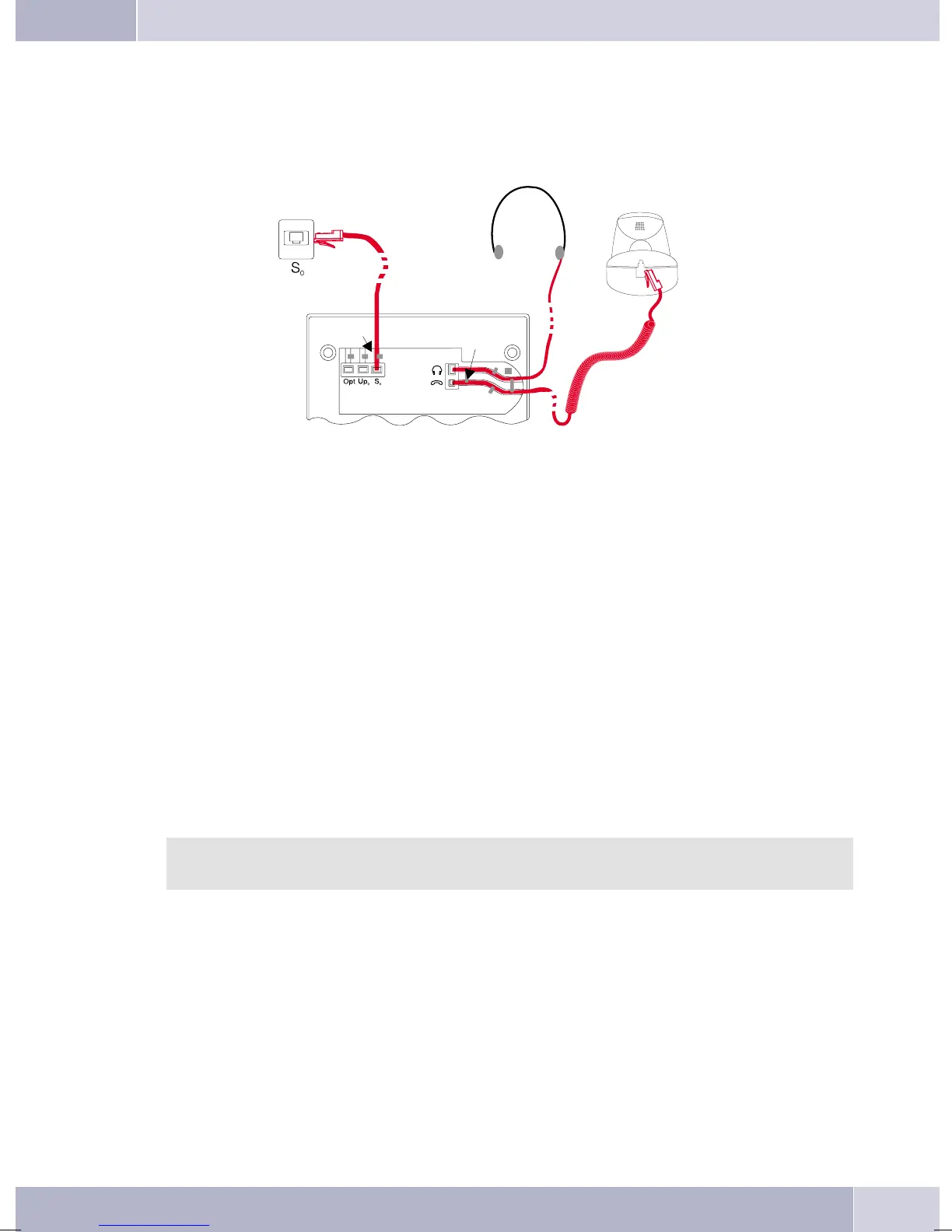
Connectthehandsetcord(1)asshowninfigure1. Laythehandsetcordinthecordgroove(4)andlockitbe-
low the two cord retainers (5).
Connecting the connecting cord
Connection to the S0 (CS410, CS400)
Connect the ISDN cord (2) as shownin figure 1 (S0-connector). Ensure that the longerISDN connector is
pluggedintotheISDNjackandtheshorterISDNconnectorintotheISDNsocketonthetelephone. Thenlay
the ISDN cord in the cord groove (4) and lock it below the two cord retainers (5).
Connection to the Up0 (CS400,CS410 with Up410/S0-module or CS0-U)
Connect the ISDN cable (1) as shown in figure 2 (Up0-socket). Ensure that the longer ISDN connector is
pluggedintotheISDNjackandtheshorterISDNconnectorintotheISDNsocketonthetelephone. Thenlay
the ISDN cord in the cord groove (2) and lock it below the two cord retainers (3).
CS410 telephones equipped with a Up0/S0 module or CS410-U phones may not be connected
through the S0-socket to an ISDN connection (e.g. internal ISDN port of the PABX).
Important notes for connecting the telephone to the Up0
•
YoucanconnectafurtherISDNdevicewithanS0-port(forexampleanISDNcardoraanothertele
-
phone) at the S0 jack ofthe telephone. For eachadditional ISDN devicethis connection provides a
powerof1watt.
Description and installation
5
1
2
3
4
4
4
5
5
6
6
7
Figure 1


 To Next Page
 Loading...
