1. OPERATION
24
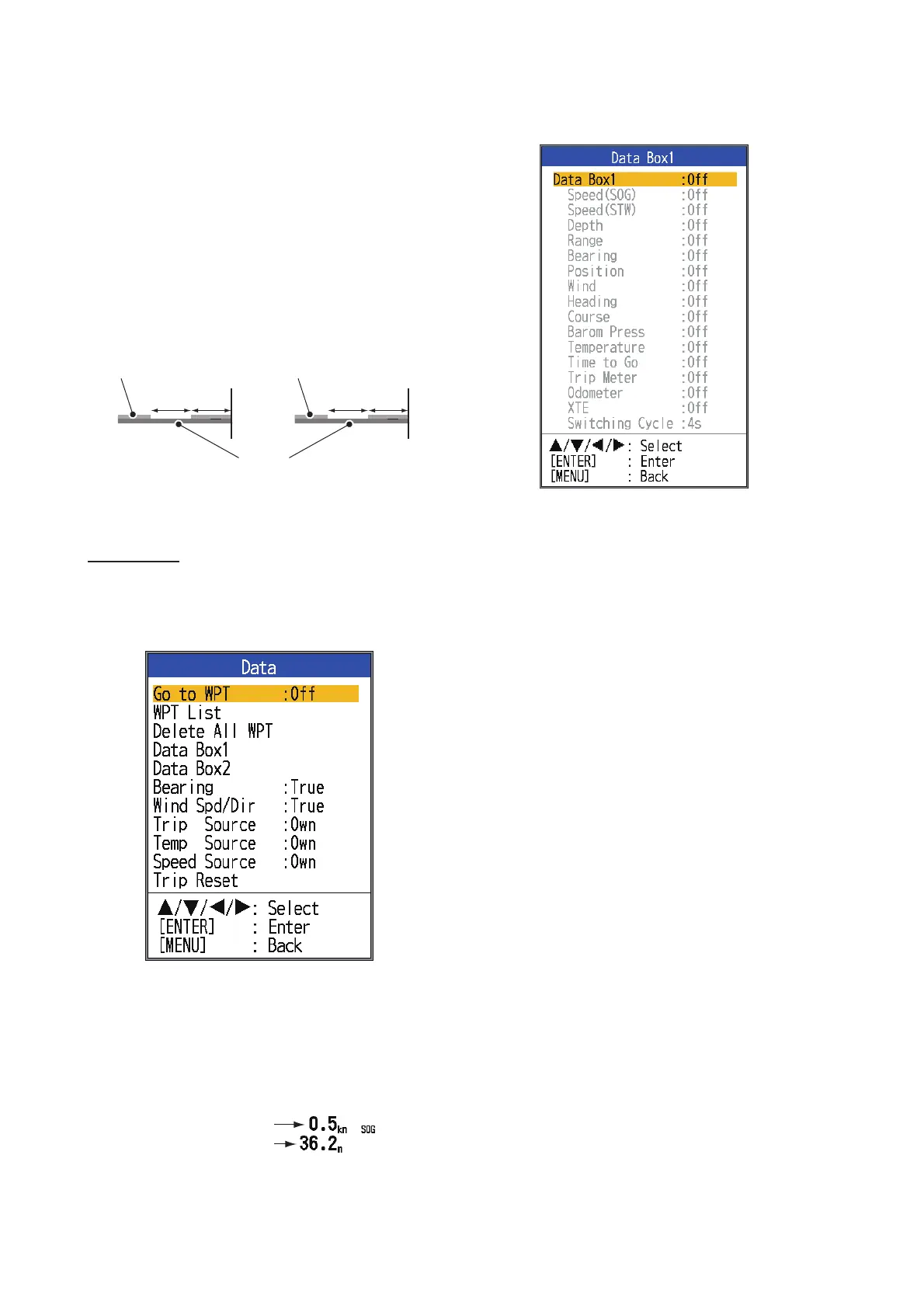
[Header Scale]: The header scale (below the
header info) provides an estimate of time or
distance.
• Time: An orange bar and a “blank” bar
scroll across the screen for 30 seconds
each. (One set is one minute.)
• Distance: An orange bar and a “blank” bar
scroll across the screen. Each bar is equal
to 0.03 NM. (One set is 0.06 NM.) Requires
speed and position data.
[Nav Data1, Nav Data2]: Set the division con-
figuration of respective displays.
Data menu
This menu mainly sets up how to display data
input by external equipment.
[Data Box1(2)]: Show or hide the Data Box1,
Data Box2 indication, which appears below
the header info. You can select multiple indi-
cations in which case they are displayed alter-
nately every four seconds (default setting).
1) Select [Nav Data1] and press the ENTER
key.
2) Select [Data Box1] and press the ENTER
key.
3) Select [On] and press the ENTER key.
4) Select a data and press the ENTER key.
5) Select [On] or [Off] and press the ENTER
key.
6) Repeat steps 4 and 5 show or hide other
items.
7) Select [Switching Cycle] and press the
ENTER key.
8) Select the amount of time (in seconds) to
show each data and press the ENTER
key.
9) Set the Nav Data2 box similar to how you
set the Nav Data1 box.
[Bearing]: Select the bearing sensor. [True]
for gyrocompass, satellite compass;
[Mag](netic) for magnetic compass.
[Wind Spd/Dir]: Select the format of wind
speed and direction output from a wind sen-
sor, [True] or [Apparent].
[Trip Source]: Select the source for the trip
indication: Select [Own] to use the speed data
from the speed sensor connected to this unit,
or [NMEA] to use speed data from a naviga-
tor.
30s 30s
0
0.03NM 0.03NM
Time marker
(orange)
Range marker
(green)
Data Box1 display
Data Box2 display


 To Next Page