EasyManua.ls Logo

Furuno FR-2105 - User Manual

Furuno FR-2105
197 pages
Print Icon
To Next Page IconTo Next Page
Loading...
New standard of marine radar technology through
50 years of FURUNO’s marine electronics activities
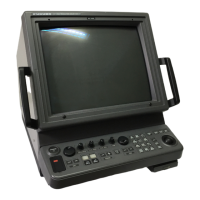
21” MULTI-COLOR HIGH-PERFORMANCE
SHIPBORNE RADAR AND ARPA
MODEL
FR-2105/2105-B SERIES
FURUNO ELECTRIC CO., LTD.
NISHINOMIYA, JAPAN

Table of Contents

Questions and Answers

Summary

Safety Instructions

DANGER

Critical warnings about immediate hazards like antenna strikes and electrical shock.

WARNING: Radio Frequency Radiation Hazard

Precautions regarding exposure to electromagnetic radio frequency energy from the radar antenna.

WARNING: Electrical Shock Hazard

Instructions to prevent electrical shock, including not opening the equipment and handling wet conditions.

WARNING: Liquid Containers and Heat

Advisories against placing liquid containers on the equipment and keeping heaters away.

CAUTION: Proper Use and Navigation Reliance

Guidance on using the equipment for its intended purpose and not relying solely on navigation devices.

Introduction to FURUNO Radar

A Word to the Owner of FURUNO Radar

Welcome message and introduction to FURUNO's commitment to quality and reliability in marine electronics.

Features of This Series of Radars and ARPA

Highlights key technological advancements and capabilities of the FR-2105/2105-B radar series.

Radar Specifications and Models

FR-2105;2105-B Series Standards Compliance

Details the international standards and regulations met by the radar and ARPA series.

Available Models and Configurations

Lists the specific models in the series, their frequency bands, output power, and transceiver configuration.

R-type vs. IMO Type Radars

Explains the differences between R-type and IMO type radars, including range scales and echo colors.

Chapter 1: Operation

1.1 Turning on the Power

Procedure for powering up the radar system, including warm-up time and standby indication.

1.2 Transmitter ON

Instructions on activating the transmitter from standby mode and quick start procedures.

1.3 Control Head Overview

Description of the control panel layout, including keys for BRILLIANCE, GAIN, CLUTTER, and menus.

1.4 CRT Brilliance Adjustment

Guidance on adjusting the overall screen brightness using the BRILLIANCE control.

1.5 Receiver Tuning

Procedure for tuning the receiver automatically or manually for optimal performance.

1.6 On-screen Legends and Markers

Explanation of various legends, markers, and data displayed on the radar screen.

1.7 Degaussing the CRT Screen

Information on the automatic and manual degaussing process to eliminate color contamination.

1.8 Initializing the Gyro Readout

Procedure for aligning the on-screen gyro readout with the interfaced gyrocompass reading.

1.9 Presentation Modes

Description of available presentation modes (RM, Head-up, Course-up, North-up, True Motion).

1.10 Selecting the Range Scale

Instructions on how to change the radar's display range scale using [+] and [-] keys.

1.11 Selecting the Pulselength

Information on selecting appropriate pulselengths for different range scales and settings.

1.12 Adjusting the Sensitivity

Guidance on using the GAIN control to optimize radar receiver sensitivity and echo visibility.

1.13 Suppressing Sea Clutter

Instructions on using the A/C SEA control to mitigate sea clutter for better target detection.

1.14 Suppressing Precipitation Clutter

Guidance on using the A/C RAIN control to reduce echoes from rain, snow, or clouds.

1.15 Interference Rejector

Explanation of how to activate the interference rejector to reduce mutual radar interference.

1.16 Measuring the Range

Instructions on using fixed range rings and variable range markers (VRMs) to measure target range.

1.17 Measuring the Bearing

Procedure for using electronic bearing lines (EBLs) to measure target bearing.

1.18 Collision Assessment by Offset EBL

Method for assessing collision risk by measuring range and bearing between targets using EBL offset.

1.19 Measuring Range and Bearing Between Two Targets

Steps to measure the range and bearing between any two targets using EBL and VRM.

1.20 Setting a Target Alarm Zone

Instructions on setting up target alarm zones (TAZ) for visual and audible alerts.

1.21 Off-Centering

Procedure to displace the sweep origin to expand the view field without changing range scale.

1.22 Echo Stretch

Explanation of the echo stretch function for enhancing target video by enlarging echoes.

1.23 Echo Averaging

Description of the echo average feature for suppressing sea clutter through scan-to-scan correlation.

1.24 Electronic Plotting Aid (EPA)

Guidance on using the EPA for electronic plotting, target tracking, and motion trend assessment.

Setting CPA;TCPA Alarm Ranges

Procedure for setting collision alarm ranges (CPA/TCPA) to alert for potential collision risks.

1.25 Entering Own Ships Speed

Instructions for entering own ship's speed automatically or manually for ARPA and stabilized modes.

1.26 Target Trails (Echo Trails)

Explanation of how to display and manage target trails for tracking target movement history.

1.27 Parallel Index Lines

Instructions on displaying and adjusting parallel index lines for maintaining constant distances.

1.28 Origin Mark

Procedure for marking reference points, targets, or points of interest on the radar display.

1.29 Zoom Function

Description of the zoom function (R-type only) for enlarging specific areas of the radar display.

1.30 Markers

Explanation of heading marker, north marker, stern marker, and own ship symbol displays.

1.31 Menu Keys

Overview of the RADAR MENU, PLOT MENU, and NAV MENU keys for system configuration.

1.32 RADAR 1, 2 and 3 Menu Settings

Detailed breakdown of settings available within the RADAR 1, 2, and 3 menus.

1.33 Function Keys

Explanation of how function keys can be assigned for quick access to specific radar settings.

1.33.1 Picture Setup

Guidance on assigning function keys for optimal radar picture settings based on navigation scenarios.

1.33.2 Specific Operation

Details on assigning specific radar functions (e.g., target trails, echo stretch) to function keys.

1.33.3 Watch Alarm

Information on setting up the watch alarm feature for safety and regular monitoring of the radar picture.

1.33.4 Setting for Function Keys #1;#2;#3

Menu structure for configuring the PICTURE/OPERATION settings for function keys.

1.33.5 Setting for Function Key #4

Menu structure for configuring the OPERATION/WATCH ALARM settings for function key #4.

1.34 Barge Information

Instructions on how to display barge information on the radar display.

1.35 Radar Map

Explanation of radar map creation, storage, and display for navigation planning.

1.35.1 Making a Radar Map

Procedure for creating and entering map data, including marks and lines, on the radar display.

1.35.2 Storing the Map Data

Steps for saving created map data with a specific map number.

1.35.3 Displaying Radar Map

Instructions on how to display previously stored radar maps by entering the map number.

1.35.4 Erasing Contents of a Radar Map

Procedure for erasing radar map data, either specific items or the entire map.

1.36 Suppressing Second-trace Echoes

Guidance on activating the second-trace echo rejector to eliminate false echoes from distant targets.

1.37 Displaying External Waypoint and Navigation Line

Instructions for displaying waypoint and navigation line data from external navaids.

1.38 Adjusting Brilliance of Screen Data

Steps to adjust the relative brilliance levels of various marks and alphanumeric readouts on the screen.

1.39 Display of Wind;Tide;Depth Information

Instructions for displaying wind, ocean current, and depth sounding data on the radar screen.

1.40 Alarms

Summary of potential alarms (gyro failure, target alarm, watch alarm) and how to quit them.

Chapter 2: ARPA Operation (Option)

2.1 General ARPA Specifications

Overview of ARPA capabilities, acquisition, tracking, vector length, stabilization, and alarms.

2.2 Keypads for ARPA

Description of ARPA-specific keys on the plotting keypad and control head.

2.3 ARPA Menu Operation

Step-by-step guide for operating the ARPA menus to set various parameters.

2.4 Start-up Procedure: Entering Own Ships Speed

Instructions for entering own ship's speed (automatic, manual, target-based) for ARPA operation.

2.5 Automatic Acquisition

Explanation of automatic target acquisition capabilities, areas, and limitations.

2.6 Manual Acquisition

Procedure for manually acquiring and tracking targets using the trackball and ACQ key.

2.7 Changing Plot Symbol Size

How to change the size of plot symbols (STANDARD or LARGE) for ARPA targets.

ARPA Symbols

Reference guide to ARPA symbols used for target acquisition, status, and alarms.

2.8 Adjusting Brilliance of Plot Marks

Steps to adjust the brilliance levels for various plot elements like vectors and symbols.

2.9 Displaying Target Data

How to display detailed target data including range, bearing, CPA, and TCPA.

2.10 Vector Modes

Explanation of vector modes (True/Relative) and stabilization (Sea/Ground) for target display.

2.11 Past Position Display

Instructions on displaying and erasing past positions for tracked targets.

2.12 Set and Drift (Set and Rate)

Procedure for manually entering set and drift corrections to improve vector accuracy.

2.13 Setting CPA;TCPA Alarm Ranges

Procedure for setting collision alarm ranges (CPA/TCPA) to alert for potential collision risks.

2.14 Setting a Guard Zone

Instructions on activating and setting guard zones for target detection alarms.

2.15 Operational Warnings

Description of ARPA warnings for CPA/TCPA alarms, guard zone alarms, lost targets, and system failures.

2.16 Trial Maneuver

Explanation of dynamic and static trial maneuvers for simulating own ship's future movements.

2.17 ARPA Performance Test

Procedure for executing the ARPA performance test to assess overall system functionality.

2.18 Criteria for Selecting Targets for Tracking

Guidelines for selecting and acquiring targets for tracking, including acquisition and quantization.

2.19 Factors Affecting ARPA Functions

Discussion of how sea returns, rain, clouds, gain, and echoes affect ARPA performance.

Chapter 3: Radar Observation

3.1 Minimum and Maximum Ranges

Explanation of minimum and maximum radar ranges, factors affecting them, and relevant IMO requirements.

3.2 False Echoes

Description of common false echoes like multiple echoes, sidelobe echoes, and virtual images.

3.3 SART (Search and Rescue Transponder)

Information on detecting SART signals, including how they appear on the radar display.

3.4 RACON (Radar Beacon)

Explanation of RACON signals and how they are displayed on the radar screen.

Chapter 4: Operation of Video Plotter

4.1 General Video Plotter Information

Overview of the Video Plotter RP-26, its memory cards, and chart display capabilities.

4.2 The Video Plotter Display

Description of the video plotter display elements and how to switch between chart and radar views.

4.3 Display Modes

Explanation of the available motion displays (RM, TM) and presentation modes (NU, CU, HU).

4.4 Set-up of Video Plotter Display

Instructions for hiding/showing graphics and navigation data on the video plotter display.

4.5 Track Display

Information on setting track display conditions for own ship and other vessels.

4.6 Marks, Lines

Procedure for entering and managing marks and lines on the display, including line change features.

4.7 Waypoints

Instructions on entering, displaying, and deleting waypoints on the navigation system.

4.8 Navigation Lines

Procedure for entering, adding, removing, and displaying navigation lines.

4.9 Recording & Replaying Data

Steps for formatting memory cards, recording, and replaying data on the video plotter.

4.10 Initial Settings

Guide to configuring initial settings for the video plotter display elements.

4.11 Latitude Error Table

Table showing longitude error correction based on latitude at a 96 nm range scale.

4.12 Plotter Presentation Mode

Explanation of plotter presentation modes, including default and user-settable colors and brilliance.

Chapter 5: Maintenance

5.1 Periodic Maintenance Schedule

Schedule for periodic checks and maintenance of the radar system components.

5.2 Life Expectancy of Major Parts

Information on the expected life span of key components like antenna motors and magnetrons.

5.3 Replacement of Battery

Guidance on replacing the battery that preserves data when the power is off.

Chapter 6: Troubleshooting

6.1 Easy Troubleshooting

User-level troubleshooting procedures for common operational problems without disassembling the unit.

6.2 Advanced-level Troubleshooting

Guidance for qualified service personnel on diagnosing and repairing hardware and software issues.

6.3 Diagnostic Test

Procedure for executing a diagnostic test to check major circuit boards and controls in the display unit.

Chapter 7: Menu Overview

Radar Menu Structure

Visual representation of the menu hierarchy for accessing radar settings.

Function Key Menu Configuration

Diagrams illustrating the configuration flow for function keys.

Chapter 8: Ancillary Equipment

8.1 Performance Monitor

Instructions for using the performance monitor (PM-30/PM-50) to check radar transmitter and receiver performance.

8.2 Interswitching Unit

Description of the interswitching unit RJ-7 for coordinated operation of two radar systems.

8.3 For Fishing Vessel

Information on custom settings for fishing vessels, including the BIRD picture setup option.

Chapter 9: Digital Interface (IEC 61162-1 Edition 1 and Edition 2)

9.1 I;O Sentences Overview

Lists the input and output NMEA sentences supported by the radar system.

9.2 Serial Signal I;O Circuit

Diagram illustrating the serial signal input/output connections for the radar system.

9.3 Sentence Descriptions

Detailed explanation of various NMEA sentences used for data transmission (BWC, BWR, DBT, etc.).

Chapter 10: Parts List And Major Parts Location

1 FR-2105 Series Display Unit Components

List of electronic parts and their locations for the FR-2105 series display unit.

3 FR-2135 SW;2135 SW-B Scanner Unit Components

List of electronic parts and their locations for the FR-2135SW/2135SW-B scanner unit.

5 FR-2125 W;2125 W-B Scanner Unit Components

List of electronic parts and their locations for the FR-2125W/2125W-B scanner unit.

7 FR-2155;2155-B Scanner Unit Components

List of electronic parts and their locations for the FR-2155/2155-B scanner unit.

9 FR-2135 S;2135 SW;2135 S-B;2135 SW-B Power Supply Unit Components

List of electronic parts for the FR-2135S/2135SW/2135S-B/2135SW-B power supply unit.

Display Unit Component Locations

Diagrams showing the location of major components within the display unit.

Scanner Unit Component Locations

Diagrams illustrating the location of components within the scanner unit for various models.

Transceiver Unit Component Locations

Diagrams showing the location of components within the transceiver unit for various models.

Simplified Interconnection Diagram

Interconnection Diagram Overview

Simplified diagram showing the interconnection of radar components and external systems.

Declaration of Conformity

Declaration of Conformity for FR-21 X5 Series

Formal declaration of product conformity to relevant standards for the FR-21X5 series.

Declaration of Conformity for FR-2155

Formal declaration of product conformity to relevant standards for the FR-2155 model.

Declaration of Conformity for FR-2165 DS

Formal declaration of product conformity to relevant standards for the FR-2165DS model.

Summary

Safety Instructions

DANGER

Critical warnings about immediate hazards like antenna strikes and electrical shock.

WARNING: Radio Frequency Radiation Hazard

Precautions regarding exposure to electromagnetic radio frequency energy from the radar antenna.

WARNING: Electrical Shock Hazard

Instructions to prevent electrical shock, including not opening the equipment and handling wet conditions.

WARNING: Liquid Containers and Heat

Advisories against placing liquid containers on the equipment and keeping heaters away.

CAUTION: Proper Use and Navigation Reliance

Guidance on using the equipment for its intended purpose and not relying solely on navigation devices.

Introduction to FURUNO Radar

A Word to the Owner of FURUNO Radar

Welcome message and introduction to FURUNO's commitment to quality and reliability in marine electronics.

Features of This Series of Radars and ARPA

Highlights key technological advancements and capabilities of the FR-2105/2105-B radar series.

Radar Specifications and Models

FR-2105;2105-B Series Standards Compliance

Details the international standards and regulations met by the radar and ARPA series.

Available Models and Configurations

Lists the specific models in the series, their frequency bands, output power, and transceiver configuration.

R-type vs. IMO Type Radars

Explains the differences between R-type and IMO type radars, including range scales and echo colors.

Chapter 1: Operation

1.1 Turning on the Power

Procedure for powering up the radar system, including warm-up time and standby indication.

1.2 Transmitter ON

Instructions on activating the transmitter from standby mode and quick start procedures.

1.3 Control Head Overview

Description of the control panel layout, including keys for BRILLIANCE, GAIN, CLUTTER, and menus.

1.4 CRT Brilliance Adjustment

Guidance on adjusting the overall screen brightness using the BRILLIANCE control.

1.5 Receiver Tuning

Procedure for tuning the receiver automatically or manually for optimal performance.

1.6 On-screen Legends and Markers

Explanation of various legends, markers, and data displayed on the radar screen.

1.7 Degaussing the CRT Screen

Information on the automatic and manual degaussing process to eliminate color contamination.

1.8 Initializing the Gyro Readout

Procedure for aligning the on-screen gyro readout with the interfaced gyrocompass reading.

1.9 Presentation Modes

Description of available presentation modes (RM, Head-up, Course-up, North-up, True Motion).

1.10 Selecting the Range Scale

Instructions on how to change the radar's display range scale using [+] and [-] keys.

1.11 Selecting the Pulselength

Information on selecting appropriate pulselengths for different range scales and settings.

1.12 Adjusting the Sensitivity

Guidance on using the GAIN control to optimize radar receiver sensitivity and echo visibility.

1.13 Suppressing Sea Clutter

Instructions on using the A/C SEA control to mitigate sea clutter for better target detection.

1.14 Suppressing Precipitation Clutter

Guidance on using the A/C RAIN control to reduce echoes from rain, snow, or clouds.

1.15 Interference Rejector

Explanation of how to activate the interference rejector to reduce mutual radar interference.

1.16 Measuring the Range

Instructions on using fixed range rings and variable range markers (VRMs) to measure target range.

1.17 Measuring the Bearing

Procedure for using electronic bearing lines (EBLs) to measure target bearing.

1.18 Collision Assessment by Offset EBL

Method for assessing collision risk by measuring range and bearing between targets using EBL offset.

1.19 Measuring Range and Bearing Between Two Targets

Steps to measure the range and bearing between any two targets using EBL and VRM.

1.20 Setting a Target Alarm Zone

Instructions on setting up target alarm zones (TAZ) for visual and audible alerts.

1.21 Off-Centering

Procedure to displace the sweep origin to expand the view field without changing range scale.

1.22 Echo Stretch

Explanation of the echo stretch function for enhancing target video by enlarging echoes.

1.23 Echo Averaging

Description of the echo average feature for suppressing sea clutter through scan-to-scan correlation.

1.24 Electronic Plotting Aid (EPA)

Guidance on using the EPA for electronic plotting, target tracking, and motion trend assessment.

Setting CPA;TCPA Alarm Ranges

Procedure for setting collision alarm ranges (CPA/TCPA) to alert for potential collision risks.

1.25 Entering Own Ships Speed

Instructions for entering own ship's speed automatically or manually for ARPA and stabilized modes.

1.26 Target Trails (Echo Trails)

Explanation of how to display and manage target trails for tracking target movement history.

1.27 Parallel Index Lines

Instructions on displaying and adjusting parallel index lines for maintaining constant distances.

1.28 Origin Mark

Procedure for marking reference points, targets, or points of interest on the radar display.

1.29 Zoom Function

Description of the zoom function (R-type only) for enlarging specific areas of the radar display.

1.30 Markers

Explanation of heading marker, north marker, stern marker, and own ship symbol displays.

1.31 Menu Keys

Overview of the RADAR MENU, PLOT MENU, and NAV MENU keys for system configuration.

1.32 RADAR 1, 2 and 3 Menu Settings

Detailed breakdown of settings available within the RADAR 1, 2, and 3 menus.

1.33 Function Keys

Explanation of how function keys can be assigned for quick access to specific radar settings.

1.33.1 Picture Setup

Guidance on assigning function keys for optimal radar picture settings based on navigation scenarios.

1.33.2 Specific Operation

Details on assigning specific radar functions (e.g., target trails, echo stretch) to function keys.

1.33.3 Watch Alarm

Information on setting up the watch alarm feature for safety and regular monitoring of the radar picture.

1.33.4 Setting for Function Keys #1;#2;#3

Menu structure for configuring the PICTURE/OPERATION settings for function keys.

1.33.5 Setting for Function Key #4

Menu structure for configuring the OPERATION/WATCH ALARM settings for function key #4.

1.34 Barge Information

Instructions on how to display barge information on the radar display.

1.35 Radar Map

Explanation of radar map creation, storage, and display for navigation planning.

1.35.1 Making a Radar Map

Procedure for creating and entering map data, including marks and lines, on the radar display.

1.35.2 Storing the Map Data

Steps for saving created map data with a specific map number.

1.35.3 Displaying Radar Map

Instructions on how to display previously stored radar maps by entering the map number.

1.35.4 Erasing Contents of a Radar Map

Procedure for erasing radar map data, either specific items or the entire map.

1.36 Suppressing Second-trace Echoes

Guidance on activating the second-trace echo rejector to eliminate false echoes from distant targets.

1.37 Displaying External Waypoint and Navigation Line

Instructions for displaying waypoint and navigation line data from external navaids.

1.38 Adjusting Brilliance of Screen Data

Steps to adjust the relative brilliance levels of various marks and alphanumeric readouts on the screen.

1.39 Display of Wind;Tide;Depth Information

Instructions for displaying wind, ocean current, and depth sounding data on the radar screen.

1.40 Alarms

Summary of potential alarms (gyro failure, target alarm, watch alarm) and how to quit them.

Chapter 2: ARPA Operation (Option)

2.1 General ARPA Specifications

Overview of ARPA capabilities, acquisition, tracking, vector length, stabilization, and alarms.

2.2 Keypads for ARPA

Description of ARPA-specific keys on the plotting keypad and control head.

2.3 ARPA Menu Operation

Step-by-step guide for operating the ARPA menus to set various parameters.

2.4 Start-up Procedure: Entering Own Ships Speed

Instructions for entering own ship's speed (automatic, manual, target-based) for ARPA operation.

2.5 Automatic Acquisition

Explanation of automatic target acquisition capabilities, areas, and limitations.

2.6 Manual Acquisition

Procedure for manually acquiring and tracking targets using the trackball and ACQ key.

2.7 Changing Plot Symbol Size

How to change the size of plot symbols (STANDARD or LARGE) for ARPA targets.

ARPA Symbols

Reference guide to ARPA symbols used for target acquisition, status, and alarms.

2.8 Adjusting Brilliance of Plot Marks

Steps to adjust the brilliance levels for various plot elements like vectors and symbols.

2.9 Displaying Target Data

How to display detailed target data including range, bearing, CPA, and TCPA.

2.10 Vector Modes

Explanation of vector modes (True/Relative) and stabilization (Sea/Ground) for target display.

2.11 Past Position Display

Instructions on displaying and erasing past positions for tracked targets.

2.12 Set and Drift (Set and Rate)

Procedure for manually entering set and drift corrections to improve vector accuracy.

2.13 Setting CPA;TCPA Alarm Ranges

Procedure for setting collision alarm ranges (CPA/TCPA) to alert for potential collision risks.

2.14 Setting a Guard Zone

Instructions on activating and setting guard zones for target detection alarms.

2.15 Operational Warnings

Description of ARPA warnings for CPA/TCPA alarms, guard zone alarms, lost targets, and system failures.

2.16 Trial Maneuver

Explanation of dynamic and static trial maneuvers for simulating own ship's future movements.

2.17 ARPA Performance Test

Procedure for executing the ARPA performance test to assess overall system functionality.

2.18 Criteria for Selecting Targets for Tracking

Guidelines for selecting and acquiring targets for tracking, including acquisition and quantization.

2.19 Factors Affecting ARPA Functions

Discussion of how sea returns, rain, clouds, gain, and echoes affect ARPA performance.

Chapter 3: Radar Observation

3.1 Minimum and Maximum Ranges

Explanation of minimum and maximum radar ranges, factors affecting them, and relevant IMO requirements.

3.2 False Echoes

Description of common false echoes like multiple echoes, sidelobe echoes, and virtual images.

3.3 SART (Search and Rescue Transponder)

Information on detecting SART signals, including how they appear on the radar display.

3.4 RACON (Radar Beacon)

Explanation of RACON signals and how they are displayed on the radar screen.

Chapter 4: Operation of Video Plotter

4.1 General Video Plotter Information

Overview of the Video Plotter RP-26, its memory cards, and chart display capabilities.

4.2 The Video Plotter Display

Description of the video plotter display elements and how to switch between chart and radar views.

4.3 Display Modes

Explanation of the available motion displays (RM, TM) and presentation modes (NU, CU, HU).

4.4 Set-up of Video Plotter Display

Instructions for hiding/showing graphics and navigation data on the video plotter display.

4.5 Track Display

Information on setting track display conditions for own ship and other vessels.

4.6 Marks, Lines

Procedure for entering and managing marks and lines on the display, including line change features.

4.7 Waypoints

Instructions on entering, displaying, and deleting waypoints on the navigation system.

4.8 Navigation Lines

Procedure for entering, adding, removing, and displaying navigation lines.

4.9 Recording & Replaying Data

Steps for formatting memory cards, recording, and replaying data on the video plotter.

4.10 Initial Settings

Guide to configuring initial settings for the video plotter display elements.

4.11 Latitude Error Table

Table showing longitude error correction based on latitude at a 96 nm range scale.

4.12 Plotter Presentation Mode

Explanation of plotter presentation modes, including default and user-settable colors and brilliance.

Chapter 5: Maintenance

5.1 Periodic Maintenance Schedule

Schedule for periodic checks and maintenance of the radar system components.

5.2 Life Expectancy of Major Parts

Information on the expected life span of key components like antenna motors and magnetrons.

5.3 Replacement of Battery

Guidance on replacing the battery that preserves data when the power is off.

Chapter 6: Troubleshooting

6.1 Easy Troubleshooting

User-level troubleshooting procedures for common operational problems without disassembling the unit.

6.2 Advanced-level Troubleshooting

Guidance for qualified service personnel on diagnosing and repairing hardware and software issues.

6.3 Diagnostic Test

Procedure for executing a diagnostic test to check major circuit boards and controls in the display unit.

Chapter 7: Menu Overview

Radar Menu Structure

Visual representation of the menu hierarchy for accessing radar settings.

Function Key Menu Configuration

Diagrams illustrating the configuration flow for function keys.

Chapter 8: Ancillary Equipment

8.1 Performance Monitor

Instructions for using the performance monitor (PM-30/PM-50) to check radar transmitter and receiver performance.

8.2 Interswitching Unit

Description of the interswitching unit RJ-7 for coordinated operation of two radar systems.

8.3 For Fishing Vessel

Information on custom settings for fishing vessels, including the BIRD picture setup option.

Chapter 9: Digital Interface (IEC 61162-1 Edition 1 and Edition 2)

9.1 I;O Sentences Overview

Lists the input and output NMEA sentences supported by the radar system.

9.2 Serial Signal I;O Circuit

Diagram illustrating the serial signal input/output connections for the radar system.

9.3 Sentence Descriptions

Detailed explanation of various NMEA sentences used for data transmission (BWC, BWR, DBT, etc.).

Chapter 10: Parts List And Major Parts Location

1 FR-2105 Series Display Unit Components

List of electronic parts and their locations for the FR-2105 series display unit.

3 FR-2135 SW;2135 SW-B Scanner Unit Components

List of electronic parts and their locations for the FR-2135SW/2135SW-B scanner unit.

5 FR-2125 W;2125 W-B Scanner Unit Components

List of electronic parts and their locations for the FR-2125W/2125W-B scanner unit.

7 FR-2155;2155-B Scanner Unit Components

List of electronic parts and their locations for the FR-2155/2155-B scanner unit.

9 FR-2135 S;2135 SW;2135 S-B;2135 SW-B Power Supply Unit Components

List of electronic parts for the FR-2135S/2135SW/2135S-B/2135SW-B power supply unit.

Display Unit Component Locations

Diagrams showing the location of major components within the display unit.

Scanner Unit Component Locations

Diagrams illustrating the location of components within the scanner unit for various models.

Transceiver Unit Component Locations

Diagrams showing the location of components within the transceiver unit for various models.

Simplified Interconnection Diagram

Interconnection Diagram Overview

Simplified diagram showing the interconnection of radar components and external systems.

Declaration of Conformity

Declaration of Conformity for FR-21 X5 Series

Formal declaration of product conformity to relevant standards for the FR-21X5 series.

Declaration of Conformity for FR-2155

Formal declaration of product conformity to relevant standards for the FR-2155 model.

Declaration of Conformity for FR-2165 DS

Formal declaration of product conformity to relevant standards for the FR-2165DS model.

Furuno FR-2105 Specifications

General IconGeneral
BrandFuruno
ModelFR-2105
CategoryRadar
LanguageEnglish

Related product manuals